DELL 00YF2 Latitude Lcd Front Bezel 817217623379 E5410 14.1
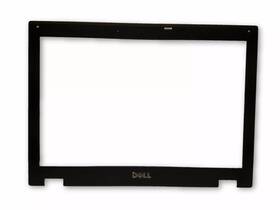
( Brand: Dell ), ( Manufacturer Part Number: 00YF2 ), ( Type: Bezel ), ( UPC: 817217623379 )
Review DELL Latitude Lcd Front Bezel 14.1 Inch
The **Dell 00YF2 Latitude E5410 LCD Front Bezel (14.1")** is a meticulously engineered component designed to enhance the durability, aesthetics, and functionality of Dell s iconic business-grade Latitude E5410 laptop series. Crafted with precision for enterprise environments, this front bezel serves as both a protective barrier and a stylish accent, seamlessly integrating into the laptop s sleek, professional design. Constructed from high-quality, reinforced polycarbonate, the bezel is engineered to withstand the rigors of daily use, including accidental bumps, drops, and exposure to dust or debris, ensuring long-term reliability in demanding workspaces. Its matte-finish surface resists fingerprints and smudges, maintaining a clean, professional appearance even after prolonged use, while the ergonomic contours provide a comfortable grip for users who frequently transport their devices.
Beyond its robust construction, the **00YF2 bezel** is designed with Dell s signature attention to detail, featuring a precise fit that aligns flawlessly with the E5410 s 14.1-inch display panel. The bezel s integrated hinges and mounting brackets ensure minimal gap between the screen and frame, optimizing both visual clarity and structural integrity. For IT administrators and technicians, this component is a straightforward upgrade or replacement option, allowing for easy swapping without the need for specialized tools, which is particularly valuable in field service or bulk maintenance scenarios. The bezel s compatibility with Dell s modular design philosophy also supports customization whether upgrading to a higher-resolution display or simply refreshing the laptop s appearance with a new finish.
In terms of functionality, the **00YF2 front bezel** plays a subtle yet critical role in the laptop s overall performance. By shielding the display s edges from physical stress, it helps prevent potential damage to the LCD panel or internal components during transit or accidental impacts. Additionally, its design contributes to thermal management by reducing air gaps that could otherwise disrupt airflow within the laptop s chassis, indirectly supporting the longevity of internal hardware like the CPU and battery. For businesses prioritizing both form and function, this bezel represents a small yet impactful investment in the longevity and professionalism of their Latitude E5410 fleet, ensuring that each unit remains a reliable tool for productivity in any setting.
### Pros and Cons of buying a Dell Latitude E5410 (00YF2) with LCD Front Bezel (14.1")
#### **Pros:**1. **Reliability and Build Quality** The Dell Latitude E5410 is a well-regarded business-class laptop known for its durability, robust construction, and long-term reliability. It has a sturdy metal chassis and a solid keyboard, making it suitable for heavy use.
2. **Performance for Business Use** The E5410 typically comes with Intel Core i5 or i7 processors (depending on the model), 4GB to 8GB of RAM, and a 500GB to 1TB hard drive (or SSD in some configurations). This setup is more than adequate for office tasks, web browsing, document editing, and light multitasking. It is not designed for gaming or heavy content creation, but it handles everyday business workloads efficiently.
3. **Business-Grade Features** The laptop includes security features such as a fingerprint reader (on some models), TPM (Trusted Platform Module) for encryption, and Dell s ProSupport for troubleshooting and warranty services. It also supports a variety of connectivity options, including Thunderbolt, USB 3.0, HDMI, and Ethernet, which are useful for professional settings.
4. **Upgradability** The E5410 allows for easy upgrades, such as replacing the hard drive with an SSD for faster performance, adding more RAM (up to 16GB in some configurations), or swapping out the battery if needed. This makes it a cost-effective choice for users who want to extend its lifespan.
5. **Display Quality** The 14.1-inch LCD with a front bezel is a standard business display, offering decent clarity and readability for office use. While not high-resolution by modern standards, it is sufficient for reading documents, spreadsheets, and presentations without eye strain.
6. **Portability** At around 3.7 lbs (1.7 kg), the E5410 is relatively lightweight for a business laptop, making it easy to carry around. Its compact size also makes it suitable for travel or use in tight spaces.
7. **Compatibility with Business Software** The laptop is compatible with most business software, including Microsoft Office, Adobe Acrobat, and various enterprise applications. It also supports Windows 10/11 (with some updates or minor tweaks, as the E5410 was originally designed for Windows 7/8.1).
8. **Cost-Effective** Compared to newer business laptops, the E5410 is significantly cheaper, making it an attractive option for users on a budget who still need a reliable machine for work. It is often found in the used or refurbished market at a fraction of the cost of a new model.
---
#### **Cons:**1. **Outdated Hardware** The E5410 was released in 2014 and uses older Intel Haswell processors (i5-4200U or i7-4600U), which are significantly slower compared to modern CPUs. Tasks that were smooth in 2014, such as running multiple browser tabs or light video editing, may feel sluggish today. Performance will be noticeably worse when compared to newer laptops with Intel 10th/11th/12th or AMD Ryzen processors.
2. **Limited RAM and Storage** Many configurations of the E5410 come with only 4GB of RAM, which is insufficient for modern multitasking (especially with multiple browser tabs, virtual machines, or resource-intensive applications). Upgrading to 8GB or 16GB is possible but may require careful selection of compatible RAM modules. Additionally, the standard hard drive (HDD) is slow compared to SSDs, leading to longer boot times and slower file access. While SSDs are available as upgrades, they are not always included in used/refurbished models.
3. **No Modern Connectivity** The E5410 lacks modern ports such as USB-C/Thunderbolt 3 or USB 3.1 Gen 2. It features USB 3.0 (Type-A), USB 2.0, HDMI, Ethernet, and a VGA port, which may be limiting for users who rely on newer peripherals or docking stations. This can also make it incompatible with newer displays or accessories that require USB-C.
4. **Battery Life** The battery life of the E5410 is modest by today s standards, typically lasting 4-6 hours of light use. This is due to the older processor and display technology. Users who rely on the laptop for extended periods without access to power may find this a significant drawback.
5. **Display Limitations** The 14.1-inch display has a resolution of 1366x768 pixels, which is low compared to modern Full HD (1920x1080) or higher-resolution displays. This can result in a less sharp image, especially when working with graphics or detailed documents. The front bezel may also feel outdated compared to newer laptops with sleeker designs.
6. **No Touchscreen or Modern Design** The E5410 lacks a touchscreen, which is a common feature in many modern business laptops. Additionally, its design is functional but not particularly stylish, with a more utilitarian appearance that may not appeal to users who prioritize aesthetics.
7. **Software Compatibility** While the E5410 can run Windows 10 or 11, some newer applications or updates may not be fully optimized for its hardware. Additionally, security updates for Windows 10 may eventually stop for older devices, leaving the laptop vulnerable to security risks if not properly maintained.
8. **Limited Availability of Parts** As the E5410 is an older model, finding replacement parts (such as batteries, keyboards, or screens) can be challenging and may be more expensive than for newer laptops. This could lead to higher repair costs if the laptop encounters hardware failures.
9. **No Dedicated Graphics** The E5410 relies on integrated graphics (Intel HD Graphics 4400 or 5500), which are not suitable for tasks like light gaming, video editing, or running virtual machines with GPU acceleration.
10. **Potential for Wear and Tear** If purchasing a used or refurbished model, there is a risk of encountering wear and tear, such as a worn-out keyboard, cracked screen, or failing battery. Buyers should thoroughly inspect the unit or purchase from a reputable seller with a warranty to mitigate this risk.
---
### **Conclusion:**The Dell Latitude E5410 (00YF2) with an LCD front bezel is a solid choice for users who need a **reliable, budget-friendly business laptop** for basic tasks such as office work, web browsing, and document management. Its strengths lie in its durability, upgradability, and business-grade features, which make it a practical option for those who prioritize longevity and functionality over cutting-edge performance.
However, its **outdated hardware, limited RAM and storage, lack of modern ports, and poor battery life** make it unsuitable for users who require a laptop for demanding tasks, modern software, or extended use without access to power. If you are working with legacy systems, running older software, or need a secondary machine for light tasks, the E5410 can still be a cost-effective solution. For anyone expecting modern performance, however, it will fall short.
---
### **Recommendation:** - **Buy the Dell Latitude E5410 if:**- You need a **budget-friendly, reliable laptop** for basic office work, such as typing documents, spreadsheets, or emails.
- You plan to **upgrade the RAM and storage** (especially to an SSD) to improve performance.
- You require a **durable, long-lasting machine** for heavy daily use where reliability is more important than speed.
- You are working with **legacy software** or systems that are not compatible with newer hardware.
- You find it at a **very low price** (e.g., under $200 used) and are willing to accept its limitations.
- **Avoid the Dell Latitude E5410 if:**- You need **modern performance** for multitasking, video editing, programming, or running virtual machines.
- You rely on **USB-C, Thunderbolt, or high-resolution displays** for your work.
- You require **long battery life** for travel or offline use.
- You want a **stylish or lightweight** laptop with modern design features.
- You are unable to **upgrade the RAM or storage**, as the default configurations will feel slow by today s standards.
- **Alternative Recommendations:**- For **budget business use**, consider newer refurbished or used models like the **Dell Latitude 5400, 7400, or 7490**, which offer better performance and modern ports at a reasonable price.
- For **lightweight and modern performance**, look into **Lenovo ThinkPad T480/T490, HP EliteBook 840 G8, or Dell XPS 13/15** (if within budget).
- If you need **a balance of price and performance**, a **used MacBook Pro (2017-2019) or a budget Windows laptop with an AMD Ryzen 5/7 processor** may be worth considering.
In summary
Details:
This bezel not only enhances the aesthetic appeal of your laptop but also provides essential protection for LCD screen, ensuring durability and longevity. The Dell Latitude E5410 LCD Front Bezel is a high-quality replacement part designed specifically for the 14.1 model. Crafted with precision, it fits seamlessly, allowing for easy installation and a perfect finish. Condition: Used.
part #: 00yf2 prices
- $9.99-$45.25
specifications laptoscreelc:
- brand: Dell
- mpn: 00yf2
- type: Bezel
- upc: 817217623379
seller laptoscreelc:
- city: Oakwood, Georgia
- # reviews: 6792
- rating: 99.7%
shipping laptoscreelc:
- class: Economy
- type: Fixed
- transit: 6-13 Days
- cost: $0.00
- service: Economy
offer laptoscreelc:
- options: Ship-to-home
- best offers: True
- sold: 0
- quantity: 1
- availability: In Stock
- started: May 25, 2026
general laptoscreelc:
- condition: Used
- Computer Components Parts > Laptop Replacement Parts > Laptop Screens LCD Panels
payments laptoscreelc:
- wallet: Apple-pay
- credit card: Discover
- other
returns laptoscreelc:
- paid by: Buyer
- method: Money back
- policy: Returns Accepted
- time: 30 Days
Dell 00YF2 Is Similar To:
- A114953g315t Generic Dell Replacement Laptop Lcd Screen Wxga Hd 032022016943 (23.4% similar) 8 laptop lcd screen resolution: GSX HD x 768 type: led diode connector: 40 pins bottom right may contain 3 to 5 dead pixels will work for Dell inspiring 5423, N140BGE-LB2-A2 model's also. 6 anarchistic: 43. lcd screen size: 14. Please match your original screens back light type, size, and ...(May 8th, 2018)
- A986011l327p Generic Laptop Lcd Replacemnet Led For Dell Inspiron (35.9% similar) 25 laptop lcd screen resolution: GSX x 900 type: led diode connector: 40 pins bottom left may contain 3 to 5 dead pixels please match your original screens back light type, size, and resolution before you purchase this item, because some model's come with more than one type of screens. 75 x ...(May 11th, 2018)
- D620-5043-lcd Generic Dell Latitude Replacement Laptop Lcd Screen Wxga 654367710821 (29.6% similar) Dell latitude D620 replacement laptop lcd screen x 8 resolution: GSX 800 type: cc fl single connector: 30 pins may contain 3 to 5 dead pixels please match your original screens back light type, size, and resolution before you purchase this item, because some model's come with more than one type of ...(May 30th, 2018)
- Led-1366-768-g-40-14.0-x11 Generic Dell Latitude Laptop Lcd Screen Replacement Wxga 529306022764 (33.8% similar) 5X8X12 anarchistic: pounds size:' requires technical installation item DIMENSIONS:1. Purchasing a screen with different specifications will not work your system. Dell latitude E6420 LTN140AT16 laptop lcd screen replacement 14...(May 16th, 2018)
- Led-1366-768-g-40-15.6-239 Dell Inspiron Laptop Lcd Screen Replacement Wxga Hd 610395664505 (28% similar) 6 item DIMENSIONS:1. You cannot deviate from your current screen specifications. Purchasing a screen with different specifications will not work your system. Product features screen size: 15. Dell inspiring N5110 laptop lcd screen replacement pounds size:'screen size: 15. 5 anarchistic: 05...(March 30th, 2018)
- 0015j5 Dell Genuine Inspiron Lcd Touchscreen Tp (32.7% similar) Screen is in good condition. Item is used. Look at pictures for details. Pulled from a working unit. Genuine Dell inspiring item has been fully tested, inspected and is in good working condition. 6 lcd touchscreen LP156WHB Twp a2 015J5 0015J5...(December 3rd, 2018)
- 0097y Dell Lcd Screen With Bezel (43.4% similar) The customer is urged to certify that parts ordered are correct one needed...(February 15th, 2017)
- 00gtn1 Hb156wx1-100 Dell Genuine Lcd (23% similar) Any question please feel free to ask. Its necessary for the end user to check with manufacturer, manual or other web sources insure compatibility. Our are correct to the best of knowledge, but with so many model's and parts its difficult know every compatible incompatible model...(August 26th, 2017)
- 00h0nx Cn-00h0nx Dell Used Inspiron Lcd Touch Screen With Cracked Digitizer (23.8% similar) The digitize is cracked. The lcd and chirpiest, cables are working fine...(August 31st, 2018)
- 00k19p Dc0200gt00 Dell Latitude Laptop Lcd Flex Cable Led Tested Warranty (37.1% similar) Stock photos. Orders purchased before noon central time are typically packaged and shipped out the same day. Notice: pictures shown are simply for reference...(February 6th, 2019)
- 00mj2p Dell Latitude Lcd Screen Matte Sp (41.8% similar) Pulled from a working unit. Item has been tested and is in good working condition. Item is used and screen in good condition. Dell latitude E7440 lcd screen matte LP140WF1 Sp b1 P/N 00MJ2P this listing is for. Look at pictures for more details...(July 21st, 2018)
