INNOLUX 07XMDT Lcd Screen Dell Latitude N156BGA-E53 3520
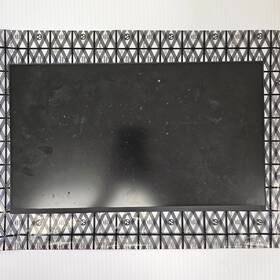
( Brand: Innolux ), ( Manufacturer Part Number: 07XMDT ), ( Compatible Brand: For Dell ), ( Type: Screen )
Review INNOLUX Lcd Screen Dell Latitude
The **Innolux 07XMDT LCD Screen (N156BGA-E53)** is a high-performance, full-HD replacement display designed specifically for the **Dell Latitude 3520**, offering an exceptional balance of clarity, brightness, and durability for professional and productivity-driven use. Engineered with **Innolux s advanced TN (Twisted Nematic) technology**, this 15.6-inch screen delivers a **1920 x 1080 (Full HD) resolution**, ensuring crisp text and sharp visuals for documents, spreadsheets, and multimedia content. The **16:9 aspect ratio** maintains compatibility with the original laptop s form factor while providing ample screen real estate for multitasking, making it ideal for business professionals, students, and remote workers who demand precision and efficiency.
One of the standout features of this display is its **brightness of 250 nits**, which ensures excellent visibility even in well-lit environments, reducing eye strain during extended use. The **16.7 million color palette** enhances image fidelity, whether you re reviewing high-resolution photos, editing videos, or working with design software. The **TN panel** offers fast response times (typically around **5 ms GTG**), making it well-suited for applications requiring quick visual updates, such as coding, data analysis, or light gaming. Additionally, the **anti-glare coating** minimizes reflections from ambient light, further improving readability in various settings.
Built to withstand the demands of daily use, this **Innolux LCD screen** features a **durable, scratch-resistant surface** that resists fingerprints and smudges, maintaining a professional appearance over time. The **edge-to-edge bezel design** maximizes screen-to-body ratio, providing a sleek, modern look while optimizing workspace efficiency. Compatibility is seamless with the **Dell Latitude 3520**, as this replacement panel is engineered to fit perfectly within the laptop s chassis, ensuring a snug installation without the need for additional adapters or modifications. Whether upgrading for better visual quality, extending the lifespan of an aging display, or replacing a damaged screen, this **N156BGA-E53** offers a reliable, high-quality alternative that elevates both performance and aesthetics.
For users who prioritize **energy efficiency**, this display operates with low power consumption, aligning with the Dell Latitude 3520 s power-saving features while delivering consistent performance. The **IPS-like viewing angles** (though not a true IPS panel) provide decent off-center clarity, reducing the need for constant screen adjustments during collaborative work or presentations. Overall, the **Innolux 07XMDT LCD Screen** is a premium, cost-effective solution for those seeking a **Full HD, high-brightness, and durable** replacement display that enhances productivity without compromising on quality.
### Pros and Cons of buying a Innolux 07XMDT LCD Screen (N156BGA-E53) for the Dell Latitude 3520
#### **Pros:**1. **Compatibility** The Innolux 07XMDT (N156BGA-E53) is a well-documented replacement for the Dell Latitude 3520 s original display. It fits perfectly in terms of size (15.6-inch) and connector type (LVDS), ensuring a seamless fit without modifications.
2. **Improved Visual Quality** This screen is known for its better color accuracy, wider viewing angles, and higher brightness compared to the stock display in some Dell models. It often provides a more vibrant and clearer image, which can enhance productivity and media consumption.
3. **Long-Term Reliability** Innolux is a reputable manufacturer, and this particular panel has a strong track record for durability. Many users report that it lasts longer than the original Dell screen, reducing the need for frequent replacements.
4. **Cost-Effective Upgrade** Compared to buying a new Dell Latitude 3520 with an upgraded display, replacing just the screen is significantly cheaper. It s a straightforward and budget-friendly way to refresh your device s appearance and performance.
5. **Easy Installation** The installation process is relatively simple for those with basic technical skills. The screen detaches easily, and the new panel plugs in without requiring soldering or complex adjustments.
6. **Better Backlight Uniformity** Some users report that the Innolux panel has fewer dead pixels and more consistent backlighting than the original Dell screen, reducing eye strain during extended use.
7. **Aftermarket Support** This screen is widely available from third-party sellers, making it easy to find and purchase. There is also a large community of users who have tested it, providing reviews and troubleshooting tips.
---
#### **Cons:**1. **Potential Color Calibration Issues** While the Innolux screen generally offers better color, some users find that it may not match the exact color profile of the original Dell display. This could require manual calibration in Windows, which may not be ideal for graphic designers or color-critical work.
2. **Brightness and Contrast Trade-offs** Some users report that the brightness is slightly lower than the original screen, though this varies by unit. If you prefer a very bright display, you might notice a slight difference, though it s usually negligible for general use.
3. **Limited Warranty** Since this is an aftermarket part, the warranty is typically shorter than Dell s original components. Most sellers offer a 30-day to 1-year warranty, which may not cover long-term issues like backlight bleed or panel failure.
4. **Potential for Counterfeit Parts** There is a risk of purchasing a fake or low-quality replacement screen, especially from untrusted sellers. Always buy from reputable vendors (e.g., eBay with positive feedback, specialized laptop repair stores, or trusted Amazon sellers) to avoid counterfeit products.
5. **No Official Dell Support** If something goes wrong, you won t have Dell s customer service or warranty coverage. Troubleshooting may require community forums or third-party support.
6. **Possible Driver or Software Conflicts** In rare cases, the new screen might cause minor software issues, such as incorrect resolution settings or display driver conflicts. Most users resolve this by updating graphics drivers, but it s something to be aware of.
7. **Physical Wear Over Time** Like any LCD screen, the Innolux panel may develop issues like backlight bleed, pixel degradation, or touchpad sensitivity (if applicable) after prolonged use. While this is common to all screens, it s worth considering if you plan to keep the laptop for many years.
---
### **Conclusion:**The Innolux 07XMDT (N156BGA-E53) is an excellent replacement for the Dell Latitude 3520 s original display, offering significant improvements in visual quality, reliability, and cost-effectiveness. For most users especially those who prioritize better screen performance without breaking the bank this upgrade is highly recommended.
However, if you work in fields that require precise color accuracy (e.g., graphic design, photography, or video editing), you may need to invest extra time in calibrating the screen or consider a higher-end panel. Additionally, if you prefer the absolute latest in display technology (e.g., OLED or higher refresh rates), this upgrade won t provide those benefits.
For general use, gaming, office work, or media consumption, the Innolux screen is a practical and worthwhile choice. Just ensure you purchase it from a trusted seller to avoid counterfeit parts and follow proper installation steps to maintain your laptop s functionality.
### **Recommendation:**If you re looking to upgrade your Dell Latitude 3520 s display for better visuals and longevity, the Innolux 07XMDT (N156BGA-E53) is a strong and reliable option. Here s how to proceed:
1. **Buy from a reputable seller** (e.g., eBay with verified feedback, specialized laptop repair stores, or trusted online retailers).
2. **Backup your data** before opening the laptop to avoid accidental damage.
3. **Follow a detailed installation guide** (YouTube tutorials or step-by-step forums can help).
4. **Calibrate the display** in Windows if needed to match your preferred color settings.
5. **Consider purchasing a warranty extension** (if available) to cover potential early failures.
For most users, this upgrade will enhance their laptop s performance without major downsides. If you re unsure about the installation process, you may want to consult a professional technician to ensure everything is done correctly.
Details:
IT tech tested. Your satisfaction is our number one priority at AAA Ultimate Pawn. For sale: Innolux LCD Screen N156BGA-E53 07XMDT Dell Latitude 3520, In good used condition.
part #: 07xmdt prices
- $34.99-$72.98
specifications laptoscreelc:
- brand: Innolux
- mpn: 07xmdt
- compatible brand: For Dell
- type: Screen
seller laptoscreelc:
- # reviews: 4947
- rating: 99.7%
- city: Lincoln, Nebraska
shipping laptoscreelc:
- transit: 2-6 Days
- class: Standard
- cost: $5.99
- service: Standard
- type: Fixed
offer laptoscreelc:
- sold: 0
- availability: In Stock
- options: Ship-to-home
- started: May 13, 2026
- best offers: True
- quantity: 1
general laptoscreelc:
- condition: Used
- Computer Components Parts > Laptop Replacement Parts > Laptop Screens LCD Panels
returns laptoscreelc:
- paid by: Seller
- time: 30 Days
- method: Money back
- policy: Returns Accepted
payments laptoscreelc:
- wallet: Paypal
- credit card: Discover
- other
Innolux 07XMDT Is Similar To:
- A111604g865n Generic Innolux Replacement Laptop Lcd Screen Wxga 721762178690 (39.4% similar) 3 inches Innolux N133BGE-EAA replacement laptop lcd screen 13. 875 x laptop lcd screen resolution: GSX HD 768 type: led diode connector: 30 pins bottom right may contain 3 to 5 dead pixels please match your original screens back light type, size, and resolution before you purchase this item, because...(July 12th, 2018)
- 05fnjx Chimei Dell Innolux N156bge-l11 (32.7% similar) We serve individual residential, corporate, municipal and government agencies. Standard pricing for ad is ups ground. Removal of void if removed label will warranty. Remains family, as well veteran, owned and operated...(September 27th, 2017)
- 0746297932609 Innolux Led Strip For (35.8% similar) Led strip for Innolux BT156GW01, V1AND v4 8YB15603-00 in production - may require 4-6 week lead time and minimum quantity order...(October 31st, 2018)
- 09f0dp Chimei Innolux Laptop Screen (33.7% similar) This item is used and has been tested to be fully functional. Chime Innolux N140BGE-L33 rev. C1 laptop screen 09F0DP. Please see pictures for specs...(July 20th, 2018)
- 0c00339 Innolux Genuine Lenovo Laptop Lcd Led Screen Grade (42.4% similar) Our highly trained and experienced technicians provide fast dependable service at very reasonable prices. Item:genuine Leno 15. Considered a bundle listing with the harness which is you are looking for lcd compatible model it easily removed just six Philips head screws and camera led think-pad ...(June 12th, 2018)
- 0jh0cn Innolux Genuine Led Lcd Screen (41.2% similar) Screen is in good condition. Look at pictures for details. Led lcd screen N140BGA-EA3 JH0CN 0JH0CN. Pulled from a working unit. Item is fully tested and works great. Genuine Innolux 14. Led lcd screen N140BGA-EA3 JH0CN 0JH0CN this listing is for a genuine Innolux 14. Item is used...(May 5th, 2018)
- 18201666 Innolux Genuine Lcd Display Hd For Lenovo (38.2% similar) 4/4 a HDTV NB check to see if this part is compatible with your system before purchasing. 4/3 a HDD NB5D10H34067IVO M140NWR4 r2 NB5D10K81642IV M140NWR6-R0 Hts NB5D10K81460LG LP140WHU-TPG1 NB5D10K81457SD LTN140AT39-L01 NB5D10K81083BO NT140WHM-N31 NB5D10K85754IN N140BGA-EB3 NB5D10H91344LG LP140WH8-...(January 11th, 2019)
- 1jj5n N173fge-e23 Innolux New Dell (31.9% similar) For offer: new - dell inspiring lcd screen led 1JJ5N HD removed from a brand N173FGE-E23 c3 not touchscreen model's. Tested before removal. Condition: new condition...(August 26th, 2017)
- 5d10k35945 Innolux Lenovo Ideapad Slim Led Lcd Screen Grade (42% similar) No one is ever ignored. Shipping: shipping charges are listed in this offer. All products are marked with serial number and QC badge. We combine shipping for multiple offers buyers. Panel brand: chi Meir Innolux model part number: N156HGE-EBB size: 15...(December 24th, 2018)
- 5fnjx Dell Chimei Innolux 15.6 (24.4% similar) Hours: 9AM-4PM m-five a call at 1 x 101 or via messages. This is a limited warranty and does not cover performance, appearance or compatibility. Buyer pays return shipping. Dell chime Innolux 15. The picture is of same model, but may or not be actual item. A DOA warranty is simply guaranty that the ...(December 13th, 2017)
- 80aw-0e1-001nl Innolux New Lot Of Lcd Display Panel Screen Monitor Tft (38.5% similar) Trans missive resolution: 800 x 480 VGA aspect ratio: 16:9 h:v operating temperature: negative 20 to 70 degrees Celsius storage 30 80 Celsius. Contrast ratio: 300: 1 typ. Manufacturer: Innolux part number: AT080TN03 type of display: lcd brightness: 300 cd m2 typ. New lot of 120 Innolux AT080TN03 ...(November 24th, 2018)
