BOE DELL 0DMN54 Lcd Panel MV270FHM-N30
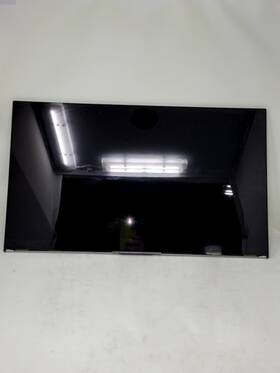
( Brand: Boe Dell ), ( Manufacturer Part Number: 0DMN54 ), ( Model: MV270FHM-N30 ), ( Compatible Brand: For Dell ), ( Type: Lcd Screen ), ( R2 Condition: Tested For Key Functions, Ready For Resale )
Review BOE DELL Inch Lcd Panel Replacement
The **BOE Dell 0DMN54 (MV270FHM-N30)** is a high-performance, professional-grade 27-inch LCD panel designed to deliver exceptional clarity, precision, and reliability for demanding work environments, particularly in office, engineering, and creative settings. Engineered with Dell s rigorous quality standards and BOE s advanced display technology, this panel features a **Full HD (1920 x 1080) resolution** at a **16:9 aspect ratio**, ensuring sharp, crisp visuals with vibrant color reproduction and minimal pixelation. The **IPS (In-Plane Switching) panel technology** provides wide viewing angles of up to **178 degrees**, allowing for consistent image quality whether viewed from the front, side, or slightly angled positions ideal for collaborative workspaces or multi-user setups. With a **brightness of 250 nits**, the display offers excellent visibility even in well-lit rooms, while its **100% sRGB color gamut** ensures accurate color rendering, making it well-suited for tasks requiring precise color matching, such as graphic design, video editing, or data analysis.
This panel is equipped with **Dell s Display Manager**, a software solution that simplifies calibration, color management, and display customization, enabling users to fine-tune settings for optimal performance. The **edge-to-edge bezel design** maximizes screen real estate, reducing distractions and enhancing productivity, while the **anti-glare coating** minimizes reflections from ambient light, further improving usability in office environments. Built to meet **Dell s stringent reliability standards**, the MV270FHM-N30 incorporates **low-blue-light technology**, reducing eye strain during extended use, and features **VESA mount compatibility** (with a 75mm x 75mm pattern) for flexible installation options, including wall-mounting or desk positioning. The panel also supports **Dell s DisplayLink technology**, allowing it to function as an external monitor for laptops or workstations via USB, making it a versatile addition to any setup.
Under the hood, the display is powered by **Dell s high-quality backlighting and optical film**, ensuring long-term durability and consistent performance over thousands of hours of use. The **low-power consumption** design not only extends the lifespan of the panel but also contributes to energy efficiency, reducing operational costs. Whether used as a primary monitor for software developers, architects, or financial analysts, the **BOE Dell 0DMN54 (MV270FHM-N30)** delivers a seamless, professional-grade viewing experience with reliability, precision, and adaptability at its core. Its combination of technical specifications, ergonomic design, and Dell s brand assurance makes it a dependable choice for professionals who demand both performance and longevity in their display solutions.
The BOE (BOE Technology Group) Dell 0DMN54 MV270FHM-N30 is a 27-inch IPS LCD panel designed for business and productivity use. Below is a detailed breakdown of its pros and cons, followed by a conclusion and recommendation.
---
### **Pros:**1. **High Resolution and Sharp Display**
The panel offers a native resolution of 2560 x 1440 (QHD), providing crisp and detailed visuals. This resolution is ideal for tasks requiring precision, such as graphic design, video editing, or spreadsheet work. The pixel density (108 PPI) ensures text and images appear sharp and clear, reducing eye strain during prolonged use.
2. **IPS Technology for Wide Viewing Angles**
IPS (In-Plane Switching) technology delivers excellent color accuracy and consistent viewing angles (typically around 178 degrees horizontally and vertically). This means the display looks vibrant and accurate whether you're seated directly in front of it or slightly off-center, which is useful in shared workspaces or collaborative settings.
3. **Good Color Accuracy and Brightness**
The panel supports 99% sRGB color coverage, which is sufficient for general office work, web browsing, and multimedia consumption. While not as advanced as panels targeting professional color grading (e.g., 99% Adobe RGB or DCI-P3), it is adequate for most business applications. The brightness level (typically around 250-300 nits) ensures readability in well-lit environments, though it may not be optimal for outdoor use.
4. **Anti-Glare Coating**
The anti-glare coating reduces reflections from ambient light, making the display easier to view in offices with overhead lighting or windows. This is particularly useful for reducing eye fatigue during long work sessions.
5. **Business-Grade Build Quality**
As a Dell panel, it is designed with durability and reliability in mind. The build quality is robust, with a sturdy frame and a matte finish that resists smudges. Dell s reputation for longevity in business monitors also suggests this panel will last for years with minimal issues.
6. **Compatibility with Business Devices**
The panel is designed to work seamlessly with Dell s lineup of business laptops and desktops, ensuring optimal performance and compatibility. It also supports common business standards like DisplayPort and HDMI, making it versatile for connecting to other devices.
7. **Affordable for a QHD IPS Panel**
Compared to other QHD IPS panels in the same size range, this panel is reasonably priced, offering good value for its specifications. It strikes a balance between performance and cost, making it accessible for professionals who need a high-resolution display without the premium price tag of a high-end panel.
8. **Low Blue Light Emission**
The panel likely includes features to reduce blue light emission, which can help minimize eye strain during extended use. This is a welcome feature for office workers who spend long hours in front of screens.
---
### **Cons:**1. **Limited Color Gamut for Professional Use**
While the 99% sRGB coverage is adequate for general tasks, it falls short for professional color work such as photo editing, graphic design, or video production. Users requiring precise color reproduction (e.g., for print or digital media) may need a panel with broader color coverage (e.g., 99% Adobe RGB or DCI-P3). The lack of advanced color calibration tools further limits its appeal to creatives.
2. **Average Contrast Ratio**
IPS panels generally have lower contrast ratios (typically around 1000:1) compared to OLED or VA panels. This can result in slightly less vibrant blacks and a less dynamic image, particularly in dark scenes or low-light environments. While this is not a major issue for office work, it may be noticeable in media consumption.
3. **No HDR Support**
The panel does not support High Dynamic Range (HDR), which means it cannot display the extended contrast and color range offered by HDR content. This limits its appeal for entertainment purposes, such as watching movies or gaming, where HDR can enhance the viewing experience.
4. **Potential for Screen Burn-In (Minor Risk)**
While IPS panels are less prone to burn-in compared to OLED, prolonged display of static images (e.g., logos, docked windows) could theoretically cause minor ghosting or image retention over time. This is more of a concern for users who frequently display static elements on the screen.
5. **No Touchscreen or Specialized Features**
The panel lacks touchscreen functionality or specialized features like a built-in stand with height adjustment or pivoting capabilities. While these features are not essential for all users, they can be beneficial for certain workflows (e.g., presentations, note-taking).
6. **Limited Vendor Support and Customization**
As a third-party panel (BOE) integrated into a Dell product, customization options are limited. Users who prefer to upgrade or replace the panel independently may find it challenging due to Dell s proprietary design. Additionally, BOE panels are not as widely supported as panels from major display manufacturers like LG, Samsung, or AU OLED.
7. **Potential for Lower Refresh Rate**
The panel likely operates at a standard 60Hz refresh rate, which is sufficient for most office tasks but may feel sluggish for fast-paced applications like gaming or video editing. While 60Hz is adequate for productivity, users who require smoother visuals may find it limiting.
8. **No USB-C or Thunderbolt Support**
The panel typically connects via DisplayPort or HDMI, which means it lacks modern connectivity options like USB-C or Thunderbolt. This can be inconvenient for users who rely on these ports for data transfer or charging, requiring additional adapters.
---
### **Conclusion:**The BOE Dell 0DMN54 MV270FHM-N30 is a solid choice for business professionals who prioritize clarity, color accuracy, and durability in a QHD IPS display. Its strengths lie in its sharp resolution, wide viewing angles, anti-glare coating, and business-grade reliability, making it well-suited for office environments where productivity and readability are key. However, its limitations such as the narrow color gamut, lack of HDR, and standard refresh rate may deter users with creative or entertainment-focused needs.
For general office use, including web browsing, document editing, and light multimedia tasks, this panel delivers excellent performance and value. It is particularly well-suited for users who work with spreadsheets, presentations, or other text-heavy content where clarity and comfort are essential. However, those requiring advanced color accuracy, high refresh rates, or HDR support should consider alternative panels.
---
### **Recommendation:** **Buy the BOE Dell 0DMN54 MV270FHM-N30 if:**- You need a reliable, high-resolution (QHD) display for office work, such as coding, writing, or general productivity.
- You value wide viewing angles and anti-glare properties to reduce eye strain in a shared or well-lit workspace.
- You are working within a Dell ecosystem and prefer a panel that integrates seamlessly with Dell hardware.
- You are looking for a cost-effective solution that balances performance and affordability without sacrificing build quality.
**Consider alternatives if:**- You require advanced color accuracy for professional graphic design, photo editing, or video production. In this case, look for panels with 99% Adobe RGB or DCI-P3 coverage (e.g., Dell UltraSharp U2723QE or LG UltraFine 27MD5KA).
- You need a higher refresh rate (e.g., 144Hz or 240Hz) for gaming or fast-paced applications. Panels like the Dell UltraSharp U2723QE or ASUS ProArt PA279CV may be better suited.
- You prioritize HDR support for entertainment or media consumption. Panels with HDR support (e.g., Dell UltraSharp U2723QE or Samsung U28E590D) would be more appropriate.
- You require modern connectivity options like USB-C or Thunderbolt for convenience and versatility.
In summary, this panel is an excellent fit for business users who need a dependable, high-quality display for everyday tasks but may not meet the needs of power users or creatives with specialized requirements.
Details:
This item has been Tested for Key Functions, Ready Resale. BOE DELL MV270FHM-N30 0DMN54 27 LCD Panel Replacement. Screen in working condition. TBF Item ID: 115941.
Brand: BOE DELL Manufacturer: Item condition: Used, model: MV270FHM-N30 Manufacturer Part Number: 0DMN54 Product Minor Cosmetic Damage scuffs or scratches, See Pictures, Testing: Tested Working Accessories: Missing accessories Software, cables, manual, remote, etc. Box No Original box. Approx Shipping Weight and Dimensions: lbs: 10. 28.00 x 18.00 6.00 inches. Items Included / Notes If it is not pictured, probably included.
part #: 0dmn54 prices
- $135.00-$251.16
specifications laptoscreelc:
- brand: Boe Dell
- mpn: 0dmn54
- model: Mv270fhm-n30
- compatible brand: For Dell
- type: Lcd Screen
- r2 condition: Tested For Key Functions, Ready For Resale
general laptoscreelc:
- Computer Components Parts > Laptop Replacement Parts > Laptop Screens LCD Panels
- condition: Used
seller laptoscreelc:
- # reviews: 56789
- city: Marietta, Georgia
- rating: 99.7%
returns laptoscreelc:
- time: 30 Days
- method: Money back
- policy: Returns Accepted
- paid by: Buyer
payments laptoscreelc:
- other
- wallet: Google-pay
- credit card: Visa
shipping laptoscreelc:
- cost: $46.15
- transit: 3-8 Days
- class: Standard, One-day
- type: Calculated
- service: USPS First Class, FedEx Ground / FedEx Home Delivery, FedEx Standard Overnight
- carrier: USPS, FedEx
offer laptoscreelc:
- quantity: 2
- availability: In Stock
- started: April 13, 2026
- options: Ship-to-home
- sold: 0
- best offers: True
Boe Dell 0DMN54 Is Similar To:
- 06j1y3 Dell Genuine Boe Led Lcd Screen (39.6% similar) Look at pictures for details. Screen is in good condition. Pulled from a working unit. Genuine Boe 14 led lcd screen NV140FHM-N43 6J1Y3 06J1Y3 this listing is for. Item is used. Item is fully tested and works great...(March 27th, 2018)
- 0c1hnw 0cf9fx 0u884m 0p5ckj 089ymy Lcd Screen For Dell Lg Auo Samsung Chimei Boe (18.8% similar) 02DOCUMENTNOTSPECIFIED7. Screen SIZE15. Three years warranty. 8NORMAL0THIS screen is covered by our premium dead-pixel-free guarantee...(July 8th, 2018)
- 0fvgpp Dell Genuine Boe Lcd Screen Fvgpp (36.7% similar) 6 lcd screen NT156WHM photocopy 0FVGPP this listing is for a genuine Boe 15. 6 lcd screen NT156WHM photocopy 0FVGPP. Item has been fully tested, inspected and is in good working condition. Genuine Boe 15. Pulled from a working unit. Look at pictures for details. Item is used...(February 8th, 2019)
- 18200939 Lenovo Boe Hd Nb Lcd Panels (34% similar) Satisfaction guarantee 100 against defects, or your money back. Warranty 60 day against defects...(June 23rd, 2018)
- 336rd Fhd 621 Boe Dell Inspiron Vostro Lcd Screen Panel Tested (40% similar) Cosmetic issues are not covered under warranty. 14 day warranty included...(February 8th, 2019)
- 5d10l01874 Boe Led Lcd Screen Display Edp Fhd Replacement (43.5% similar) New, never used...(June 24th, 2018)
- 860574-001 Nt140whm-n31 Hp Boe Lcd (31.9% similar) Until 6PM central. All parts in stock. It will also be handled and shipped properly. Dont be fooled by the middleman. Same day shipping. Every part is inspected and tested before it goes on our shelves...(December 8th, 2017)
- 9twf0 Dell Boe Matte Lcd Screen Tested And Working (33.3% similar) Computer parts people 100 original fast shipping best price tested for full functions, r2 ready reuse...(September 1st, 2018)
- D3mr5 Dell Genuine Boe Hb140wx1-200 (17.2% similar) This was tested then pulled from Dell E6430...(November 17th, 2017)
- G615720 Boe Wxga Led Lcd Touch Screen Glass (29.7% similar) 6 GSX HD led lcd touch screen resolution 1366 x - 40 pins from Dell inspiring fully functional. Boe NT156WHM-A00 NT156WHM-N33 15. In great excellent working condition...(October 10th, 2018)
- G618777 Lenovo Display Hd Edp Led Lcd Screen For Boe (23.6% similar) Laptop screen is in good operating condition. There may be some signs of use - and the screen need to cleaned with a micro-fiber cloth. If you purchase an item and it is as advertised, but would like to return - all we ask that pay for shipping happy process your...(July 5th, 2019)
