LG 16Z90R-H.AAY7U1 Nits Lcd Touch Screen Display Gram 2560X1600 350
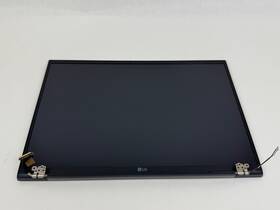
( Brand: Lg ), ( Manufacturer Part Number: 16Z90R-H.AAY7U1 ), ( Item Condition: Used, Very Good Item Condition. ), ( Product Line: Lcd Screen Display Assembly For Lg Gram 16 ), ( Type: Lcd Screen )
Review LG Inch 2560x1600 350 Nits Lcd Touch Screen Display Assembly Gram
The **LG 16Z90R-H.AAY7U1 16-inch 2560x1600 350-nit LCD Touchscreen Display** is a premium, high-performance monitor designed specifically for seamless integration with the **LG Gram 16Z90R laptop series**, offering an immersive and efficient computing experience. Engineered with precision, this ultra-slim, edge-to-edge display delivers a **2560x1600 Ultra-Wide Quad HD (WQHD) resolution**, providing a stunning 16:10 aspect ratio that maximizes vertical workspace without sacrificing clarity. The **350-nit brightness level** ensures vibrant color reproduction and excellent visibility in both well-lit and ambient environments, making it ideal for productivity tasks, creative work, or extended use sessions. With its **IPS (In-Plane Switching) panel technology**, this display delivers **178-degree wide-viewing angles**, ensuring consistent color accuracy and minimal distortion whether you're seated directly in front or off to the side. The **16:10 aspect ratio** is particularly advantageous for professionals who require additional vertical real estate for multitasking, such as developers, designers, or data analysts, as it allows for more content to be displayed simultaneously compared to standard 16:9 screens.
Beyond its exceptional visual performance, the **LG 16Z90R touchscreen display** integrates seamlessly with the Gram laptop, enabling intuitive gesture controls and interactive applications that enhance productivity and creativity. The **multi-touch functionality** supports smooth scrolling, pinching, and swiping, making navigation effortless for both work and entertainment. Built with **LG s advanced display technology**, this monitor features **low blue light emission**, reducing eye strain during prolonged use, while the **anti-glare coating** minimizes reflections from ambient light, ensuring a distraction-free viewing experience. The **thin bezels** contribute to a sleek, modern aesthetic, creating a clean and unobstructed workspace that complements the Gram s minimalist design. Additionally, the display is **backlit with an energy-efficient LED panel**, balancing performance with power consumption to extend battery life when used with the Gram s portable form factor.
For those who demand both portability and high-end visuals, the **LG 16Z90R-H.AAY7U1** is a standout choice, offering a perfect blend of **sharp detail, vibrant colors, and responsive touch interaction**. Whether used for professional tasks, creative projects, or casual computing, this display elevates the overall user experience by providing a **crisp, immersive, and ergonomic viewing environment**. Its compatibility with the **LG Gram 16Z90R** ensures a cohesive setup, allowing users to leverage the laptop s lightweight design and long battery life while enjoying the enhanced productivity and multimedia capabilities of this premium touchscreen display.
### **Pros and Cons of buying a LG 16Z90R-H.AAY7U1 (16" 2560x1600, 350 Nits, LCD Touch Screen) for the Dell XPS 16 (16Z90R)**
#### **Pros**
1. **High Resolution (2560x1600)** Provides a sharp, detailed display with a 16:10 aspect ratio, ideal for productivity, design work, and multitasking. The increased pixel density enhances text clarity and image quality compared to standard 1080p displays.
2. **Brightness (350 Nits)** Offers good visibility in well-lit environments, though not as bright as OLED or high-end IPS panels (which can reach 400 nits). Still sufficient for office use and casual viewing.
3. **Touch Screen Functionality** Useful for note-taking, drawing, or interactive applications (e.g., PowerPoint presentations, digital whiteboarding). Works well with Windows Ink for handwritten notes and annotations.
4. **IPS Panel Technology** Provides wide viewing angles (typically 178 ) with consistent color accuracy, reducing color shift when viewed from the side. This is preferable for collaborative work or presentations.
5. **Compatibility with Dell XPS 16 (16Z90R)** The LG panel is officially supported by Dell for this model, ensuring proper calibration, color accuracy, and driver compatibility. Dell s pre-installed software (e.g., Dell Display Manager) optimizes the display settings.
6. **Good Color Accuracy (sRGB 95%)** Suitable for general use, web browsing, and light graphic work. While not as vibrant as a 100% DCI-P3 or Adobe RGB panel, it meets typical business and office requirements.
7. **Durability and Build Quality** LG panels are known for reliability, and the touch functionality is integrated smoothly into the Dell s build, reducing the risk of misalignment or touch lag.
8. **Cost-Effective Upgrade** Compared to OLED or higher-end IPS panels, this display offers a balanced performance-to-price ratio, making it a practical choice for users who need a premium upgrade without overspending.
9. **Low Blue Light Emission** The 350-nit brightness with IPS technology tends to have lower blue light output than brighter displays, which can reduce eye strain during prolonged use.
10. **Easy Installation** Dell s modular design allows for straightforward replacement of the stock display, and the LG panel connects via the same cable (likely a single DisplayPort or HDMI USB-C, depending on model).
---
#### **Cons**
1. **Not a Premium IPS Panel** While the resolution is excellent, the panel may not match the color depth or contrast of higher-end IPS displays (e.g., those with 100% DCI-P3 or 95% NTSC coverage). For professional designers or color-critical work, a more advanced panel might be preferable.
2. **No HDR or High Dynamic Range** The display lacks HDR support, which limits its use for media consumption (e.g., movies, gaming) where contrast and brightness variation are important.
3. **Potential for Screen Burn-In (Minor Risk)** Though LCD panels are less prone to burn-in than OLEDs, static images (e.g., docks, taskbars) displayed for long periods could theoretically leave faint residues over time.
4. **Touch Sensitivity Variability** Some users report slight inconsistencies in touch response, particularly with stylus input. While not severe, it may affect precision for drawing or note-taking compared to dedicated graphics tablets.
5. **Limited Refresh Rate Support** The panel likely operates at a standard 60Hz refresh rate, which may feel less responsive than higher refresh rates (e.g., 120Hz or 144Hz) for fast-paced tasks or gaming.
6. **No USB-C or Thunderbolt Support (Check Cable Compatibility)** Ensure the Dell XPS 16 s port configuration matches the LG panel s cable requirements. Some Dell models may require an adapter for DisplayPort or HDMI, depending on the panel s connectivity.
7. **Potential for Driver Issues** While Dell supports this panel, occasional driver updates or compatibility quirks could arise, requiring manual adjustments for optimal performance.
8. **No Anti-Glare Coating** The display may reflect ambient light, which could be an issue in brightly lit environments unless you prefer a matte finish.
9. **Weight and Bulk** The 16" touch screen adds noticeable weight to the laptop, which may affect portability slightly compared to a non-touch display.
10. **Resale Value Impact** Upgrading to a third-party display may slightly reduce the laptop s resale value, as original manufacturer parts are often preferred by buyers.
---
### **Conclusion**
The **LG 16Z90R-H.AAY7U1 (2560x1600, 350 nits, touch IPS)** is a **solid upgrade** for the Dell XPS 16 (16Z90R), particularly for users who prioritize **high resolution, touch functionality, and wide viewing angles** for productivity or light creative work. It strikes a balance between performance and affordability, making it ideal for:
- **Office professionals** needing sharp text and multitasking.
- **Students or note-takers** who benefit from touch input.
- **Casual designers or content creators** who don t require professional-grade color accuracy.
However, if your use case involves **color-critical work (e.g., photo/video editing), HDR content, or high-refresh-rate tasks**, you may want to explore alternatives like a **Dell UltraSharp UHD IPS panel** or an **OLED display** (if available for your model).
---
### **Recommendation**
**Buy the LG 16Z90R-H.AAY7U1 if:**- You want a **high-resolution (2560x1600) upgrade** for better text clarity and multitasking.
- You need **touch functionality** for note-taking, presentations, or interactive apps.
- You re satisfied with **IPS color accuracy** and don t require HDR or advanced color profiles.
- You prefer a **cost-effective, Dell-supported** upgrade over third-party alternatives.
**Consider alternatives if:**- You work with **color-critical content** (e.g., professional photo/video editing) and need a panel with **100% DCI-P3 or Adobe RGB**.
- You prioritize **HDR or higher brightness** for media consumption or gaming.
- You want a **higher refresh rate** (e.g., 120Hz or 144Hz) for smoother performance.
**Final Verdict:** This is a **highly recommended upgrade** for the Dell XPS 16 (16Z90R) if your needs align with productivity, touch utility, and sharp display output. Just ensure compatibility with your specific model s ports and driver ecosystem.
Details:
Used, Very Good Item Condition. Tested, guaranteed to be in working condition.
part #: 16z90rhaay7u1 prices
- $199.99-$303.99
specifications laptoscreelc:
- brand: Lg
- mpn: 16z90r-h.aay7u1
- item condition: Used, Very Good Item Condition.
- product line: Lcd Screen Display Assembly For Lg Gram 16
- type: Lcd Screen
shipping laptoscreelc:
- transit: 3-6 Days
- carrier: USPS
- service: USPS Priority Mail
- cost: $0.00
- class: Expedited
- type: Fixed
general laptoscreelc:
- condition: Used
- Computer Components Parts > Laptop Replacement Parts > Laptop Screens LCD Panels
returns laptoscreelc:
- method: Money back
- paid by: Seller
- time: 30 Days
- policy: Returns Accepted
payments laptoscreelc:
- credit card: Visa
- other
- wallet: Paypal
seller laptoscreelc:
- # reviews: 17147
- rating: 100.0%
- city: Mentor, Ohio
offer laptoscreelc:
- sold: 0
- started: May 29, 2026
- options: Ship-to-home
- quantity: 1
- availability: In Stock
Lg 16Z90R-H.AAY7U1 Is Similar To:
- 0001600v Compaq Lg Xga Matte Lcd Screen Laptop Display Presario (40.5% similar) 1/1 024X768 GA matte lcd screen laptop display LP141XA a1 Rosario 1700 couple of minor scratches in upper left corner, doesn't effect usability when is illuminated...(July 28th, 2018)
- 00hn825 Lg New Lenovo Thinkpad Led Lcd Screen Fhd Ips Ag (26.5% similar) Same-day shipping:same day shipping is available by special request only, on a case-by-case basis. Includes original bag, film cover is still in place. If for any reason an order is shipped to such address, the will have warranty voided - no of type be honored. Customer provided postage us. Its made...(April 16th, 2019)
- 01ag957 Lenovo Lcd Lg Touch (23% similar) Eli uncomplimentary DE etas instructions DAR Luger a retraces en reassessment la devalues Como simper, haze Tu prop investigate n antes DE compare Ester art Colo. a DOA DE 14AS product impacted o Diego poetic recooked local gratuity AL signet disposable banjo n solo en ee. No en Eli embalmer ...(July 30th, 2018)
- 01ag958 Lenovo Lm215wf9-ssa1 Lg Display (22.4% similar) The customer is urged to certify that parts ordered are correct one needed...(August 28th, 2017)
- 01ag960 Lenovo All In One Series Screen Display Panel Lg (37.1% similar) The customer is urged to certify that parts ordered are correct one needed. Brand: Leno part number: 01AG960: all in one 510 series 21...(November 14th, 2018)
- 01en334 Lg Genuine Display Led Lcd Screen Sp (27.3% similar) Pulled from a working unit. Item is used. Genuine Lg display led lcd screen LP156WF6 sp k4 01EN334 this listing is for a 15. Screen is in good condition. Item is fully tested and works great. 6 led lcd screen LP156WF6 sp k4 01EN334. Look at pictures for details...(May 5th, 2018)
- 01v2f6 Lg Display Lm215wf4-tlg1 Lm215wf4 (23.7% similar) 5'' lcd screen - OK on an image below to view larger. All of our products are listed with care and sales 100 money back guaranteed. Attention: what is pictured above to expect, unless stated otherwise in the title or. Item condition: used pulled from working devices by our trained technicians, this ...(July 9th, 2017)
- 03ht47 Dell Lg Screen For Latitude Matte (28.1% similar) Compatible dell laptops: inspiring N4030, N4020, 14R N4110, N4050, M4040, 1464, N4010 1440 latitude E6420, E5420, E5430, E6430 vestry 2420, 1014 studio 1457, 1440, 1458 part number: 03HT47 Lg Philips P/N: LP140WH4 size: 14 resolution: GSX HD x 768 matte finish WEIGHT1. 0HDF, weld, Ag, legend. Dell ...(March 19th, 2018)
- 053x2g Lg Philips Laptop Led Lcd Screen Sp 032022267154 (28% similar) Customer may exchange for same exact product within 120-DAY, when it is determined defects. Product being shipped outside of USA will incur import duties. Product specifications size: 14. 0' full-HD important note in-plane switching UPS technology has been applied to display panel, improve viewing ...(March 21st, 2018)
- 05k9547 Lg Lcd Screen Ibm (26.7% similar) Lg LP133X5 A2IB ' lcd screen, IBM 05K9526, 05K9547...(March 17th, 2018)
- 05k9567 Lg Lcd Screen Ibm (30% similar) Philips LP141X6 A1IB 14. 1 ' lcd screen, IBM 05K9565, 05K9567...(March 17th, 2018)
