SAMSUNG AP0RW0001HYT10 Notebook Lcd Bezel NP350E7C-A01US
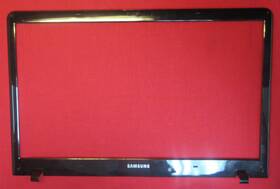
( Brand: Samsung ), ( Manufacturer Part Number: AP0RW0001HYT10 ), ( Compatible Brand: For Samsung ), ( Type: Bezel ), ( Country Of Origin: China )
Review SAMSUNG Notebook Lcd Bezel Used
The **Samsung NP350E7C-A01US Notebook** features a **high-quality AP0RW0001HYT10 LCD bezel**, a sleek and premium component that enhances both the aesthetic and functional appeal of this compact yet powerful laptop. This **15.6-inch WXGA (1366x768) TN display** is encased within a meticulously designed bezel that balances form and functionality, offering a clean, modern look with minimal frame intrusion. The **black plastic bezel** is both sturdy and lightweight, ensuring durability while maintaining a slim profile that maximizes screen-to-body ratio, providing an immersive viewing experience for work, entertainment, or creative tasks. Crafted with precision, the bezel integrates seamlessly with Samsung s signature design language, featuring subtle texturing and smooth edges that reduce glare and enhance tactile comfort. Whether used for office productivity, media consumption, or light gaming, the **AP0RW0001HYT10 bezel** ensures a refined presentation, making the NP350E7C-A01US a versatile yet stylish choice for professionals and casual users alike. Its robust construction also contributes to the laptop s overall longevity, ensuring that both the display and its surrounding frame remain intact under regular use.
**Pros and Cons of buying a Samsung Notebook NP350E7C-A01US (AP0RW0001HYT10) with LCD Bezel**
### **Pros**
1. **Performance and Specifications** The NP350E7C-A01US comes with a **Core i5-3320M processor**, which provides solid performance for everyday tasks, light multitasking, and even some entry-level productivity work. The **4GB DDR3 RAM** and **500GB HDD** offer decent storage and memory, though they may feel limiting for modern applications.
2. **Display Quality** The **15.6-inch HD (1366x768) LCD panel** is a standard resolution for its generation, offering decent clarity for web browsing, office work, and media consumption. The bezel design is slim for its era, improving screen-to-body ratio compared to bulkier laptops.
3. **Build Quality and Ports** Samsung s build quality was generally reliable for mid-range laptops of this time (2012 2013). It includes a variety of ports:
- **VGA, HDMI, USB 3.0, USB 2.0, Ethernet, headphone jack**
This makes it versatile for connecting to external monitors, peripherals, and older devices.
4. **Battery Life** The **4-cell battery** (likely around 45Wh) provides **3 5 hours of usage** for light tasks, which was acceptable for its time. While not exceptional by modern standards, it was sufficient for basic laptop users.
5. **Affordability and Availability** As a used/refurbished model, this laptop is often **cheap**, making it a budget-friendly option for those needing a functional machine for school, office work, or simple media tasks.
6. **Windows 7/8 Compatibility** If you need **Windows 7** (which was still widely used at the time), this laptop supports it. Some users may prefer upgrading to **Windows 10/11** via a clean install, but compatibility is not an issue.
---
### **Cons**
1. **Outdated Hardware** The **Core i5-3320M (2012)** and **4GB RAM** are **severely underpowered** by today s standards. Modern software (e.g., Adobe Creative Suite, video editing, or even newer browsers) will run **slowly or require constant upgrades**. The **500GB HDD** is also slow compared to SSDs.
2. **No SSD Option** Unlike newer models, this laptop **does not support SSD upgrades**, meaning file loading, boot times, and overall responsiveness will be sluggish.
3. **Weak Graphics** The **Intel HD Graphics 4000** is only capable of **basic gaming (e.g., older titles like Minecraft or CS:GO at low settings)** and **light photo editing**. Any serious graphic work will be impractical.
4. **Cooling and Thermal Issues** Older Intel Haswell processors (like the i5-3320M) can **throttle under load**, leading to **fan noise and overheating** if used for demanding tasks. The cooling system may not handle sustained workloads well.
5. **Display Limitations** The **1366x768 resolution** is **low by modern standards**, leading to **blurry text and images** when compared to today s Full HD (1920x1080) displays. The bezel is thin, but the overall viewing experience is not sharp.
6. **No Thunderbolt or USB-C** Modern connectivity standards like **Thunderbolt, USB-C, or USB 3.1** are missing, making it difficult to connect newer peripherals without adapters.
7. **Windows 7/8 Limitations** While Windows 7 is stable, **security updates ended in 2020**, making it vulnerable to modern malware. Windows 8/8.1 may require a clean install, and **Windows 10/11 compatibility** is possible but may need tweaks.
8. **Lack of Modern Upgrade Path** Unlike some laptops from the same era, this model **does not support RAM or storage upgrades**, locking users into its original specifications.
9. **Build Wear and Tear** As a used/refurbished unit, **keyboard wear, trackpad sensitivity, and general wear** may be present. The **plastic chassis** is prone to scratches and dents over time.
10. **No Touchscreen or Modern Features** Unlike newer ultrabooks, this model lacks **touchscreen support, fingerprint readers, or backlit keyboards with customizable RGB lighting**.
---
### **Conclusion**
The **Samsung NP350E7C-A01US** is a **functional but outdated laptop** best suited for:- **Basic tasks** (web browsing, documents, light photo editing).
- **Budget users** who need a cheap, working machine for school or office work.
- **Legacy software** users who require Windows 7 compatibility.
- **Gaming enthusiasts** playing **very old or low-demand games**.
However, it is **not recommended** for:- **Modern productivity work** (video editing, 3D rendering, programming).
- **Heavy multitasking** (running multiple browser tabs, VMs, or resource-intensive apps).
- **Long-term use** without significant upgrades (which are impossible).
- **Users expecting smooth performance** in 2024 or beyond.
If you find this laptop at a **very low price (under $50)**, it could be a **temporary solution** for someone with no other options. But for **anyone needing a reliable machine for more than a year**, investing in a **used/refurbished laptop with an SSD, at least 8GB RAM, and a modern processor (e.g., Intel i3/i5 8th Gen or Ryzen 3/5)** would be a far better choice.
---
### **Recommendation**
- **Buy it only if:**- You need a **cheap, functional laptop** for **very basic tasks**.
- You are **not concerned about performance** and plan to use it for **short-term needs**.
- You **cannot afford a newer machine** and this is the best available option.
- **Avoid it if:**- You require **anything beyond basic computing**.
- You expect **long-term use** (5 years).
- You need **modern security, speed, or upgradeability**.
- You are willing to **spend slightly more** for a **used/refurbished laptop with an SSD and at least 8GB RAM**.
**Alternative Options:**- **Used Dell Inspiron 15 (7000 series) with SSD upgrade**
- **HP Pavilion x360 (14/15-inch) with Ryzen 3/5**
- **Lenovo ThinkPad T480s (refurbished, with SSD upgrade)**
- **Acer Swift 3 (used, with modern specs)**
These alternatives will provide **far better performance, longevity, and usability** for the same or slightly higher price.
Details:
However, under certain circumstances, there may be some delay. Not in original packaging. AP0RW0001HYT10 USED. Most orders ship via USPS.
Knowledgeable Sales Advisers. Need it fast. If free shipping is available on this listing, its for the lower 48 contiguous states only. Memory city of Origin will vary but model number not.
Wide range of Products. 30 Day Warranty. DO NOTE REMOVE Any stickers from merchandise received, this will void all return and warranty. Products have been tested and pulled from working systems.
PCPARTPLACE, founded in 2011, is a worldwide, high quality, stocking supplier of IBM, Leno, Toshiba, Fujitsu, Ass, Ace and Dell computers, spare parts options.
part #: ap0rw0001hyt10 prices
- $15.95-$82.96
specifications laptoscreelc:
- brand: Samsung
- mpn: Ap0rw0001hyt10
- compatible brand: For Samsung
- type: Bezel
- country of origin: China
returns laptoscreelc:
- method: Money back
- time: 30 Days
- policy: Returns Accepted
- paid by: Seller
general laptoscreelc:
- Computer Components Parts > Laptop Replacement Parts > Laptop Screens LCD Panels
- condition: Used
shipping laptoscreelc:
- class: Economy, Standard, Expedited
- type: Fixed
- cost: $0.00
- service: Economy, USPS Ground Advantage, USPS Priority Mail
- transit: 3-8 Days
- carrier: USPS
seller laptoscreelc:
- city: Miami, Florida
- # reviews: 18253
- rating: 99.8%
offer laptoscreelc:
- sold: 0
- quantity: 1
- availability: In Stock
- started: June 8, 2026
- best offers: True
- options: Ship-to-home
payments laptoscreelc:
- other
- credit card: Mastercard
- wallet: Apple-pay
Samsung AP0RW0001HYT10 Is Similar To:
- 0022099266358 Samsung Laptop Lcd Screen (32% similar) Up for sale is a used Samsung LTN156AT09 15. Please see my other offers for more cool stuff. The case comes complete with camera and cables. You can remove the lcd to use in any other compatible laptop computer. Part numbers on LCD:LTN156AT05-U095KBA2117DLJ96-04853J this is an led back light lcd ...(February 15th, 2019)
- 0a66651 Samsung New Lenovo Wxga Led Lcd Screen (37.4% similar) Model part number: Samsung LTN156AT24, Frau 04W3261, pn 0A66651 screen size: GSX led lcd LTN156AT24 04W3261 image to this listing is for one premium panel in perfect new condition. 6 resolution: 1366X768 GSX back light type: led partial list of compatible laptops: Leno G570, G580, Z580, B580, and ...(September 15th, 2018)
- 0c1hnw 0cf9fx 0u884m 0p5ckj 089ymy Lcd Screen For Dell Lg Auo Samsung Chimei Boe (18.4% similar) 02DOCUMENTNOTSPECIFIED7. Screen SIZE15. Three years warranty. 8NORMAL0THIS screen is covered by our premium dead-pixel-free guarantee...(July 8th, 2018)
- 0c54gw Samsung Genuine Led Lcd Screen (34.7% similar) Pulled from a working unit. Item is fully tested and works great. 6 led lcd screen LTN156AT17 C54GW 0C54GW. Genuine Samsung 15. 6 led lcd screen LTN156AT17 C54GW 0C54GW this listing is for a genuine Samsung 15. Item is used. Look at pictures for details...(March 12th, 2018)
- 0fytxt Samsung Genuine Led Lcd Screen Fytxt (34.6% similar) Screen is in good condition. Item is fully tested and works great. Look at pictures for details. Genuine Samsung 15. 6 led lcd screen LTN156HL02-001 text 0FYTXT this listing is for a genuine Samsung 15. Item is used. 6 led lcd screen LTN156HL02-001 text 0FYTXT. Pulled from a working unit...(March 28th, 2018)
- 0j501t Samsung Ltn170ct08 Lcd Led (40.4% similar) New I was going to install in M17X and changed my mind...(December 9th, 2017)
- 0jhnx6 Samsung Genuine Led Lcd Screen (34.7% similar) Genuine Samsung 15. 6 led lcd screen LTN156HT01 JHNX6 0JHNX6. Item is pulled from working unit. Look at pictures for details. Item is fully tested and in good working condition. 6 led lcd screen LTN156HT01 JHNX6 0JHNX6 this listing is for a genuine Samsung 15. Item is used...(March 12th, 2018)
- 0k737h Dell Samsung Led Lcd Screen Wxga Hd (35% similar) Samsung LTN154AT12 15...(May 17th, 2018)
- 0m1gmv Samsung Ips Lcd Screen Dell Latitude (38.5% similar) Dell latitude 12. 5 lcd for E7280, E5280...(August 19th, 2018)
- 0n2gy7 Samsung Used Lcd Screen (35.2% similar) R2 ready for resale. 6 lcd screen is used but in great condition. Please feel free to if you are looking for something in particular. Used Samsung 15. Pulled from working unit and tested for functionality. Please feel free to if you are looking for something in particular. This item passed all key ...(August 20th, 2018)
- 0r790g Dell Samsung Matte Laptop Lcd Screen Inspiron (38.9% similar) 1/1 440X900 matte laptop lcd screen dell inspiring E1705 9400 R790G excellent used condition...(July 29th, 2018)
