ASUS C302C Chromebook Lcd Touch Screen 12.5
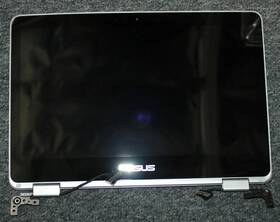
( Brand: Asus ), ( Manufacturer Part Number: C302C ), ( Compatible Brand: For Asus ), ( Screen Finish: Glossy ), ( Type: Lcd Screen ), ( Screen Size: 12.5 In ), ( Color: Silver ), ( Compatible Model: Chromebook Flip C302c ), ( Country Of Origin: China ), ( Compatible Product Line: For Chromebook )
Review ASUS Chromebook Flip 12.5 Inch Lcd Touch Screen Assembly Complete
The **ASUS Chromebook C302C** is a sleek, versatile, and power-efficient laptop designed to deliver a seamless computing experience for students, professionals, and everyday users alike. Engineered with a **12.5-inch Full HD (1920 x 1080) IPS touchscreen display**, this Chromebook offers vibrant colors, sharp details, and wide viewing angles, making it ideal for multimedia consumption, creative tasks, and interactive learning. The **10-point multi-touch interface** enhances usability, allowing for intuitive navigation, note-taking, and digital drawing with a stylus (sold separately), while the **anti-glare coating** ensures comfortable viewing even in bright environments. Built on **Google s Chrome OS**, the C302C combines simplicity with productivity, running on the latest web-based applications, Google Workspace, and Android apps, all while prioritizing security and automatic updates. Powered by an **Intel Celeron N4020 quad-core processor** with a base clock speed of 1.1 GHz and a turbo boost up to 2.8 GHz, this Chromebook balances performance and energy efficiency, handling everyday tasks like web browsing, document editing, and light video streaming with ease. With **8GB of DDR4 RAM**, it ensures smooth multitasking, allowing users to switch between apps and browser tabs without lag. Storage is managed by a **64GB eMMC internal drive**, providing ample space for essential files, apps, and offline content, though additional storage can be expanded via a **microSD card slot** for extra flexibility. The device features a **backlit keyboard** with a comfortable, spill-resistant design, ensuring durability and ease of use, while the **HD webcam with dual microphones** supports high-quality video calls for virtual meetings and online collaboration. On the connectivity front, the C302C includes **Wi-Fi 5 (802.11ac) and Bluetooth 4.2**, enabling fast wireless internet and seamless pairing with peripherals like keyboards, mice, and speakers. For portability, it weighs just **2.65 lbs (1.2 kg)**, making it lightweight and easy to carry, while its **thin, aluminum-magnesium alloy chassis** gives it a premium yet understated aesthetic. The **battery life** is impressive, lasting up to **10 hours** on a single charge, thanks to its energy-efficient components, ensuring all-day productivity without frequent recharging. Whether used in a classroom, office, or at home, the **ASUS Chromebook C302C** stands out as a reliable, feature-packed device that merges affordability with modern functionality, making it a smart choice for anyone seeking a no-frills yet capable computing solution.
The **ASUS Chromebook C302C** is a budget-friendly Chromebook with a 12.5-inch touchscreen display. Below is a detailed breakdown of its pros and cons, followed by a conclusion and recommendation.
---
### **Pros of the ASUS Chromebook C302C**
1. **Affordable Price** One of the most budget-friendly Chromebooks available, making it accessible for students, basic users, or those on a tight budget.
2. **Lightweight and Portable** Weighs around **2.6 lbs (1.2 kg)**, making it easy to carry around for school or travel.
3. **Touchscreen Display** The **12.5-inch HD (1366x768) touchscreen** allows for intuitive navigation, note-taking, and basic multimedia use.
4. **Long Battery Life** Typically lasts **8 10 hours** on a single charge, which is decent for a low-cost device.
5. **Reliable Performance** Runs smoothly on **Intel Celeron N4000** (dual-core, 4MB cache), which handles basic tasks like web browsing, documents, and light streaming without major lag.
6. **Chrome OS Efficiency** Optimized for speed, security, and simplicity, making it ideal for users who prioritize ease of use over advanced features.
7. **Good for Education** Many schools and institutions use Chromebooks for their affordability and managed security features.
8. **Wi-Fi 5 (802.11ac)** Decent wireless connectivity for its price range, though not the latest standard.
9. **USB-C Port (with adapter)** Supports USB-C (via adapter) for charging and data transfer, though it lacks modern Thunderbolt or USB 3.2.
10. **Basic Webcam & Microphone** Decent for video calls, though not high-end.
---
### **Cons of the ASUS Chromebook C302C**
1. **Outdated Hardware** The **Intel Celeron N4000** (2020) is now several generations old, which means it struggles with modern demanding apps, multitasking, or heavy workloads.
2. **Poor Upgradeability** Like most Chromebooks, it has **no RAM or storage upgrades**, meaning performance is fixed at purchase.
3. **Low-Resolution Display** The **1366x768 HD screen** is sharp enough for basic use but lacks the clarity and color accuracy of higher-end displays.
4. **No Full HD Option** Unlike some competitors, this model does not offer a **Full HD (1920x1080)** screen, which can be limiting for media consumption.
5. **Limited Ports** Only **1x USB-C (with adapter)** and **1x USB-A**, making it less versatile for peripherals like external drives or older devices.
6. **No SD Card Slot** Unlike some Chromebooks, it lacks an **SD card reader**, which can be inconvenient for media storage.
7. **Basic Build Quality** The plastic body feels **cheap** compared to premium Chromebooks, and there s no backlit keyboard (though this is common in budget models).
8. **No Dedicated Graphics** Relies on **Intel UHD Graphics**, which is fine for basic tasks but cannot handle gaming or video editing.
9. **Slow File Transfers** USB-C (with adapter) is **USB 3.0**, but the overall system speed is limited by the CPU.
10. **Limited Offline Functionality** Chrome OS is optimized for online use, and offline apps (like Google Docs) have restrictions compared to full-fledged operating systems.
---
### **Conclusion**
The **ASUS Chromebook C302C** is a **solid budget Chromebook** for **basic tasks** such as web browsing, email, documents, and light multimedia. It excels in **affordability, portability, and battery life**, making it a great choice for **students, casual users, or those who need a simple, no-frills device**.
However, its **outdated CPU, low-resolution display, limited ports, and lack of upgradeability** make it **unsuited for demanding users** who require multitasking, high-performance apps, or future-proofing. If you need a Chromebook for **gaming, video editing, or heavy productivity**, you should consider a more powerful model (e.g., **Acer Chromebook Spin 713, Lenovo Chromebook Duet 5, or ASUS Chromebook Flip C434**.
---
### **Recommendation**
**Buy the ASUS Chromebook C302C if:**- You need a **cheap, portable device** for **basic tasks** (school, work, browsing).
- You **don t require high performance** and are okay with **limited multitasking**.
- You **prioritize battery life and simplicity** over advanced features.
**Avoid the ASUS Chromebook C302C if:**- You need **a longer lifespan** (consider a newer model with a better CPU).
- You want **Full HD display, better ports, or upgradeability**.
- You plan to use **demanding apps, gaming, or professional software**.
**Alternative Considerations:**- **For better performance:** **Acer Chromebook Spin 713 (Intel Core i3, Full HD, touchscreen).**
- **For 2-in-1 flexibility:** **Lenovo Chromebook Duet 5 (better screen, stylus support).**
- **For absolute budget:** **HP Chromebook 14 (similar specs, sometimes cheaper).**
If your needs align with **basic, low-cost computing**, the **C302C is a decent choice**. Otherwise, investing a little more in a newer model will provide **better long-term usability**.
Details:
The item was carefully removed and has been used previously. Asus Chromebook Flip C302C 12.5 LCD Touch Screen Assembly Complete. Check Pictures. Every Item Is in Stock and Ready To Ship.
Item is Covered by a 30-day warranty from the moment of delivery.
part #: c302c prices
- $23.99-$71.34
specifications laptoscreelc:
- brand: Asus
- mpn: C302c
- compatible brand: For Asus
- screen finish: Glossy
- type: Lcd Screen
- screen size: 12.5 In
- color: Silver
- compatible model: Chromebook Flip C302c
- country of origin: China
- compatible product line: For Chromebook
shipping laptoscreelc:
- cost: $0.00
- service: Standard
- type: Fixed
- class: Standard
- transit: 3-7 Days
offer laptoscreelc:
- options: Ship-to-home
- quantity: 3
- sold: 0
- best offers: True
- availability: In Stock
- started: March 18, 2026
general laptoscreelc:
- Computer Components Parts > Laptop Replacement Parts > Laptop Screens LCD Panels
- condition: Used
seller laptoscreelc:
- city: Santa Ana, California
- rating: 99.6%
- # reviews: 51014
payments laptoscreelc:
- other
- wallet: Google-pay
- credit card: Visa
returns laptoscreelc:
- policy: Returns Accepted
- method: Money back
- paid by: Seller
- time: 30 Days
Asus C302C Is Similar To:
- A113884r747l Generic Asus Zenbook Replacement Laptop Lcd 032022003066 (25.5% similar) 3 full-HD led diode substitute only. Asus zen book UX31A N133HSE-EA1 rev. lcd screen size: 13. Regardless how people share their positive experience in upgrading, it is for sure the product will not be working properly when you attempt to replace your existing GSX HD or screen. C1 replacement ...(October 26th, 2018)
- A925127j315j Generic Asus Laptop Screen Wxga Hd 091819871578 (24.2% similar) Inches laptop lcd screen resolution: GSX HD x 768 type: led diode connector: 40 pins bottom right may contain 3 to 5 dead pixels please match your original screens back light type, size, and resolution before you purchase this item, because some model's come with more than one type of screens. lcd ...(May 28th, 2018)
- A984762s125p Generic Asus Laptop Screen Led Bottom Left Wxga 191820661301 (29% similar) 1 x laptop lcd screen resolution: GSX HD 768 type: led diode connector: 40 pins bottom left may contain 3 to 5 dead pixels please match your original screens back light type, size, and resolution before you purchase this item, because some model's come with more than one type of screens. lcd screen...(May 8th, 2018)
- A986853y335t Asus Laptop Led Lcd Screen Replacement 634972683086 (36.8% similar) 2 year warranty. Disconnect your laptop power and remove the battery before installation to avoid any damage of electrical components. Repair difficulty - low. 6 connector: 40 pin led screen socket screen finish: glossy resolution: GSX 1366X768 HD this is brand new laptop replacement for. Please, ...(November 17th, 2018)
- A987674a317z Asus Laptop Led Lcd Screen Replacement 634972683345 (36.8% similar) Product features warranty: 2 years screen size: 14. Disconnect your laptop power and remove the battery before installation to avoid any damage of electrical components. Please, make sure your original screen has the same specifications before purchasing this item. Repair difficulty - low. Connector...(November 17th, 2018)
- Led-1366-768-g-40-15.6-3803 Asus Replacement Laptop Lcd Led Display Screen 656729554623 (27.7% similar) 6 item DIMENSIONS:1. You can deviate from your current screen specifications. Product features screen size: 15. Purchasing a screen with different specifications will work your system...(December 21st, 2018)
- Led-1366-768-g-40-15.6-a118 Asus Laptop Lcd Screen Wxga Hd Led Compatible 610395665960 (32.9% similar) You cannot deviate from your current screen specifications. 5 anarchistic: 60. 5 pounds size:' requires technical installation item DIMENSIONS:1. Product features screen size: 15. Purchasing a screen with different specifications will not work your system. Asus K50I laptop lcd screen 15...(March 31st, 2018)
- Led-1366-768-g-40-15.6-ee9399 Generic Asus Wxga Laptop Led Screen 610395664352 (21.3% similar) Asus K53E SX087V K53E-BBR1 15. 6 connector: 40 pins screen finish: glossy maximum resolution: HD1 year warranty please match your original screens back light type, size, and resolution before you purchase this item, because some laptop model's come with more than one type of screens. 6 GSX laptop ...(June 15th, 2018)
- Led-1366-768-g-40-15.6-slim-u-l204 Generic Asus New Replacement Lcd Screen For Laptop 634304542098 (28.2% similar) You can deviate from your current screen specifications. 05 pounds size:'technical installation required item DIMENSIONS:1. Purchasing a screen with different specifications will work your system...(November 30th, 2018)
- 08301-01481200 Me181c-lcd-cable Asus Memo Pad Tablet Lcd Flex Cable Led Tested Warranty (22.8% similar) Orders purchased before noon central time are typically packaged and shipped out the same day. Stock photos. Notice: pictures shown are simply for reference...(September 12th, 2018)
- 13gnnw1ap031-5 13gnnw1ap033-5 Asus Lcd Back Cover (23.3% similar) Condition: - small scratches on the surface from normal use one corner has a slight wear mark picture enclosed near hinge area shows cracks what was once slightly broken. Specs: - Asus part number: 13GNNW1AP031-5, 13GNNW1AP033-5, 13N0-1ZA0401 color: silver lcd screen size: 14. The plastic in this ...(October 20th, 2018)
