ACER C871-328J Chromebook Lcd Screen
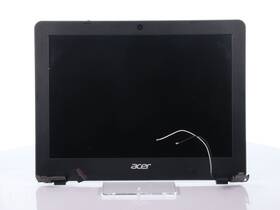
( Brand: Acer ), ( Manufacturer Part Number: C871-328J ), ( Compatible Brand: For Acer ), ( Screen Finish: Matte ), ( Type: Screen ), ( Display Technology: Led Lcd ), ( Screen Size: 11.6 In ), ( Color: Black ), ( Compatible Model: Chromebook C871 ), ( Compatible Product Line: For Chromebook )
Review ACER Chromebook C871 Lcd Screen Assembly
The **Acer Chromebook C871-328J** is a sleek, modern laptop designed to deliver a seamless computing experience for students, professionals, and everyday users who rely on the efficiency and simplicity of Google s Chrome OS. This model features a **11.6-inch HD (1366 x 768) LCD display** with a crisp, vibrant screen that ensures sharp text and vivid visuals for web browsing, multimedia consumption, and light productivity tasks. The display is backlit with an anti-glare coating, reducing eye strain during extended use and providing a comfortable viewing experience in both well-lit and low-light environments. Whether you're taking notes in a classroom, streaming your favorite content, or collaborating on documents, the C871 s screen offers a balanced blend of clarity and readability without the distraction of excessive brightness or glare.
Under the hood, the Chromebook C871-328J is powered by an **Intel Celeron N3350 processor**, a dual-core chip that delivers reliable performance for everyday tasks such as web browsing, email management, document editing, and basic photo editing. While not designed for high-end gaming or resource-intensive applications, this processor ensures smooth multitasking and responsive operation for most productivity and entertainment needs. Paired with **4GB of DDR4 RAM**, the device handles multiple browser tabs, apps, and background processes with ease, preventing lag and ensuring a fluid user experience. Storage is provided by a **64GB eMMC solid-state drive**, offering ample space for essential files, Chrome OS apps, and a modest collection of media, though users with heavier storage demands may find the capacity limiting and could benefit from expanding it with a microSD card or cloud storage solutions.
The **Acer Chromebook C871-328J** is built with portability in mind, weighing just **2.65 pounds** and featuring a **thin, lightweight chassis** that makes it easy to carry in a backpack or briefcase. Its **11.6-inch screen** and compact form factor make it ideal for students or professionals on the go, while the **full-size keyboard** and **spacious touchpad** provide a comfortable typing experience, even for extended periods. The device includes a **microSD card reader**, allowing users to expand storage or transfer files from cameras and other devices effortlessly. Connectivity is handled by **Wi-Fi 5 (802.11ac)** and **Bluetooth 4.2**, ensuring stable internet access and wireless peripherals like keyboards, mice, or headphones. Additionally, the Chromebook features a **USB 3.0 port** and a **USB-C port** (with optional charging capabilities, depending on the power adapter), offering flexibility for connecting external devices, monitors, or flash drives.
Security and durability are also key considerations in the C871 s design. The Chromebook includes **Acer s PrivacyShade**, a physical privacy screen that reduces the viewing angle of the display, making it harder for others to see your screen in public spaces. The device also supports **Google s built-in security features**, such as automatic updates, sandboxing, and virus protection, ensuring a safe and secure browsing environment. The build quality is robust, with a **durable plastic chassis** that can withstand the rigors of daily use, though it may not be as rugged as some enterprise-grade Chromebooks. The **single-cell battery** provides **up to 10 hours of runtime** on a single charge, making it a reliable companion for a full day of work or study without frequent recharging.
For users who prefer a more traditional computing experience, the **Acer Chromebook C871-328J** offers a seamless transition to Chrome OS, which runs on the same underlying Linux kernel as Google s Chrome browser. This operating system is optimized for speed, simplicity, and integration with Google s ecosystem, including **Google Drive, Gmail, Google Docs, and Google Meet**. The device supports **Android apps** from the Google Play Store, expanding its functionality to include productivity tools, communication apps, and entertainment options. While it lacks a traditional Windows or macOS experience, the Chromebook excels in web-based productivity, making it an excellent choice for users who prioritize cloud-based collaboration, online learning, and efficient digital workflows.
Overall, the **Acer Chromebook C871-328J** is a well-rounded, budget-friendly laptop that strikes a balance between performance, portability, and affordability. Its **11.6-inch HD LCD display** ensures clear visuals for all tasks, while its lightweight design and long battery life make it a practical choice for users who need a reliable, no-frills computing device. Whether for school, work, or everyday use, this Chromebook delivers a smooth, secure, and user-friendly experience that leverages the power of the cloud to keep you productive and connected.
### **Pros and Cons of buying a Acer C871-328J Chromebook (with LCD Screen)**
#### **Pros:**1. **Affordability** The Acer C871-328J is a budget-friendly Chromebook, making it accessible for students, basic office work, or casual users who need a simple device without high-end features.
2. **Lightweight and Portable** Weighing around 2.6 3.3 lbs (depending on model), it is easy to carry, ideal for students or professionals who need a device for on-the-go use.
3. **Chrome OS Efficiency** Runs smoothly on Chrome OS, which is lightweight, fast, and optimized for web-based tasks. It updates automatically, ensuring security and performance.
4. **Good for Basic Tasks** Suitable for web browsing, document editing (Google Docs, Sheets), email, streaming, and light multimedia consumption.
5. **Long Battery Life** Typically lasts 8 10 hours on a single charge, which is decent for a budget device.
6. **Durability** Acer Chromebooks are known for being rugged, with some models featuring spill-resistant keyboards and reinforced chassis.
7. **Google Integration** Seamless syncing with Google Drive, Gmail, and other Google services, making it ideal for users already in the Google ecosystem.
8. **No Overheating Issues** Unlike some budget laptops, this model does not suffer from excessive heat buildup during normal use.
9. **Simple Upgrade Path** If needed, the storage can sometimes be expanded via a microSD card (though this depends on the specific model).
10. **Good for Educational Use** Many schools recommend Chromebooks due to their affordability, security, and ease of management.
---
#### **Cons:**1. **Limited Offline Functionality** Chrome OS is primarily web-based, meaning some apps and features require an internet connection. Offline work is possible but limited compared to Windows or macOS.
2. **No Full-Fledged Desktop Apps** Cannot run traditional Windows or macOS software (e.g., Adobe Photoshop, Microsoft Office desktop versions, or gaming). Some apps can be installed via the Chrome Web Store, but they are not as powerful.
3. **Weak Performance for Demanding Tasks** Struggles with video editing, 3D rendering, or running multiple resource-heavy applications simultaneously. The Intel Celeron or Pentium processor is not powerful enough for advanced work.
4. **Small Storage (eMMC, No SSD Upgrade)** Typically comes with 16GB or 32GB eMMC storage, which fills up quickly with apps, files, and updates. There is usually no option to upgrade to an SSD.
5. **Basic Display (LCD Screen)** The 11.6-inch HD (1366x768) LCD screen is adequate for reading and basic tasks but lacks the color accuracy and brightness of higher-end displays. It may not be ideal for graphic design or photo editing.
6. **No Dedicated Graphics** Lacks a dedicated GPU, so graphics-intensive tasks (e.g., light gaming, video editing) will perform poorly.
7. **Limited Port Selection** Usually features only USB 2.0 ports (no USB-C or Thunderbolt), which can be restrictive for modern peripherals. Some models may lack an HDMI or Ethernet port.
8. **No Touchscreen or Stylus Support** Unlike newer Chromebooks, this model does not support touch input or stylus use, limiting creative flexibility.
9. **Outdated Design** The build quality is functional but not premium. The keyboard and trackpad are adequate but not as refined as those on higher-end laptops.
10. **Vendor Lock-in with Google** Heavy reliance on Google services means switching to another ecosystem (e.g., Microsoft or Apple) could be inconvenient.
---
### **Conclusion:**The **Acer C871-328J Chromebook** is a solid **budget-friendly choice** for users who prioritize **portability, simplicity, and Chrome OS efficiency** over advanced performance. It excels in **basic tasks like web browsing, document editing, and light media consumption**, making it ideal for **students, office workers, or casual users** who do not require heavy-duty computing.
However, if you need **powerful software, offline productivity, or high-end multimedia work**, this Chromebook will fall short. Its **LCD screen, limited storage, and lack of upgradeability** also make it less suitable for users who anticipate future needs.
For those who **only need a no-frills, affordable device for web-based work**, the C871-328J is a **good purchase**. But if you require **more performance, better display quality, or Windows/macOS compatibility**, investing in a slightly higher-end Chromebook or a different platform may be worth it.
---
### **Recommendation:** - **Buy the Acer C871-328J if:**- You need a **cheap, portable device** for **school, basic work, or web browsing**.
- You are **already in the Google ecosystem** and rely on Chrome OS apps.
- You **do not need offline heavy software** or advanced graphics.
- **Consider alternatives if:**- You require **better performance** (e.g., a Chromebook with a faster processor or more RAM).
- You need a **higher-quality display** (e.g., an IPS or touchscreen model).
- You want **expandable storage** (e.g., an SSD upgrade option).
- You need **Windows or macOS compatibility** for specific software.
For a **slightly better upgrade**, models like the **Acer Chromebook Spin 311** (with touchscreen) or **Lenovo Chromebook Duet** (2-in-1) may offer more versatility without a significant price jump. However, if your needs are **strictly basic and budget-conscious**, the C871-328J remains a **practical choice**.
Details:
Refurbished and Tested: Each unit has been carefully inspected, cleaned, restored to full working condition. Acer Chromebook C871 LCD Screen Assembly. This item comes with a 30-day limited warranty against any hardware defects. Type: Screen.
Red Byte Technology. Screen Finish: Matte. Display Technology: LED LCD. This refurbished item has been previously used and may exhibit some signs of cosmetic wear, such as minor scratches or scuffs.
Screen Size: 11.6 in. Compatible Brand: For Acer. Product specifics.
part #: c871328j prices
- $21.62-$21.99
specifications laptoscreelc:
- brand: Acer
- mpn: C871-328j
- compatible brand: For Acer
- screen finish: Matte
- type: Screen
- display technology: Led Lcd
- screen size: 11.6 In
- color: Black
- compatible model: Chromebook C871
- compatible product line: For Chromebook
payments laptoscreelc:
- credit card: Mastercard
- wallet: Paypal
- other
offer laptoscreelc:
- quantity: 1
- started: May 15, 2026
- options: Ship-to-home
- sold: 0
- best offers: True
- availability: In Stock
returns laptoscreelc:
- paid by: Seller
- policy: Returns Accepted
- time: 30 Days
- method: Money back
seller laptoscreelc:
- rating: 99.2%
- # reviews: 7161
- city: Marietta, Georgia
general laptoscreelc:
- condition: Used
- Computer Components Parts > Laptop Replacement Parts > Laptop Screens LCD Panels
shipping laptoscreelc:
- carrier: USPS, UPS
- service: USPS Ground Advantage, UPS Ground Saver
- cost: $4.99
- type: Fixed
- transit: 4-11 Days
- class: Standard, Economy
Acer C871-328J Is Similar To:
- 4328730991 Acer Aspire Replacement Screen For Laptop Led Hd 634304510660 (27.6% similar) 2 year warranty. Repair difficulty - low. Product features warranty: 2 years screen size: 15. Disconnect your laptop power and remove the battery before installation to avoid any damage of electrical components. 6 connector: 30 pin led socket screen finish: matte resolution: GSX 1366X768 HD this is ...(November 17th, 2018)
- 6434349 Acer Aspire Replacement Screen For Laptop Led Hd 634304510387 (28.3% similar) Product features warranty: 2 years screen size: 15. Repair difficulty - low. Please, make sure your original screen has the same specifications before purchasing this item. Disconnect your laptop power and remove the battery before installation to avoid any damage of electrical components. 2 year ...(November 17th, 2018)
- A068179n602e Generic Acer Aspire One Replacement Laptop Lcd Screen 654367757406 (32.3% similar) 1 Sega led diode substitute only. Acer aspire one D250-1116 replacement laptop lcd screen 10. 55 pounds size:' requires technical installation item DIMENSIONS:1X0. 1 inches laptop lcd screen resolution: Sega x 600 type: led diode connector: 40 pins bottom left may contain 3 to 5 dead pixels: please ...(February 4th, 2019)
- A941813i125b Generic Acer Aspire Laptop Lcd Screen Replacement Wxga 610395665861 (33.6% similar) 6 replacement laptop screen with led back light and bottom left connection. Product features 15...(January 26th, 2019)
- A941821h125j Generic Acer Aspire Laptop Lcd Screen Replacement Wxga 610395665397 (33.6% similar) Product features 15. 6 replacement laptop screened back light technology bottom left connection 15. 6 replacement laptop screen with led back light and bottom left connection. 25 pounds size: ' requires technical installation item DIMENSIONS:1X0...(January 26th, 2019)
- A985551y674n Generic Acer Series Chromebook Laptop Led Lcd Screen 634972682317 (45% similar) 93 pounds size:technical installation required ITEMDIMENSIONS:1X0. lcd screen size: x 6 inches anarchistic: laptop lcd screen resolution: GSX HD x 768 type: led diode connector: 40 pins bottom right may contain 3 to 5 dead pixels please match your original screens back light type, size, and ...(May 8th, 2018)
- Led-1024-600-g-40-10.1-23 Acer Aspire One Laptop Lcd Screen Replacement Wsvga 617401140947 (31.2% similar) You cannot deviate from your current screen specifications. 35 pounds size:n item DIMENSIONS:1. 5X8X12 anarchistic: 47. Product features screen size: 10. Acer aspire one D257 laptop lcd screen replacement 10. Purchasing a screen with different specifications will not work your system...(June 17th, 2018)
- Led-1024-600-g-40-10.1-3063 Acer Aspire One Replacement Laptop Lcd Led Display Screen (29.4% similar) Not entire computer. Is just screen assembly...(April 26th, 2018)
- Led-1366-768-g-40-15.6-213 Acer Laptop Led Lcd With Glossy Finish And 617401137718 (24.1% similar) 6 item DIMENSIONS:1. You cannot deviate from your current screen specifications. 6 pounds size:'screen size: 15...(December 25th, 2018)
- Led-1366-768-g-40-15.6-82 Acer Aspire Laptop Lcd Screen Replacement Wxga Hd 610395665922 (31.7% similar) 5 anarchistic: 22. 6 item DIMENSIONS:1. 6 each laptop maybe use more than one type screen. Please match your laptop model and original screens back light type, size, data cable pin, resolution before you purchase this item, because even same model's come with more than one type of screens. 3 pounds ...(March 30th, 2018)
- Led-1366-768-g-40-15.6-n3005 Acer Aspire New Replacement Lcd Screen For Laptop 634304542029 (28.2% similar) 37 pounds size:'technical installation required item DIMENSIONS:1. You can deviate from your current screen specifications. Product features screen size: 15. Purchasing a screen with different specifications will work your system...(November 30th, 2018)
