ASUS CM1402CM2A-M8186 Lcd Screen Chromebook 14FTFT
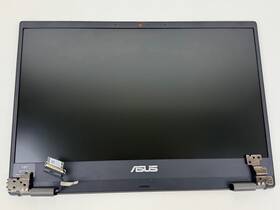
( Brand: Asus ), ( Manufacturer Part Number: CM1402CM2A-M8186 ), ( Item Condition: Used, Very Good Item Condition. ), ( Product Line: 14 Lcd Screen Assembly For Asus Chromebook Cm14 ), ( Type: Lcd Screen )
Review ASUS 14ftft Lcd Screen Assembly Chromebook Cm14 Cm1402cm2a
The **ASUS CM1402CM2A-M8186** is a high-quality 14-inch Full HD (1920 x 1080) IPS LCD display designed specifically for the ASUS Chromebook CM14 series, including models like the CM1402CM2A. This screen delivers a vibrant and immersive viewing experience with a sleek, slim profile that enhances both aesthetics and portability. Featuring an **80% screen-to-body ratio**, the display maximizes visual real estate, providing ample space for multitasking, streaming, or creative work without sacrificing the device s compact form factor. The **IPS (In-Plane Switching) technology** ensures wide viewing angles of up to **178 degrees**, meaning colors remain crisp and accurate whether you re viewing content from a direct front-on perspective or from the side. This makes it ideal for collaborative work, presentations, or casual entertainment where clarity and consistency are essential.
Under the hood, the **14-inch Full HD resolution** (1920 x 1080 pixels) offers sharp, detailed visuals with smooth text rendering, reducing eye strain during prolonged use. The **800:1 contrast ratio** enhances depth and clarity, making images and videos pop with greater vibrancy, while the **250 nits brightness** ensures readability even in well-lit environments, though it may require additional backlighting in brightly lit outdoor settings. The **16.7 million-color display** supports a rich, accurate color palette, making it suitable for tasks ranging from graphic design and photo editing to casual browsing and media consumption. The **anti-glare coating** further reduces reflections, helping to maintain focus and comfort during extended sessions.
Built to complement the Chromebook s lightweight and durable design, this display is engineered for reliability and longevity. The **M8186 panel** is optimized for energy efficiency, contributing to the device s extended battery life a critical feature for users on the go. Whether you re a student, professional, or creative enthusiast, this screen provides a seamless blend of performance and portability, ensuring a responsive and engaging interaction with your Chromebook. Its compatibility with the CM14 series ensures a perfect fit, both functionally and aesthetically, while its robust build quality reflects ASUS s commitment to delivering a premium user experience. From productivity tasks to entertainment, the **ASUS CM1402CM2A-M8186** screen elevates the overall performance of your Chromebook, making it a versatile and indispensable component for modern digital lifestyles.
The ASUS CM1402CM2A-M8186 14-inch FHD LCD screen is a replacement display for the ASUS Chromebook Flip CM14 (CM1402CM2A). Below is a detailed analysis of its pros and cons, followed by a conclusion and recommendation.
---
### **Pros of buying a ASUS CM1402CM2A-M8186 Screen**
1. **Exact Fit and Compatibility**
The screen is designed specifically for the ASUS Chromebook Flip CM14, ensuring a perfect fit without compatibility issues. This eliminates the risk of misalignment or physical damage during installation.
2. **High Resolution and Clarity**
The 1920x1080 (Full HD) resolution provides sharp visuals, which is ideal for reading, web browsing, and light multimedia tasks. The IPS panel technology delivers good color accuracy and wide viewing angles, reducing eye strain compared to older TN panels.
3. **Durable Build**
ASUS screens are generally built to last, with reinforced edges and a sturdy frame. This reduces the likelihood of cracking or bending during handling or installation.
4. **Easy Replacement Process**
The screen is designed for straightforward replacement, requiring only basic tools (screwdriver, plastic pry tools). Many users report that the process takes less than an hour, even for beginners.
5. **Cost-Effective Upgrade**
Replacing a cracked or damaged screen is far cheaper than buying a new Chromebook. For a few hundred dollars, you can restore your device to full functionality without sacrificing performance.
6. **Maintains Original Aesthetics**
The screen matches the original design of the CM14, preserving the device s appearance. This is particularly important if you prefer the stock look over aftermarket alternatives.
7. **Warranty and Support**
ASUS provides warranty coverage for replacement parts, offering peace of mind in case of manufacturing defects. Some third-party sellers may also offer limited warranties.
8. **Improved User Experience**
A functional, high-quality screen enhances productivity, comfort, and overall satisfaction with the device. This is especially valuable for students, professionals, or anyone who relies on their Chromebook daily.
---
### **Cons of buying a ASUS CM1402CM2A-M8186 Screen**
1. **Limited Availability and Pricing**
Authentic ASUS screens can sometimes be difficult to find, especially from official channels. Prices may fluctuate due to demand, and third-party sellers might charge premiums for convenience. This can make the upgrade less cost-effective than intended.
2. **Potential Counterfeit Risks**
Buying from unverified sellers increases the risk of receiving a counterfeit or low-quality screen. Counterfeit screens may have poor image quality, shorter lifespans, or compatibility issues. Always purchase from reputable sources, such as ASUS s official store, authorized resellers, or trusted third-party sellers with good reviews.
3. **No Significant Performance Upgrade**
The screen itself does not improve the Chromebook s performance it only replaces a damaged or malfunctioning display. If your Chromebook s hardware (CPU, RAM, storage) is outdated, upgrading the screen alone won t enhance speed or functionality.
4. **Installation Skill Required**
While the process is generally straightforward, inexperienced users may accidentally damage the screen or internal components during removal or installation. Poor handling could lead to further issues, such as bent hinges or damaged cables.
5. **No Additional Features**
The screen does not include any extra features like touch functionality (if your original screen was non-touch) or higher brightness levels. If you re looking for a touchscreen upgrade, this part won t suffice.
6. **Environmental Impact**
Replacing a screen contributes to electronic waste. If you re environmentally conscious, consider repairing or recycling your old screen before disposing of it.
7. **Potential for Screen Burn-In (Minor Risk)**
While rare with modern IPS panels, prolonged use of static images (e.g., wallpapers, browser tabs) could theoretically cause minor image retention over time. This is more common with older LCDs and is unlikely to be an issue with this model.
8. **No Backlight or Panel Upgrades**
The screen does not offer improvements like higher brightness, better color gamut, or anti-glare coatings. If you re in a brightly lit environment, you may still experience reflections or reduced visibility.
---
### **Conclusion**
The ASUS CM1402CM2A-M8186 14-inch FHD LCD screen is a reliable and cost-effective solution for restoring your Chromebook Flip CM14 to working order. Its exact compatibility, high resolution, and durable build make it a practical choice for users who prioritize functionality and aesthetics. However, potential buyers should be cautious of counterfeit products, ensure they purchase from trusted sources, and be prepared for a modestly involved installation process.
For most users, the benefits of a fully functional, high-quality display outweigh the drawbacks. If your primary concern is replacing a cracked or dead screen without compromising performance, this is an excellent option. However, if you re looking for significant visual upgrades (e.g., touchscreen, higher brightness, or better color accuracy), you may need to explore alternative parts or consider upgrading to a newer Chromebook model.
---
### **Recommendation**
**Buy the ASUS CM1402CM2A-M8186 screen if:**- Your Chromebook Flip CM14 s screen is cracked, dead, or malfunctioning.
- You want an exact replacement that matches the original design.
- You re comfortable with a straightforward DIY installation.
- You prioritize reliability and warranty coverage over additional features.
**Avoid or consider alternatives if:**- You cannot verify the authenticity of the seller.
- You re looking for a touchscreen or significant visual improvements.
- You re uncomfortable with the installation process and prefer professional repair services.
- You find a better-priced, high-quality third-party screen with additional features (e.g., anti-glare, higher brightness).
**Where to Buy:**- **Official ASUS Store** (for warranty and authenticity).
- **Authorized ASUS resellers** (check reviews for reliability).
- **Trusted third-party sellers** (e.g., Amazon, Newegg, or specialized electronics retailers with positive feedback). Always verify seller ratings and return policies.
**Preparation Tips:**- Backup your data before attempting any hardware modifications.
- Gather the necessary tools (screwdriver set, plastic pry tools, tweezers).
- Watch detailed installation guides (e.g., from ASUS or repair forums) to avoid mistakes.
- Consider recycling or donating your old screen responsibly.
In summary, this screen is a solid choice for restoring your Chromebook s functionality, provided you take precautions to ensure quality and authenticity. For most users, the trade-offs are minimal, and the upgrade is well worth the investment.
Details:
Used, Very Good Item Condition. Tested, guaranteed to be in working condition.
part #: cm1402cm2am8186 prices
- $49.95-$70.98
specifications laptoscreelc:
- brand: Asus
- mpn: Cm1402cm2a-m8186
- item condition: Used, Very Good Item Condition.
- product line: 14 Lcd Screen Assembly For Asus Chromebook Cm14
- type: Lcd Screen
general laptoscreelc:
- Computer Components Parts > Laptop Replacement Parts > Laptop Screens LCD Panels
- condition: Used
shipping laptoscreelc:
- class: Expedited
- type: Fixed
- service: USPS Priority Mail
- carrier: USPS
- transit: 3-6 Days
- cost: $0.00
seller laptoscreelc:
- city: Mentor, Ohio
- # reviews: 17145
- rating: 100.0%
returns laptoscreelc:
- method: Money back
- paid by: Seller
- time: 30 Days
- policy: Returns Accepted
payments laptoscreelc:
- credit card: Visa
- other
- wallet: Apple-pay
offer laptoscreelc:
- options: Ship-to-home
- quantity: 1
- sold: 0
- availability: In Stock
- started: May 29, 2026
Asus CM1402CM2A-M8186 Is Similar To:
- A113884r747l Generic Asus Zenbook Replacement Laptop Lcd 032022003066 (22.8% similar) 3 full-HD led diode substitute only. Asus zen book UX31A N133HSE-EA1 rev. lcd screen size: 13. Regardless how people share their positive experience in upgrading, it is for sure the product will not be working properly when you attempt to replace your existing GSX HD or screen. C1 replacement ...(October 26th, 2018)
- A925127j315j Generic Asus Laptop Screen Wxga Hd 091819871578 (21.4% similar) Inches laptop lcd screen resolution: GSX HD x 768 type: led diode connector: 40 pins bottom right may contain 3 to 5 dead pixels please match your original screens back light type, size, and resolution before you purchase this item, because some model's come with more than one type of screens. lcd ...(May 28th, 2018)
- A984762s125p Generic Asus Laptop Screen Led Bottom Left Wxga 191820661301 (28.8% similar) 1 x laptop lcd screen resolution: GSX HD 768 type: led diode connector: 40 pins bottom left may contain 3 to 5 dead pixels please match your original screens back light type, size, and resolution before you purchase this item, because some model's come with more than one type of screens. lcd screen...(May 8th, 2018)
- A986853y335t Asus Laptop Led Lcd Screen Replacement 634972683086 (34.7% similar) 2 year warranty. Disconnect your laptop power and remove the battery before installation to avoid any damage of electrical components. Repair difficulty - low. 6 connector: 40 pin led screen socket screen finish: glossy resolution: GSX 1366X768 HD this is brand new laptop replacement for. Please, ...(November 17th, 2018)
- A987674a317z Asus Laptop Led Lcd Screen Replacement 634972683345 (34.7% similar) Product features warranty: 2 years screen size: 14. Disconnect your laptop power and remove the battery before installation to avoid any damage of electrical components. Please, make sure your original screen has the same specifications before purchasing this item. Repair difficulty - low. Connector...(November 17th, 2018)
- Led-1366-768-g-40-15.6-3803 Asus Replacement Laptop Lcd Led Display Screen 656729554623 (27.5% similar) 6 item DIMENSIONS:1. You can deviate from your current screen specifications. Product features screen size: 15. Purchasing a screen with different specifications will work your system...(December 21st, 2018)
- Led-1366-768-g-40-15.6-a118 Asus Laptop Lcd Screen Wxga Hd Led Compatible 610395665960 (30.1% similar) You cannot deviate from your current screen specifications. 5 anarchistic: 60. 5 pounds size:' requires technical installation item DIMENSIONS:1. Product features screen size: 15. Purchasing a screen with different specifications will not work your system. Asus K50I laptop lcd screen 15...(March 31st, 2018)
- Led-1366-768-g-40-15.6-ee9399 Generic Asus Wxga Laptop Led Screen 610395664352 (25.3% similar) Asus K53E SX087V K53E-BBR1 15. 6 connector: 40 pins screen finish: glossy maximum resolution: HD1 year warranty please match your original screens back light type, size, and resolution before you purchase this item, because some laptop model's come with more than one type of screens. 6 GSX laptop ...(June 15th, 2018)
- Led-1366-768-g-40-15.6-slim-u-l204 Generic Asus New Replacement Lcd Screen For Laptop 634304542098 (27% similar) You can deviate from your current screen specifications. 05 pounds size:'technical installation required item DIMENSIONS:1. Purchasing a screen with different specifications will work your system...(November 30th, 2018)
- 08301-01481200 Me181c-lcd-cable Asus Memo Pad Tablet Lcd Flex Cable Led Tested Warranty (20.5% similar) Orders purchased before noon central time are typically packaged and shipped out the same day. Stock photos. Notice: pictures shown are simply for reference...(September 12th, 2018)
- 13gnnw1ap031-5 13gnnw1ap033-5 Asus Lcd Back Cover (20.3% similar) Condition: - small scratches on the surface from normal use one corner has a slight wear mark picture enclosed near hinge area shows cracks what was once slightly broken. Specs: - Asus part number: 13GNNW1AP031-5, 13GNNW1AP033-5, 13N0-1ZA0401 color: silver lcd screen size: 14. The plastic in this ...(October 20th, 2018)
