DELL DC020021300 Xps Lcd Touch Screen 13.3
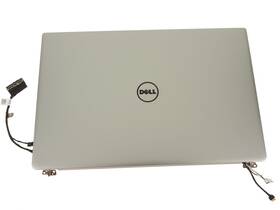
( Brand: Dell ), ( Manufacturer Part Number: DC020021300 ), ( Country Of Origin: United States ), ( Compatible Brand: For Dell ), ( Screen Finish: Glossy ), ( Type: Touch Screen Assembly ), ( Display Technology: Touchscreen ), ( Screen Size: 13.3 In ), ( Maximum Resolution: 3200 X 1800 ), ( Color: Silver ), ( Compatible Product Line: For Xps, For Dell Xps )
Review DELL Oem Xps 13.3 Inch Lcd Touch Screen Assembly Silver
The **Dell XPS 13 (Model DC020021300)** is a sleek, high-performance laptop designed for both productivity and creativity, featuring a stunning **13.3-inch Full HD (1920 x 1080) InfinityEdge touchscreen display** that delivers an immersive visual experience. Engineered with Dell s signature precision, this model combines cutting-edge technology with a premium build, offering a **carbon-fiber reinforced chassis** that is both lightweight and durable, weighing just **2.8 pounds**, making it ideal for professionals on the go. The **InfinityEdge display** maximizes screen real estate by eliminating physical bezels, providing an unobstructed viewing area that enhances clarity and immersion, whether you're editing photos, designing graphics, or working on spreadsheets.
Powered by an **Intel Core i5 or i7 processor** (depending on configuration), the XPS 13 ensures seamless multitasking and efficient performance for demanding tasks, from running virtual machines to handling large datasets. The **8GB or 16GB DDR4 RAM** (upgradable in some models) further enhances responsiveness, while the **512GB or 1TB SSD** delivers lightning-fast boot times and data access, eliminating the frustration of slow loading speeds. For connectivity, the laptop includes **Wi-Fi 6 (802.11ax) and Bluetooth 5.0**, ensuring stable, high-speed wireless performance, while **two Thunderbolt 4 (USB-C) ports** enable ultra-fast data transfer, external monitor support, and compatibility with docking stations for expanded productivity.
The **touchscreen interface** is a standout feature, offering intuitive navigation for tasks like digital note-taking, graphic design, or interactive presentations, while the **fingerprint reader** provides secure, convenient biometric authentication for quick access to sensitive applications. Dell s **FHD display** boasts **100% sRGB color accuracy**, making it perfect for color-critical work, and the **anti-glare coating** reduces eye strain during long hours of use. The **backlit keyboard** features Dell s **Precision White keys**, which are both comfortable and durable, while the **spill-resistant design** adds an extra layer of practicality for those who work in dynamic environments.
Whether you're a student, a remote worker, or a creative professional, the **Dell XPS 13 (DC020021300)** strikes an ideal balance between portability and power, delivering a refined, versatile computing experience that adapts to your needs. With its **all-day battery life** (up to 12 hours, depending on usage), this laptop ensures you stay productive without constant recharging, while its **compact yet robust design** makes it a seamless fit for both home and office settings. Built for those who demand excellence in every aspect of their technology, the XPS 13 redefines what a premium ultrabook can achieve.
The Dell DC020021300 is a 13.3-inch LCD touchscreen panel designed for commercial and industrial applications, often used in embedded systems, kiosks, or ruggedized devices. Below is a detailed analysis of its pros and cons, followed by a conclusion and recommendation.
---
### **Pros of the Dell DC020021300 (13.3" LCD Touch Screen)**
1. **High Resolution and Clarity**
The panel offers a resolution of 1920x1080 (Full HD) with a pixel pitch of 0.264 mm, providing sharp and clear visuals. This is suitable for applications requiring detailed displays, such as digital signage, POS systems, or industrial monitoring.
2. **Wide Viewing Angles**
With a viewing angle of 178 horizontally and vertically, the display maintains good visibility even when viewed from off-center positions. This is particularly useful in public-facing or collaborative environments.
3. **Touchscreen Functionality**
The touchscreen is multi-touch capable, supporting gestures like swiping, pinching, and tapping. This makes it ideal for interactive applications such as kiosks, retail systems, or touch-based control panels.
4. **Brightness and Contrast**
The panel has a high brightness level (typically around 500 nits) and a contrast ratio of 1000:1, ensuring visibility in well-lit environments. This is beneficial for outdoor or brightly lit indoor settings.
5. **Durability and Rugged Design**
The panel is designed for rugged use, with features like wide operating temperature ranges (-20 C to 60 C) and resistance to dust and moisture (IP65 rating). This makes it suitable for industrial, automotive, or outdoor applications where environmental factors are a concern.
6. **Long Lifespan**
The expected lifespan of the panel is around 50,000 to 100,000 hours, which translates to several years of continuous use. This is advantageous for long-term deployments where screen replacement is not feasible.
7. **Compatibility with Embedded Systems**
The panel is designed to integrate seamlessly with embedded systems, single-board computers (like Raspberry Pi or NVIDIA Jetson), or custom-built devices. It often comes with a VESA mount and standard interfaces like LVDS or MIPI-DSI, making integration straightforward.
8. **Low Power Consumption**
Compared to some high-end consumer displays, this panel is designed to be energy-efficient, which is beneficial for battery-powered or energy-sensitive applications.
9. **Customization Options**
Dell offers various customization options, such as different backlight colors, touch overlay types (resistive vs. capacitive), and mounting configurations, allowing for tailored solutions to specific needs.
10. **Warranty and Support**
Dell provides commercial-grade warranties and technical support, which can be crucial for businesses relying on the reliability of their display systems.
---
### **Cons of the Dell DC020021300 (13.3" LCD Touch Screen)**
1. **Limited Color Accuracy**
While the panel is suitable for general-purpose applications, it may not meet the color accuracy requirements of professional graphics work, photo editing, or video production. The color gamut is likely to be narrower than that of consumer-grade displays.
2. **No Built-in Audio or Connectivity**
The panel is a standalone display and does not include speakers, microphones, or additional ports (like USB or HDMI). Users will need to integrate these separately, which can add complexity and cost.
3. **Higher Upfront Cost**
Compared to consumer-grade displays, this panel is more expensive due to its rugged design, commercial-grade components, and touchscreen capabilities. The cost may not justify the investment for casual or non-professional use.
4. **Limited Refresh Rate**
The refresh rate is typically 60Hz, which may feel less responsive compared to higher refresh rate displays (e.g., 120Hz or 144Hz) used in gaming or fast-paced applications.
5. **Potential Latency in Touch Response**
While the touchscreen is responsive, the latency (delay between touch input and display response) may not be as low as high-end consumer touchscreens, which could affect user experience in interactive applications.
6. **Limited Availability of Replacement Parts**
As a commercial-grade panel, finding replacement parts or support may be more difficult than for widely available consumer displays. This could lead to longer downtimes if issues arise.
7. **Size Limitations**
The 13.3-inch size may be too small for certain applications requiring larger displays, such as digital signage in public spaces or multi-user setups. Larger panels may offer better visibility and impact.
8. **No Built-in HDR or Advanced Features**
The panel lacks advanced features like HDR (High Dynamic Range), which are becoming standard in premium consumer displays. This limits its use in applications requiring high-end visuals.
9. **Integration Complexity**
While the panel is designed for embedded systems, integrating it with custom hardware or software may require additional development effort, especially for non-technical users.
10. **Potential for Burn-in (Permanent Image Retention)**
Like many LCD panels, prolonged display of static images (e.g., logos or menus) can lead to burn-in, though this is less common in commercial-grade panels with proper backlight management.
---
### **Conclusion**
The Dell DC020021300 is a robust, high-performance 13.3-inch LCD touchscreen panel that excels in commercial, industrial, and embedded applications where durability, clarity, and touch interactivity are prioritized. Its strengths lie in its rugged design, wide viewing angles, and compatibility with embedded systems, making it ideal for kiosks, POS systems, digital signage, and industrial control panels. However, its limitations such as lower color accuracy, lack of advanced features, and higher cost may make it less suitable for consumer applications, professional graphics work, or environments requiring high refresh rates.
If your application demands a reliable, long-lasting, and interactive display in a challenging environment, the Dell DC020021300 is a strong choice. However, if you need a display for general consumer use, gaming, or high-end visual work, you may find better alternatives in the consumer market.
---
### **Recommendation**
**Buy the Dell DC020021300 if:**- You are developing an embedded system, kiosk, or industrial device that requires a rugged, touch-enabled display.
- Your application operates in environments with varying temperatures, dust, or moisture (e.g., automotive, outdoor, or factory settings).
- You need a high-resolution, clear display with wide viewing angles for public-facing or interactive use.
- You prioritize longevity and low maintenance, as the panel is designed for extended use without frequent replacements.
**Avoid the Dell DC020021300 if:**- You are looking for a consumer-grade display for personal use, gaming, or professional graphic design.
- Your budget is constrained, as the commercial-grade panel is more expensive than many consumer alternatives.
- You require advanced features like HDR, high refresh rates, or precise color accuracy.
- You need a larger display size or one with built-in connectivity options (e.g., speakers, USB ports).
**Alternatives to Consider:**- For **consumer or office use**, consider a standard 13.3-inch laptop display (e.g., Dell UltraSharp, LG UltraFine) or a touchscreen monitor like the Lenovo ThinkVision.
- For **industrial or rugged applications**, explore other commercial-grade panels like those from Panasonic (e.g., TPF series) or Epson (e.g., BrightLink).
- For **embedded or custom projects**, evaluate other touchscreen panels with MIPI-DSI or LVDS interfaces, such as those from WaveShare or Adafruit, depending on your specific hardware requirements.
Details:
This glossy touch screen assembly is specifically designed for Dell XPS model's and offers a maximum resolution of 3200 x 1800. Compatible with various Dell XPS laptops, this LCD touch screen assembly is a reliable choice for those in need of replacement part. The Dell OEM XPS 13.3 LCD Touch Screen Assembly in Silver is a high-quality replacement part for laptops. The sleek silver color adds a stylish touch to the device, and touchscreen display technology enhances overall user experience.
part #: dc020021300 prices
- $40.00-$149.99
specifications laptoscreelc:
- brand: Dell
- mpn: Dc020021300
- country of origin: United States
- compatible brand: For Dell
- screen finish: Glossy
- type: Touch Screen Assembly
- display technology: Touchscreen
- screen size: 13.3 In
- maximum resolution: 3200 X 1800
- color: Silver
- compatible product line: For Xps, For Dell Xps
returns laptoscreelc:
- policy: No Returns
payments laptoscreelc:
- credit card: Diners-club
- other
- wallet: Apple-pay
shipping laptoscreelc:
- cost: $0.00
- transit: 5-11 Days
- class: Expedited
- service: USPS Priority Mail
- type: Calculated
- carrier: USPS
offer laptoscreelc:
- availability: In Stock
- started: May 8, 2026
- quantity: 1
- options: Ship-to-home
- best offers: True
- sold: 0
general laptoscreelc:
- condition: Used
- Computer Components Parts > Laptop Replacement Parts > Laptop Screens LCD Panels
seller laptoscreelc:
- rating: 100.0%
- city: Austin, Texas
- # reviews: 37
Dell DC020021300 Is Similar To:
- A114953g315t Generic Dell Replacement Laptop Lcd Screen Wxga Hd 032022016943 (31.5% similar) 8 laptop lcd screen resolution: GSX HD x 768 type: led diode connector: 40 pins bottom right may contain 3 to 5 dead pixels will work for Dell inspiring 5423, N140BGE-LB2-A2 model's also. 6 anarchistic: 43. lcd screen size: 14. Please match your original screens back light type, size, and ...(May 8th, 2018)
- A986011l327p Generic Laptop Lcd Replacemnet Led For Dell Inspiron (26.7% similar) 25 laptop lcd screen resolution: GSX x 900 type: led diode connector: 40 pins bottom left may contain 3 to 5 dead pixels please match your original screens back light type, size, and resolution before you purchase this item, because some model's come with more than one type of screens. 75 x ...(May 11th, 2018)
- D620-5043-lcd Generic Dell Latitude Replacement Laptop Lcd Screen Wxga 654367710821 (28.8% similar) Dell latitude D620 replacement laptop lcd screen x 8 resolution: GSX 800 type: cc fl single connector: 30 pins may contain 3 to 5 dead pixels please match your original screens back light type, size, and resolution before you purchase this item, because some model's come with more than one type of ...(May 30th, 2018)
- Led-1366-768-g-40-14.0-x11 Generic Dell Latitude Laptop Lcd Screen Replacement Wxga 529306022764 (27.7% similar) 5X8X12 anarchistic: pounds size:' requires technical installation item DIMENSIONS:1. Purchasing a screen with different specifications will not work your system. Dell latitude E6420 LTN140AT16 laptop lcd screen replacement 14...(May 16th, 2018)
- Led-1366-768-g-40-15.6-239 Dell Inspiron Laptop Lcd Screen Replacement Wxga Hd 610395664505 (27.3% similar) 6 item DIMENSIONS:1. You cannot deviate from your current screen specifications. Purchasing a screen with different specifications will not work your system. Product features screen size: 15. Dell inspiring N5110 laptop lcd screen replacement pounds size:'screen size: 15. 5 anarchistic: 05...(March 30th, 2018)
- 0015j5 Dell Genuine Inspiron Lcd Touchscreen Tp (43.1% similar) Screen is in good condition. Item is used. Look at pictures for details. Pulled from a working unit. Genuine Dell inspiring item has been fully tested, inspected and is in good working condition. 6 lcd touchscreen LP156WHB Twp a2 015J5 0015J5...(December 3rd, 2018)
- 0097y Dell Lcd Screen With Bezel (35.6% similar) The customer is urged to certify that parts ordered are correct one needed...(February 15th, 2017)
- 00gtn1 Hb156wx1-100 Dell Genuine Lcd (21% similar) Any question please feel free to ask. Its necessary for the end user to check with manufacturer, manual or other web sources insure compatibility. Our are correct to the best of knowledge, but with so many model's and parts its difficult know every compatible incompatible model...(August 26th, 2017)
- 00h0nx Cn-00h0nx Dell Used Inspiron Lcd Touch Screen With Cracked Digitizer (41.7% similar) The digitize is cracked. The lcd and chirpiest, cables are working fine...(August 31st, 2018)
- 00k19p Dc0200gt00 Dell Latitude Laptop Lcd Flex Cable Led Tested Warranty (33.8% similar) Stock photos. Orders purchased before noon central time are typically packaged and shipped out the same day. Notice: pictures shown are simply for reference...(February 6th, 2019)
- 00mj2p Dell Latitude Lcd Screen Matte Sp (38.5% similar) Pulled from a working unit. Item has been tested and is in good working condition. Item is used and screen in good condition. Dell latitude E7440 lcd screen matte LP140WF1 sp b1 P/N 00MJ2P this listing is for. Look at pictures for more details...(July 21st, 2018)
