LENOVO DC02C00PS00 Thinkpad Fhd Lcd Screen T14S
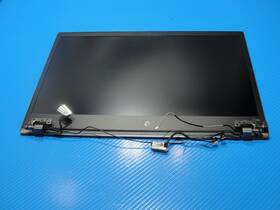
( Brand: Lenovo ), ( Manufacturer Part Number: DC02C00PS00 ), ( Compatible Brand: For Lenovo ), ( Screen Finish: Matte ), ( Type: Screen ), ( Screen Size: 14 In ), ( Maximum Resolution: 1920 X 1080 ), ( Compatible Model: T14s Gen 2 )
Review LENOVO Thinkpad Gen Inch Matte Fhd Lcd Screen Complete Assembly
The **Lenovo ThinkPad T14s Gen 14 (DC02C00PS00)** is a refined, business-grade laptop designed to deliver a seamless blend of performance, portability, and durability, making it an ideal choice for professionals who demand both productivity and reliability in a compact yet powerful form factor. Engineered with Lenovo s signature ThinkPad precision, this model features a **14-inch Full HD (1920 x 1080) IPS LCD display** with a sleek, anti-glare coating, ensuring crisp visuals and comfortable viewing angles for extended work sessions. The display is optimized for clarity and color accuracy, making it suitable for tasks ranging from document editing to light multimedia consumption, all while maintaining a professional aesthetic with its slim bezels and matte finish.
Under the hood, the T14s Gen 14 is powered by a **high-performance Intel Core i7-1360P processor** (or available in i5/i7 configurations), paired with up to **16GB of DDR5 RAM** and **512GB of PCIe NVMe SSD storage**, delivering rapid boot times, smooth multitasking, and efficient data access. The inclusion of **Intel Iris Xe graphics** ensures that productivity tasks, light graphic design, and even some video editing workflows run efficiently without compromising battery life. For connectivity, the laptop offers a versatile array of ports, including **two Thunderbolt 4 (USB-C) ports** with support for up to 40Gbps data transfer, a **USB-A 3.2 Gen 2 port**, an **HDMI 2.0 port**, and a **microSD card reader**, catering to both modern peripherals and legacy devices. Additionally, the inclusion of **Wi-Fi 6E and Bluetooth 5.2** ensures fast, stable wireless connectivity in demanding environments.
Durability is a cornerstone of the ThinkPad philosophy, and the T14s Gen 14 embodies this with its **military-grade MIL-STD-810G certification**, protecting against drops, vibrations, and extreme temperatures. The chassis is constructed from a **durable polycarbonate frame**, while the **carbon-fiber palm rest** and **reinforced keyboard deck** enhance both sturdiness and ergonomic comfort. The **classic ThinkPad TrackPoint** remains a standout feature, offering precise cursor control without the need for a separate mouse, while the **backlit, spill-resistant keyboard** with its familiar red-key layout ensures a comfortable typing experience even in low-light conditions. The laptop s **thin and lightweight design** (weighing approximately **2.8 lbs**) makes it exceptionally portable, ideal for professionals on the move who require a balance between power and mobility.
For those prioritizing security, the T14s Gen 14 includes **Lenovo s Vantage platform**, which provides comprehensive system monitoring, firmware updates, and security features like **TPM 2.0, fingerprint reader (optional), and a privacy shutter for the webcam**. The operating system options include **Windows 11 Pro** (pre-installed) or **Lenovo s ThinkPad Linux** for users seeking a more open-source experience. Whether used in a corporate office, a remote workspace, or during travel, this laptop is engineered to withstand the demands of modern work while providing the reliability and performance expected from a ThinkPad. With its thoughtful design, robust build, and powerful specifications, the T14s Gen 14 stands as a versatile workstation that adapts seamlessly to the needs of today s dynamic professionals.
### **Pros and Cons of the Lenovo ThinkPad T14s Gen 14 (DC02C00PS00) with FHD LCD Screen**
#### **Pros**
1. **Premium Build Quality and Durability**
- The ThinkPad T14s is renowned for its rugged, military-grade construction, featuring a carbon-fiber reinforced chassis, reinforced hinges, and a spill-resistant keyboard. This makes it highly durable for both office and travel use.
2. **Excellent Keyboard and Trackpad**
- The ThinkPad keyboard is one of the best in the business, with tactile keys, precise feedback, and excellent typing comfort. The trackpad is smooth, responsive, and supports multi-touch gestures, including Windows Precision Gestures.
3. **Strong Performance Options**
- The T14s Gen 14 offers a variety of CPU choices, including Intel Core i5, i7, and i9 processors (12th Gen Alder Lake), as well as AMD Ryzen 7 options. This flexibility allows users to choose based on their workload needs, from light office tasks to demanding productivity or light content creation.
- The laptop supports up to 32GB of DDR4 RAM (soldered on some models, upgradeable on others) and offers SSD storage options ranging from 512GB to 1TB (NVMe PCIe Gen 3 or Gen 4, depending on the model).
4. **Long Battery Life**
- The T14s is designed for productivity on the go, with a 56Wh battery that provides **10 14 hours of real-world usage** (varies based on workload). This is competitive with other premium ultrabooks.
5. **Thin and Lightweight Design**
- At **1.35 kg (2.98 lbs)**, the T14s is one of the lighter ThinkPad models, making it easy to carry for extended periods. The 14-inch display keeps it portable without sacrificing screen real estate.
6. **High-Quality FHD Display (1920x1080, 2240x1440 Optional)**
- The standard FHD (Full HD) IPS display offers **good color accuracy (72% NTSC)** and wide viewing angles, suitable for office work, web browsing, and light media consumption. While not as vibrant as OLED or higher-end IPS panels, it is sharp and clear for its price.
- The optional **QHD (2560x1600) display** (if available in your region) provides even better clarity and is worth considering if you prioritize screen quality.
7. **Lenovo s ThinkPad Ecosystem**
- The T14s comes with **ThinkPad s signature features**, such as:- **TrackPoint** (optional, for precision navigation).
- **ThinkVantage** utilities (e.g., **ThinkPad Security Chip** for hardware-based encryption, **ThinkPad Power Manager** for battery optimization).
- **Docking support** (via optional ThinkPad Dock Gen 2 or MST docks).
- Strong **customer support and warranty** (Lenovo s global service network is reliable).
8. **Good Port Selection**
- The T14s includes:- **2x USB-C/Thunderbolt 4** (supports charging, DisplayPort, and data transfer).
- **1x USB-A** (for legacy peripherals).
- **1x HDMI 2.0** (for external monitors).
- **1x headphone/microphone combo jack**.
- **1x microSD card reader** (useful for media professionals).
- Thunderbolt 4 ensures **fast data transfer (up to 40Gbps)** and **dual 4K monitor support**.
9. **Business-Grade Security Features**
- **TPM 2.0 chip** for hardware-based encryption.
- **Fingerprint reader** (on some models) for secure login.
- **Secure Boot and BIOS protection** against malware.
- **Lenovo Vantage** for remote management (useful for IT admins).
10. **Upgradeability (On Some Models)**
- Unlike many ultrabooks, the T14s allows **RAM and storage upgrades** (though some models have soldered RAM). This makes it more future-proof than sealed ultrabooks.
---
#### **Cons**
1. **Average Display Quality for the Price**
- The **standard FHD IPS panel** is bright (300 nits) but lacks the **vibrant colors and deep blacks** of an OLED or higher-end IPS display. If you work with graphics, video editing, or design, you may find it limiting.
- **No touchscreen option** (unlike some competitors like Dell XPS or Surface).
- **No Dolby Vision or HDR** (common in premium gaming or entertainment laptops).
2. **Limited GPU Options**
- The T14s does **not** come with a dedicated GPU. The **Intel Iris Xe graphics** (integrated) are sufficient for **light photo editing, basic 3D modeling, or office tasks**, but they **cannot handle gaming or heavy video rendering**.
- If you need a **dedicated GPU**, you ll need to look at the **ThinkPad P-series** (e.g., T16 or T16s).
3. **No USB-A on Some Models (Region-Dependent)**
- Some global variants (especially newer ones) **remove the USB-A port** in favor of more USB-C/Thunderbolt ports. If you rely on USB-A peripherals (e.g., older mice, flash drives), this could be inconvenient.
4. **Fan Noise Under Heavy Load**
- While the T14s is quiet during light use, **CPU-intensive tasks (compiling code, video encoding, multitasking with heavy apps) can cause noticeable fan noise**. This is typical for ThinkPads but may be annoying for some users.
5. **Battery Life Not Exceptional Under Heavy Use**
- While the battery lasts **10 14 hours on light tasks**, **heavy workloads (video editing, multitasking with Chrome) can reduce this to 4 6 hours**. This is par for the course for a productivity laptop, but not as impressive as some MacBooks or premium ultrabooks.
6. **No Backlit Keyboard (On Some Models)**
- The **standard keyboard is not backlit**, which can be an issue if you work in low-light conditions. Some models (like the **T14s Gen 14 with backlit keyboard**) offer this feature, but it may not be available in all configurations.
7. **Price Can Be High for Entry-Level Configurations**
- The **base model (i5, 8GB RAM, 512GB SSD) starts around $1,000 $1,200**, which is **competitive but not the cheapest** compared to Chromebooks or budget Windows laptops.
- **Upgrading to i7/i9 or adding more RAM/SSD can push the price above $1,500**, making it less attractive for casual users.
8. **No HDMI Port on Some Models (Thunderbolt-Only)**
- Some newer variants **replace HDMI with additional USB-C/Thunderbolt ports**, which may require an adapter for older monitors or devices.
9. **Limited Color Options**
- The T14s is available in **Black, Silver, and a few other colors**, but the selection is **not as diverse** as some gaming or consumer laptops.
10. **ThinkPad s Ecosystem Can Be Overkill for Casual Users**
- Features like **TrackPoint, ThinkVantage utilities, and fingerprint readers** are **great for business users** but may feel **unnecessary or confusing** for home users who just want a simple laptop.
---
### **Conclusion**
The **Lenovo ThinkPad T14s Gen 14 (DC02C00PS00) with FHD LCD** is an **excellent choice for professionals, students, and power users** who prioritize **durability, keyboard quality, security, and long-term reliability**. It excels in **productivity, business use, and portability**, making it one of the best **workstation-class ultrabooks** available.
However, it is **not ideal** for:- **Gamers or content creators needing dedicated GPUs**.
- **Users who require high-end display quality (OLED, HDR, touchscreen)**.
- **Casual users who want a budget-friendly, simple laptop**.
- **Those who need multiple USB-A ports or HDMI without adapters**.
If you **value build quality, keyboard comfort, security, and battery life** over cutting-edge display tech or gaming performance, the **T14s is a fantastic investment**. For **gaming, heavy video editing, or ultra-portable use**, you may want to consider alternatives like the **Dell XPS 15, MacBook Pro, or HP Spectre**.
---
### **Final Recommendation**
**Buy the Lenovo ThinkPad T14s Gen 14 if:**You need a **durable, business-grade laptop** for work, travel, or heavy productivity.
You **prioritize the ThinkPad keyboard and trackpad** over other features.
You want **long battery life, security features, and upgradeability**.
Details:
Make the best deals with us. Screen has been gently removed from a working Lenovo ThinkPad T14s Gen laptop and is in GOOD cosmetic condition, keyboard marks on the screen, back cover shows minor scratches. Actual Item Pictured.
part #: dc02c00ps00 prices
- $39.98-$58.97
specifications laptoscreelc:
- brand: Lenovo
- mpn: Dc02c00ps00
- compatible brand: For Lenovo
- screen finish: Matte
- type: Screen
- screen size: 14 In
- maximum resolution: 1920 X 1080
- compatible model: T14s Gen 2
payments laptoscreelc:
- credit card: Discover
- other
- wallet: Paypal
shipping laptoscreelc:
- transit: 4-7 Days
- carrier: UPS, FedEx
- cost: $15.00
- service: UPS Ground, FedEx 2Day
- type: Fixed
- class: Standard, Expedited
general laptoscreelc:
- condition: Used
- Computer Components Parts > Laptop Replacement Parts > Laptop Screens LCD Panels
returns laptoscreelc:
- time: 30 Days
- method: Money back
- paid by: Buyer
- policy: Returns Accepted
seller laptoscreelc:
- rating: 99.7%
- city: Reno, Nevada
- # reviews: 28314
offer laptoscreelc:
- quantity: 1
- started: May 7, 2026
- sold: 0
- options: Ship-to-home
- availability: In Stock
Lenovo DC02C00PS00 Is Similar To:
- 00hm076 Lenovo Lcd Touch (22% similar) 00HM076 - Lenovo 14. Shipping orders are normally processed promptly within hours. However, under certain circumstances, there may be some delay. Need it fast. For details. Picture is for reference only. Product has been tested and pulled from working systems. Free shipping is for lower 48 ...(March 1st, 2019)
- 00hm082 N156hge-ea2 C1 Lenovo Thinkpad (24.4% similar) 1LCD brand: lg model number: lcd resolution: hd 1366 x 768LCD inverter included: no lcd finish: matte touchscreen: NO3D capable: NO30 day money back guarantee warranty: all parts are tested and guaranteed to be working as described. Notice: pictures shown are simply for reference. In every way, ...(August 22nd, 2017)
- 00hm806 Lenovo Lcd Display Thinkpad Tablet Helix (40.6% similar) I ordered for cracked lcd replacement but don't need it BC just a new laptop happy buying...(October 18th, 2018)
- 00hm809 Lenovo Thinkpad S1 Yoga (32.8% similar) Actual product shown in photos. This screen is in very good condition and fully operational. 5 lcd touch screen with digitize. The screen itself is perfect. Lenovo thinkpad s1 yoga 12. 5 lcd touch screen with digitize: in this listing is a Lenovo thinkpad s1 yoga 12. There are a few scratches scuffs...(July 4th, 2017)
- 00hm912 Lenovo New Genuine Thinkpad Yoga (28.8% similar) New genuine Lenovo thinkpad yoga s1 lcd touch screen panel 00HM912 specification: resolution 1920X1080CONNECTOR 40 pings outscoring finish glossy back light note this support stylus pen...(February 15th, 2017)
- 00hm966 Lenovo Thinkpad X1 Carbon 14 (36.4% similar) New genuine Lenovo thinkpad x1 carbon 14 lcd led touch screen digitize assembly 00HM966...(February 22nd, 2017)
- 00hn541 Lenovo Thinkpad Lcd Screen Front Bezel (48.9% similar) The customer is urged to certify that parts ordered are correct one needed...(October 16th, 2018)
- 00hn684 Lenovo Thinkpad Edp Lcd Cable For Touch Models Fru (35% similar) Lenovo thinkpad 00HN684 cable EDP for touch new genuine T450S 2 lcd model's Frau: compatible: touch pad condition: brand...(June 10th, 2018)
- 00hn747 Lenovo Thinkpad Touch Screen Fhd Ips New (45.1% similar) New open box. Item is brand new. Ordered the wrong part, didn realize till I opened box...(March 18th, 2019)
- 00hn825 Lg New Lenovo Thinkpad Led Lcd Screen Fhd Ips Ag (46.8% similar) Same-day shipping:same day shipping is available by special request only, on a case-by-case basis. Includes original bag, film cover is still in place. If for any reason an order is shipped to such address, the will have warranty voided - no of type be honored. Customer provided postage us. Its made...(April 16th, 2019)
- 00hn827 Lenovo Lcd Panel 14 (25% similar) However under certain circumstances there may be some delay and we request your patience. Lcd panel 14 HD x multi-touch glossy Bacall: Lenovo 00HN827...(June 21st, 2017)
