ACER EAZAM00201A Chromebook Touch Display Lcd CP311-1HN 6M.GV4N7.002
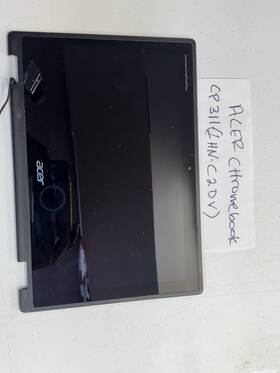
( Brand: Acer ), ( Manufacturer Part Number: EAZAM00201A ), ( Display Technology: Ccfl Lcd ), ( Screen Resolution: 1366 X 768 ), ( Type: Display ), ( Connector Location: Bottom Right ), ( Screen Size: 11.6 ), ( Pin Count: 40 Pin )
Review ACER Chromebook Series Touch Display Assembly Lcd
The **Acer Chromebook Spin 311 (Model CP311-1HN, SKU Eazam00201A)** is a versatile and compact 2-in-1 laptop designed to deliver a seamless blend of productivity and entertainment in a lightweight, portable form factor. Engineered with a sleek **11.6-inch Full HD (1920 x 1080) IPS touchscreen display**, this Chromebook ensures vibrant colors, wide viewing angles, and crisp visuals for everything from streaming movies to editing documents or collaborating on creative projects. The **multi-touch gesture support** enhances navigation, allowing users to pinch, swipe, and rotate content effortlessly, while the **180-degree hinge** transforms the device into a tablet-like experience for on-the-go use or hands-free viewing. Built with a **durable yet slim aluminum chassis**, the Chromebook balances robustness with portability, weighing just **2.65 lbs (1.2 kg)**, making it an ideal companion for students, professionals on the move, or travelers who prioritize convenience without sacrificing performance.
Powered by an **Intel Celeron N4020 dual-core processor** clocked at up to **2.8 GHz**, this Chromebook delivers efficient performance for everyday tasks, including web browsing, document editing, email management, and light multimedia consumption. Paired with **4GB of LPDDR4X RAM**, it handles multitasking smoothly, ensuring that switching between apps whether Google Docs, Chrome tabs, or streaming services remains fluid and responsive. Storage is managed by a **64GB eMMC flash memory**, providing ample space for essential files, apps, and offline content, though users with heavier storage needs may opt for an optional microSD card slot (sold separately) for expandability. The **Wi-Fi 5 (802.11ac) and Bluetooth 4.2** connectivity options ensure reliable wireless performance, while the **HDMI port, USB-C (with DisplayPort alt mode), and a single USB-A port** offer versatile connectivity for external monitors, peripherals, or data transfers.
Acer has equipped the Chromebook Spin 311 with a **10-hour battery life** (as per Acer s estimates), allowing users to work or entertain themselves throughout a typical workday or a long commute without frequent recharging. The **backlit keyboard** features a comfortable, well-spaced layout with **1.4mm key travel**, providing a satisfying typing experience, while the **fingerprint reader** adds an extra layer of security for quick and convenient login. Running on **Chrome OS**, the device leverages cloud-based applications and Google s ecosystem, offering seamless integration with Google Drive, Gmail, and other productivity tools. The operating system also benefits from automatic updates, ensuring the device remains secure and up-to-date with the latest features and security patches.
Designed with both functionality and aesthetics in mind, the **Acer Chromebook Spin 311** features a **silver or black color option**, giving it a polished, professional appearance that suits various personal or professional settings. The **dual speakers** deliver clear audio for calls, videos, or music, while the **microphone** ensures crisp voice capture for virtual meetings or voice recordings. With its **low power consumption** and **energy-efficient components**, this Chromebook is not only a practical tool for productivity but also an eco-conscious choice for those looking to minimize their environmental impact. Whether used for schoolwork, remote work, creative projects, or casual entertainment, the Acer Chromebook Spin 311 (CP311-1HN) stands out as a reliable, all-in-one solution that combines affordability with modern functionality in a compact, portable package.
### **Pros and Cons of the Acer Chromebook Spin 311 (CP311-1HN) with Touch Display**
#### **Pros:**1. **Affordable Price** This Chromebook offers solid performance at a budget-friendly price, making it a cost-effective choice for basic computing needs.
2. **Lightweight and Portable** Weighing around **2.65 lbs (1.2 kg)**, it is easy to carry, ideal for students, travelers, or those who need a device for on-the-go use.
3. **Touchscreen Display** The **11.6-inch HD (1366x768) touchscreen** enhances usability for note-taking, drawing, and interactive applications, though the resolution is not high-end.
4. **Long Battery Life** Chromebooks are known for their efficiency, and this model typically lasts **8-10 hours** on a single charge, which is decent for a budget device.
5. **Chrome OS Flexibility** Runs smoothly on Chrome OS, which is lightweight, secure, and optimized for web-based tasks. It also supports **Android apps** and **Linux (via Crostini)**, expanding functionality beyond basic browsing.
6. **Decent Performance for Basic Tasks** The **MediaTek Helio P60 (Octa-core, up to 2.0 GHz)** processor handles everyday tasks like web browsing, document editing (Google Docs), streaming, and light multitasking efficiently.
7. **Full HD Webcam (720p)** The built-in camera is adequate for video calls, though not high-quality for professional use.
8. **USB-C Port (with USB 3.1)** While it lacks a traditional HDMI or USB-A port, the **USB-C (with alt-mode for HDMI)** allows for flexible connectivity, though you may need adapters for older devices.
9. **Durable Build** The **aluminum frame** gives it a sturdy feel, and it includes **spill-resistant keyboard** protection, which is useful for accidental spills.
10. **Good for Education & Productivity** Ideal for students, remote workers, or anyone needing a no-frills device for school, work, or entertainment.
---
#### **Cons:**1. **Weak Processor for Demanding Tasks** The **MediaTek Helio P60** is not powerful enough for **heavy multitasking, gaming, or resource-intensive applications** (e.g., video editing, 3D rendering). It struggles with modern apps that require more processing power.
2. **Low-Resolution Display (HD, 1366x768)** The **11.6-inch screen** is small and lacks sharpness, making it less ideal for extended use compared to higher-resolution displays. Colors and text may appear slightly washed out.
3. **Limited Ports** Only **one USB-C port (with alt-mode for HDMI)** and **no USB-A, HDMI, or SD card slot**, which can be inconvenient for connecting older peripherals or external storage.
4. **No Backlit Keyboard (on some models)** While this specific model (CP311-1HN) likely has a backlit keyboard, some budget Chromebooks lack this feature, making nighttime typing difficult.
5. **Storage is Fixed (64GB eMMC)** Unlike SSDs, **eMMC storage is slower and cannot be upgraded**. While 64GB is enough for Chrome OS and basic files, it fills up quickly with apps, photos, and documents.
6. **No Dedicated GPU** Lacks a **discrete graphics card**, so it cannot run **graphics-heavy apps or games** (e.g., Chrome OS games, VR, or even some Android apps that require GPU acceleration).
7. **Fanless Design (Potential for Overheating)** Being fanless, it may **throttle performance under heavy load** to prevent overheating, which can be frustrating during demanding tasks.
8. **Limited Offline Functionality** Chrome OS relies heavily on **online access**, and offline performance is restricted to installed apps and cached data.
9. **No Thunderbolt or High-Speed Data Ports** The single USB-C port is **USB 3.1 Gen 1 (5 Gbps)**, which is slower than Thunderbolt 3/4 for high-speed data transfer.
10. **Build Quality Variability** Some users report **plastic components in certain areas**, reducing the premium feel despite the aluminum frame.
---
### **Conclusion:**The **Acer Chromebook Spin 311 (CP311-1HN)** is a **solid budget-friendly Chromebook** that excels in **portability, battery life, and simplicity** for basic computing needs. It is well-suited for:
- **Students** (schoolwork, Google Workspace, note-taking)
- **Remote workers** (light document editing, video calls, web browsing)
- **Casual users** (streaming, social media, Android apps)
- **Travelers** (compact and lightweight)
However, it **struggles with demanding tasks** (gaming, video editing, heavy multitasking) due to its **weak processor, lack of a dedicated GPU, and limited storage**. The **low-resolution display** and **single USB-C port** may also be limiting for users who need higher performance or multiple peripherals.
If you **prioritize affordability, portability, and Chrome OS efficiency** over high-end performance, this Chromebook is a **good purchase**. If you need **more power, better display quality, or expandability**, consider upgrading to a **higher-end Chromebook, Windows laptop, or a MacBook**.
---
### **Recommendation:** **Buy this Chromebook if:**- You need a **budget-friendly, lightweight device** for **school, work, or basic tasks**.
- You primarily use **Chrome OS, Android apps, and web-based tools**.
- You don t require **high-performance gaming, video editing, or heavy multitasking**.
- You prefer **long battery life and simplicity** over advanced features.
**Avoid this Chromebook if:**- You need **a powerful machine for programming, 3D rendering, or gaming**.
- You require **a high-resolution display (Full HD or better)** for extended use.
- You frequently connect **multiple peripherals (USB-A, HDMI, SD card reader)**.
- You want **upgradable storage or a dedicated GPU**.
- You plan to use **Windows or macOS apps** (this is strictly a Chrome OS device).
#### **Alternatives to Consider:**- **For better performance:** *Acer Chromebook Spin 713 (Intel Core i5, 10th Gen, 4K touchscreen)*
- **For gaming/heavy tasks:** *Lenovo IdeaPad Flex 5 (Windows 11, AMD Ryzen 5)*
- **For premium build & display:** *HP Chromebook x360 14c (OLED, Intel Core i3)*
- **For maximum portability:** *Asus Chromebook Flip C434 (14-inch, Intel Core m3)*
If your needs align with **basic productivity and affordability**, the **Acer CP311-1HN** is a **reliable choice**. Otherwise, investing in a slightly higher-end model may be worth it for long-term usability.
Details:
Condition is Used. Shipped with USPS Ground Advantage. Acer Chromebook CP311-1HN Series Touch Display Assembly LCD 6M.GV4N7.002.
part #: eazam00201a prices
- $18.00-$22.00
specifications laptoscreelc:
- brand: Acer
- mpn: Eazam00201a
- display technology: Ccfl Lcd
- screen resolution: 1366 X 768
- type: Display
- connector location: Bottom Right
- screen size: 11.6
- pin count: 40 Pin
shipping laptoscreelc:
- cost: $8.72
- service: USPS Ground Advantage
- transit: 4-11 Days
- type: Calculated
- carrier: USPS
- class: Standard
payments laptoscreelc:
- wallet: Google-pay
- credit card: Visa
- other
seller laptoscreelc:
- rating: 100.0%
- # reviews: 117
- city: Peekskill, New York
general laptoscreelc:
- Computer Components Parts > Laptop Replacement Parts > Laptop Screens LCD Panels
- condition: Used
returns laptoscreelc:
- policy: No Returns
offer laptoscreelc:
- availability: In Stock
- options: Ship-to-home
- sold: 0
- started: March 31, 2026
- quantity: 1
Acer EAZAM00201A Is Similar To:
- A068179n602e Generic Acer Aspire One Replacement Laptop Lcd Screen 654367757406 (24.4% similar) 1 Sega led diode substitute only. Acer aspire one D250-1116 replacement laptop lcd screen 10. 55 pounds size:' requires technical installation item DIMENSIONS:1X0. 1 inches laptop lcd screen resolution: Sega x 600 type: led diode connector: 40 pins bottom left may contain 3 to 5 dead pixels: please ...(February 4th, 2019)
- A941813i125b Generic Acer Aspire Laptop Lcd Screen Replacement Wxga 610395665861 (18.2% similar) 6 replacement laptop screen with led back light and bottom left connection. Product features 15...(January 26th, 2019)
- A941821h125j Generic Acer Aspire Laptop Lcd Screen Replacement Wxga 610395665397 (18.2% similar) Product features 15. 6 replacement laptop screened back light technology bottom left connection 15. 6 replacement laptop screen with led back light and bottom left connection. 25 pounds size: ' requires technical installation item DIMENSIONS:1X0...(January 26th, 2019)
- A985551y674n Generic Acer Series Chromebook Laptop Led Lcd Screen 634972682317 (34.4% similar) 93 pounds size:technical installation required ITEMDIMENSIONS:1X0. lcd screen size: x 6 inches anarchistic: laptop lcd screen resolution: GSX HD x 768 type: led diode connector: 40 pins bottom right may contain 3 to 5 dead pixels please match your original screens back light type, size, and ...(May 8th, 2018)
- Led-1024-600-g-40-10.1-23 Acer Aspire One Laptop Lcd Screen Replacement Wsvga 617401140947 (19.4% similar) You cannot deviate from your current screen specifications. 35 pounds size:n item DIMENSIONS:1. 5X8X12 anarchistic: 47. Product features screen size: 10. Acer aspire one D257 laptop lcd screen replacement 10. Purchasing a screen with different specifications will not work your system...(June 17th, 2018)
- Led-1024-600-g-40-10.1-3063 Acer Aspire One Replacement Laptop Lcd Led Display Screen (27.1% similar) Not entire computer. Is just screen assembly...(April 26th, 2018)
- Led-1366-768-g-40-15.6-213 Acer Laptop Led Lcd With Glossy Finish And 617401137718 (22.8% similar) 6 item DIMENSIONS:1. You cannot deviate from your current screen specifications. 6 pounds size:'screen size: 15...(December 25th, 2018)
- Led-1366-768-g-40-15.6-82 Acer Aspire Laptop Lcd Screen Replacement Wxga Hd 610395665922 (18.5% similar) 5 anarchistic: 22. 6 item DIMENSIONS:1. 6 each laptop maybe use more than one type screen. Please match your laptop model and original screens back light type, size, data cable pin, resolution before you purchase this item, because even same model's come with more than one type of screens. 3 pounds ...(March 30th, 2018)
- Led-1366-768-g-40-15.6-n3005 Acer Aspire New Replacement Lcd Screen For Laptop 634304542029 (23.9% similar) 37 pounds size:'technical installation required item DIMENSIONS:1. You can deviate from your current screen specifications. Product features screen size: 15. Purchasing a screen with different specifications will work your system...(November 30th, 2018)
- Led-1600-900-g-40-17.3-61 Acer Aspire Hd Led Glossy Lcd Screen Display 616983123713 (23.8% similar) 45 pounds size: ' requires technical installation item DIMENSIONS:1. You cannot deviate from your current screen specifications. Product features screen size: 17...(January 31st, 2019)
- 120mhz Lcd Acer Fhd Ips Laptop Screen Fit (16% similar) ...(October 18th, 2018)
