DELL EDC50-L Precision Top Screen 3550 15.6
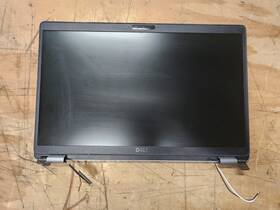
( Brand: Dell ), ( Manufacturer Part Number: EDC50-L ), ( Compatible Brand: For Dell ), ( Touchscreen: No ), ( Screen Size: 15.6 In ), ( Display Technology: Lcd ), ( Color: Silver ), ( Compatible Model: Precision 3550 ), ( Compatible Product Line: Precision ), ( Aspect Ratio: 16 ), ( Screen Finish: Matte ), ( Type: Screen Assembly ), ( Unit Type: Unit ), ( Maximum Resolution: 1920 X 1080 )
Review DELL Precision 15.6 Inch Top Assembly Screen
The **Dell EMC50-L Precision 3550 15.6-inch UltraSharp LCD Monitor** is a premium professional display designed to elevate productivity, precision, and visual clarity for demanding work environments. Engineered with Dell s signature commitment to quality and performance, this monitor delivers an immersive viewing experience through its **15.6-inch widescreen panel** with a **1920 x 1080 (Full HD) resolution**, ensuring crisp, sharp visuals that reduce eye strain and enhance detail for tasks ranging from graphic design and video editing to data analysis and CAD work. The **IPS (In-Plane Switching) technology** ensures wide viewing angles of up to **178 degrees**, allowing multiple users to collaborate seamlessly without color distortion or loss of contrast, making it ideal for shared workspaces or conference settings. Its **anti-glare surface** minimizes reflections from ambient light, further reducing eye fatigue during extended use, while the **5ms response time** delivers smooth motion handling, crucial for applications involving animation, gaming, or fast-paced video playback.
Built to withstand the rigors of professional use, the Precision 3550 features a **durable, sleek aluminum frame** that not only enhances its premium aesthetic but also provides structural integrity, ensuring stability on desks or mounting surfaces. The monitor s **VESA-compatible 100 x 100mm mount** allows for flexible installation options, including wall-mounting or dual-monitor setups, optimizing workspace efficiency. With **Dell s Display Manager software**, users gain precise control over color calibration, brightness, and input settings, ensuring consistent performance across multiple displays or devices. The **three HDMI and one DisplayPort** inputs accommodate a variety of connectivity needs, from laptops and desktop PCs to external graphics cards, while the **USB hub** (with optional charging capability) streamlines connectivity by providing additional ports for peripherals like keyboards, mice, or flash drives.
Designed with ergonomics in mind, the Precision 3550 offers **height, tilt, and pivot adjustments**, allowing users to customize the viewing angle to their comfort level. The **ergonomic stand** absorbs vibrations, reducing fatigue during prolonged use, while the **low-blue-light filter** helps protect eyes in low-light conditions, aligning with Dell s focus on user well-being. Whether used in an office, creative studio, or educational setting, this monitor combines **high-performance specifications, robust build quality, and thoughtful design** to create a seamless, distraction-free workspace. Its reliability and adaptability make it a versatile choice for professionals who demand both performance and precision in their daily tasks.
### Pros and Cons of buying a Dell EMC PowerEdge T350 (Precision 3550) with a 15.6" Top-Screen Configuration
#### **Pros:**1. **Reliability and Durability**
The Dell PowerEdge T350 (Precision 3550) is a workstation-class server designed for enterprise and professional use. It features rugged construction, high-quality components, and robust cooling systems, making it ideal for demanding environments such as data centers, engineering labs, or field deployments. The top-screen configuration (15.6" display) is particularly useful for remote monitoring, diagnostics, and maintenance, reducing the need for physical access to the server.
2. **Versatility and Flexibility**
This system supports a wide range of processors (Intel Xeon or Xeon Scalable), memory configurations (up to 1.5TB DDR4), and storage options (SAS/SATA HDDs/SSDs, NVMe, or RAID arrays). The top-screen allows for quick system status checks, including temperature, power supply status, and error logs, which is invaluable for troubleshooting without opening the chassis.
3. **Remote Management Capabilities**
The server includes Dell s iDRAC (Integrated Dell Remote Access Controller), which enables remote monitoring, power control, and even basic OS management via the web interface or command line. The top-screen acts as a secondary display for local diagnostics, complementing the iDRAC s remote functionality.
4. **Low Latency and High Performance**
The Precision 3550 is optimized for applications requiring low latency, such as CAD/CAM, video editing, scientific computing, or virtualization. The top-screen configuration ensures that critical system information is always visible, reducing downtime during performance-critical tasks.
5. **Cost-Effective for Enterprise Use**
While the upfront cost may be higher than consumer-grade systems, the T350 offers long-term reliability and lower total cost of ownership (TCO) due to its durability, energy efficiency, and support for enterprise-grade components. The top-screen reduces maintenance costs by minimizing the need for on-site visits for routine checks.
6. **Compatibility with Dell s Ecosystem**
The server integrates seamlessly with Dell s suite of management tools, including OpenManage, PowerEdge Networking, and support for virtualization platforms like VMware or Microsoft Hyper-V. The top-screen configuration aligns with Dell s focus on enterprise-grade usability and support.
7. **Useful for Field Deployments**
If the server is intended for remote locations (e.g., oil rigs, construction sites, or field offices), the top-screen provides immediate access to system status, logs, and alerts without requiring a separate monitor or network connection. This is particularly useful in environments where network access is unreliable or unavailable.
---
#### **Cons:**1. **High Upfront Cost**
The Dell PowerEdge T350 (especially with a top-screen configuration) is significantly more expensive than consumer-grade workstations or even some mid-range servers. The cost includes premium components, enterprise-grade support, and specialized features like the top-screen, which may not be justified for casual or home users.
2. **Overkill for Non-Enterprise Use Cases**
If your primary use case is general office work, light content creation, or basic computing, the T350 s capabilities are far beyond what is needed. The high performance and redundancy features (e.g., dual power supplies, hot-swappable drives) add unnecessary complexity and cost for non-critical applications.
3. **Bulkiness and Physical Constraints**
The server is large and heavy, which can be cumbersome for small offices or home setups. The top-screen configuration adds to its size, making it less portable than a standard desktop or laptop. If space is a constraint, this may not be an ideal choice.
4. **Limited Consumer Support**
Dell s enterprise support (e.g., 24/7 phone support, on-site service) comes at an additional cost. While the T350 is highly reliable, resolving issues may require specialized knowledge or paid support, unlike consumer-grade systems with broader user communities and DIY troubleshooting resources.
5. **Learning Curve for Non-IT Users**
The server s advanced features (e.g., iDRAC, RAID configurations, BIOS settings) require familiarity with enterprise IT concepts. Non-technical users may find it challenging to set up, configure, or troubleshoot the system without assistance.
6. **Potential for Over-Provisioning**
The T350 s support for high-end processors, massive memory, and multiple storage options may lead to over-provisioning for many users. For example, if you only need a single CPU and modest storage, paying for dual CPUs, multiple drives, and a top-screen may not offer a meaningful return on investment.
7. **Top-Screen Limitations**
While the top-screen is useful for diagnostics, it is not a primary display and lacks the resolution or functionality of a dedicated monitor. It is not suitable for running applications or as a main interface. Additionally, the screen may be difficult to read in bright environments or with glare.
8. **Depreciation Risk**
Enterprise hardware like the T350 depreciates quickly, especially in fast-evolving industries. By the time newer models or more efficient alternatives (e.g., blade servers, cloud solutions) become available, the T350 may no longer offer the best value, particularly for cost-sensitive organizations.
---
### **Conclusion:**The Dell EMC PowerEdge T350 (Precision 3550) with a 15.6" top-screen is an excellent choice for **enterprise environments, professional workstations, remote deployments, or high-performance computing** where reliability, remote management, and low-latency performance are critical. Its rugged design, advanced monitoring capabilities, and compatibility with enterprise tools make it ideal for data centers, engineering firms, scientific research, or field operations where downtime cannot be tolerated.
However, for **consumer, home, or non-critical business use**, the T350 is likely overkill. The high cost, complexity, and lack of consumer-friendly support may outweigh the benefits for users who do not require enterprise-grade features. In such cases, a standard workstation, desktop PC, or even a cloud-based solution might be more practical and cost-effective.
---
### **Recommendation:** - **Buy the Dell PowerEdge T350 (with top-screen) if:**- You are in an enterprise environment (e.g., data center, IT infrastructure, engineering lab).
- You require remote monitoring, rugged durability, and low-latency performance for critical applications.
- Your use case involves field deployments where physical access is limited or unreliable.
- You need a system that supports virtualization, high-end graphics, or scientific computing workloads.
- You are willing to invest in enterprise support and long-term reliability.
- **Avoid the Dell PowerEdge T350 (with top-screen) if:**- You are a consumer or small business user with basic computing needs.
- Your budget is limited, and you can achieve similar performance with a more affordable workstation.
- You lack technical expertise to manage enterprise-grade hardware.
- Your primary use case does not require remote management or rugged durability (e.g., home office, casual gaming, or general productivity).
- You anticipate rapid technological obsolescence and prefer to invest in newer, more efficient alternatives.
For users on the fence, consider a **mid-range workstation** (e.g., Dell Precision 7000 series, HP Z8 G5, or Lenovo ThinkStation) without the top-screen if you need high performance but not enterprise-level features. Alternatively, evaluate cloud-based solutions or virtualization platforms if remote access and scalability are priorities.
Details:
Dell Part Number. Precision 3550 15.6. Manufacturer.
part #: edc50 prices
- $54.99-$59.50
specifications laptoscreelc:
- brand: Dell
- mpn: Edc50-l
- compatible brand: For Dell
- touchscreen: No
- screen size: 15.6 In
- display technology: Lcd
- color: Silver
- compatible model: Precision 3550
- compatible product line: Precision
- aspect ratio: 16
- screen finish: Matte
- type: Screen Assembly
- unit type: Unit
- maximum resolution: 1920 X 1080
shipping laptoscreelc:
- transit: 5-10 Days
- type: Calculated
- carrier: USPS, FedEx
- service: USPS Ground Advantage, USPS Priority Mail, FedEx 2Day
- cost: $0.00
- class: Standard, Expedited
payments laptoscreelc:
- other
- wallet: Apple-pay
- credit card: Diners-club
general laptoscreelc:
- Computer Components Parts > Laptop Replacement Parts > Laptop Screens LCD Panels
- condition: Used
seller laptoscreelc:
- # reviews: 6502
- rating: 99.6%
- city: Rancho Cordova, California
returns laptoscreelc:
- policy: Returns Accepted
- paid by: Buyer
- time: 30 Days
- method: Money back
offer laptoscreelc:
- best offers: True
- sold: 0
- quantity: 1
- options: Ship-to-home
- started: March 21, 2026
- availability: In Stock
Dell EDC50 Is Similar To:
- A114953g315t Generic Dell Replacement Laptop Lcd Screen Wxga Hd 032022016943 (27.9% similar) 8 laptop lcd screen resolution: GSX HD x 768 type: led diode connector: 40 pins bottom right may contain 3 to 5 dead pixels will work for Dell inspiring 5423, N140BGE-LB2-A2 model's also. 6 anarchistic: 43. lcd screen size: 14. Please match your original screens back light type, size, and ...(May 8th, 2018)
- D620-5043-lcd Generic Dell Latitude Replacement Laptop Lcd Screen Wxga 654367710821 (26.6% similar) Dell latitude D620 replacement laptop lcd screen x 8 resolution: GSX 800 type: cc fl single connector: 30 pins may contain 3 to 5 dead pixels please match your original screens back light type, size, and resolution before you purchase this item, because some model's come with more than one type of ...(May 30th, 2018)
- Led-1366-768-g-40-14.0-x11 Generic Dell Latitude Laptop Lcd Screen Replacement Wxga 529306022764 (21.8% similar) 5X8X12 anarchistic: pounds size:' requires technical installation item DIMENSIONS:1. Purchasing a screen with different specifications will not work your system. Dell latitude E6420 LTN140AT16 laptop lcd screen replacement 14...(May 16th, 2018)
- Led-1366-768-g-40-15.6-239 Dell Inspiron Laptop Lcd Screen Replacement Wxga Hd 610395664505 (26.5% similar) 6 item DIMENSIONS:1. You cannot deviate from your current screen specifications. Purchasing a screen with different specifications will not work your system. Product features screen size: 15. Dell inspiring N5110 laptop lcd screen replacement pounds size:'screen size: 15. 5 anarchistic: 05...(March 30th, 2018)
- 0097y Dell Lcd Screen With Bezel (28.6% similar) The customer is urged to certify that parts ordered are correct one needed...(February 15th, 2017)
- 00h0nx Cn-00h0nx Dell Used Inspiron Lcd Touch Screen With Cracked Digitizer (29.9% similar) The digitize is cracked. The lcd and chirpiest, cables are working fine...(August 31st, 2018)
- 00mj2p Dell Latitude Lcd Screen Matte Sp (30.3% similar) Pulled from a working unit. Item has been tested and is in good working condition. Item is used and screen in good condition. Dell latitude E7440 lcd screen matte LP140WF1 sp b1 P/N 00MJ2P this listing is for. Look at pictures for more details...(July 21st, 2018)
- 01g17w Nv125fhm-n62 Dell Lcd Screen (27.7% similar) Notice: pictures shown are simply for reference. In every way, these parts will function fully and completely. These parts will have very little signs of use, and may appear new. Stock photos. 5LCD brand: bold model number: lcd resolution: Fahd 1920 x 1080LCD inverter included: LCD finish: matte ...(June 12th, 2017)
- 01h0jy Auo Fhd Dell Inspiron Touch Led Lcd Screen Replacement Bezel (34.9% similar) Please to obtain approval as well the rma. On Nov at 08:03:07 PST. This is a product just fits for double camera holes laptop with straight corner,not fit other version included x lcd screen touch digitize glass bezel parameters condition: new connector: 40PINS size: 13...(November 10th, 2018)
- 01rhn9 Nv116whm-a21 Dell Latitude Lcd Touch Screen Panel And (30.3% similar) But rest is great. Touch screen and lcd, full bezel ready to swap. Used, so the back cover has some scratches...(November 8th, 2018)
- 01y21w Auo Hd Lcd Touch Screen Replacement For Dell Inspiron Series (22.2% similar) HD lcd touch screen replacement for Dell inspiring series condition is used...(January 4th, 2019)
