LENOVO EE-PB133S-NA560 Thinkpad Yoga Chromebook Touch Board C13 Control Cable DD0LF7LC111
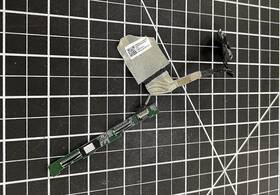
( Brand: Lenovo ), ( Manufacturer Part Number: EE-PB133S-NA560 ), ( Compatible Brand: For Lenovo ), ( Type: Control Board )
Review LENOVO Thinkpad C13 Yoga Chromebook Touch Control Board Cable
The **Lenovo ThinkPad C13 Yoga Chromebook (Model EE-PB133S-NA560) Touch Control Board Cable (Part Number DD0LF7LC111)** is a precision-engineered component designed exclusively for the durable and versatile ThinkPad C13 Yoga Chromebook, ensuring seamless integration between the device s touchscreen and its underlying hardware. This cable serves as the critical link between the touch-sensitive display and the motherboard, facilitating responsive multi-touch gestures, precise cursor control, and intuitive input functionality essential for productivity, creativity, and everyday computing tasks. Crafted with Lenovo s signature attention to detail, the cable is built to withstand the rigors of daily use, including repeated folding and unfolding of the 2-in-1 convertible design, while maintaining optimal signal integrity and durability. Constructed from high-quality, flexible materials, it is engineered to resist wear and tear, ensuring long-term reliability even in demanding environments. Whether used for note-taking, digital sketching, or navigating the Chrome OS interface with a finger or stylus, this cable guarantees smooth, lag-free performance, enhancing the overall user experience. Its compatibility with the ThinkPad C13 Yoga s advanced touch technology also supports features like palm rejection, pressure sensitivity, and multi-finger gestures, making it an indispensable part of the device s functionality. For users seeking to maintain the full potential of their Chromebook s touch capabilities, this replacement cable is a straightforward yet vital upgrade, ensuring that every interaction with the screen remains intuitive, efficient, and free from technical interruptions.
### **Pros and Cons of the Lenovo ThinkPad C13 Yoga Chromebook (EE-PB133S-NA560, DD0LF7LC111)**
#### **Pros:**1. **Premium Build Quality** The ThinkPad C13 features a durable magnesium-aluminum chassis with a sturdy keyboard and trackpad, offering a business-grade feel. The 2-in-1 design allows for both laptop and tablet modes, making it versatile for different use cases.
2. **Strong Performance for a Chromebook** Powered by an **Intel Core i5-1135G7 (up to 4.2 GHz with Turbo Boost)** and integrated Intel Iris Xe graphics, this model handles multitasking, web browsing, and light productivity tasks efficiently. The **8GB LPDDR4X RAM** ensures smooth performance, though it is soldered (not upgradeable).
3. **Long Battery Life** With a **50Wh battery**, the C13 offers **up to 10-12 hours of real-world usage** (varies based on workload), which is solid for a Chromebook. The power efficiency of Chrome OS helps extend battery longevity.
4. **Excellent Keyboard and Trackpad** ThinkPad keyboards are renowned for their **durable keys, precise feedback, and comfortable typing experience**. The **multi-touch trackpad** is responsive and supports gestures, improving productivity.
5. **Full HD (1920x1080) 2K Display** The **13.3-inch IPS touchscreen** provides sharp visuals with good color accuracy and wide viewing angles. The touch functionality adds convenience for note-taking and media consumption.
6. **Security Features** ThinkPads are known for their **security-focused design**, including:- **Fingerprint reader (optional, may require upgrade)**
- **TPM 2.0 chip** for secure boot and encryption
- **Privacy shutter** on the webcam (physical cover)
- **Spill-resistant keyboard** (great for accidental liquid exposure)
7. **Chrome OS Ecosystem** The device runs **Chrome OS**, which is lightweight, secure, and integrates seamlessly with Google Workspace (Docs, Sheets, Drive). It also supports **Android apps** and **Linux (via Crostini)**, expanding functionality.
8. **Lightweight and Portable** Weighing around **1.3-1.5 kg**, the C13 is one of the lighter ThinkPad models, making it easy to carry for students, travelers, or professionals on the go.
9. **Good Connectivity Options**
- **USB-C (Thunderbolt 4, supports charging, DisplayPort, and peripherals)**
- **USB-A port** (for legacy devices)
- **HDMI 2.0** (for external displays)
- **Wi-Fi 6 (802.11ax)** and **Bluetooth 5.0** for fast wireless connectivity
10. **Lenovo s Customer Support** ThinkPads benefit from **Lenovo s warranty and service network**, including options for **extended warranties and repair services**.
---
#### **Cons:**1. **No Upgradable RAM or Storage** The **8GB RAM is soldered**, and the **128GB eMMC storage** cannot be expanded (no M.2 SSD slot). This limits future-proofing for users who may need more capacity.
2. **Limited Storage Capacity** The **128GB eMMC** is adequate for Chrome OS and basic files but may feel restrictive for heavy users who store large media files or offline apps.
3. **Chrome OS Limitations** While Chrome OS is efficient, it lacks **deep customization** compared to Windows or Linux. Some professional software (e.g., Adobe Creative Suite, advanced engineering tools) may not run natively.
4. **Touchscreen Quality Varies** Some users report **touch sensitivity issues** or **ghost touches**, though this can depend on individual units. The screen is not OLED, so colors may not be as vibrant as on premium ultrabooks.
5. **No Dedicated GPU** While the **Intel Iris Xe** handles most tasks well, it is not a true discrete GPU. Gamers or content creators requiring GPU acceleration may find it limiting.
6. **Fingerprint Reader Not Included (Standard Model)** The **base model (DD0LF7LC111) lacks a fingerprint sensor**, which is a common ThinkPad security feature. A **paid upgrade** is required for this feature.
7. **Price Relative to Alternatives** The C13 is **more expensive than standard Chromebooks** but may not offer as much value as **Windows-based ultrabooks** (e.g., Dell XPS, HP Spectre) for users needing full OS flexibility.
8. **Fan Noise Under Heavy Load** While the C13 stays cool during normal use, **intensive tasks (e.g., video editing, multitasking with heavy apps) may cause noticeable fan noise**.
9. **Limited Port Selection** Only **one USB-C (Thunderbolt 4) and one USB-A port** may feel restrictive for users who need multiple peripherals simultaneously.
10. **Touchpad Sensitivity Issues (Reported by Some Users)** A few users have mentioned **click sensitivity problems** or **accidental taps**, though this is not universal.
---
### **Conclusion:**The **Lenovo ThinkPad C13 Yoga Chromebook (EE-PB133S-NA560)** is an **excellent choice for users who prioritize durability, security, and productivity** within the Chrome OS ecosystem. Its **ThinkPad build quality, strong performance, long battery life, and premium keyboard** make it ideal for:
- **Students** needing a reliable, portable device for schoolwork.
- **Professionals** who value security (TPM, fingerprint reader if upgraded) and a durable workstation.
- **Travelers** who want a lightweight yet robust machine.
- **Users who prefer Chrome OS** for its simplicity, cloud integration, and security.
However, it is **not the best fit for:**- **Power users** who need Windows/Linux for professional software.
- **Gamers or content creators** requiring dedicated GPU power.
- **Users who want expandable storage or RAM** (since it is soldered).
- **Budget-conscious buyers**, as it is priced higher than standard Chromebooks.
If you **value ThinkPad reliability, security, and Chrome OS efficiency**, this is a **solid investment**. If you **need Windows flexibility or more storage/RAM**, consider alternatives like the **Dell XPS 13, HP Spectre x360, or a Windows-based ThinkPad (e.g., T14/T15)**.
---
### **Final Recommendation:** **Buy the Lenovo ThinkPad C13 Yoga Chromebook if:**You want a **durable, secure, and portable** device with ThinkPad s legendary keyboard and trackpad.
You primarily use **Chrome OS, Google Workspace, and Android apps**.
You need **long battery life and a lightweight machine** for work or study.
You can live with **128GB storage and non-upgradable RAM**.
**Consider alternatives if:**You **require Windows for professional software**.
You **need more storage or RAM** (look for a ThinkPad with SSD upgrade options).
You **game or do heavy multimedia editing** (a Windows ultrabook with a dedicated GPU is better).
**Upgrade Considerations:**- If **security is a priority**, opt for the **fingerprint reader upgrade**.
- If **storage is a concern**, ensure you **use cloud storage (Google Drive, Dropbox)** to offload files.
- If **you need more power**, the **ThinkPad T14/T15 with Windows** may be worth the extra cost.
Overall, the **ThinkPad C13 is a well-rounded Chromebook** that excels in **build quality, security, and productivity** just be mindful of its **storage and OS limitations**.
Details:
part #: eepb133sna560 price
- $24.99
specifications laptoscreelc:
- brand: Lenovo
- mpn: Ee-pb133s-na560
- compatible brand: For Lenovo
- type: Control Board
shipping laptoscreelc:
- type: Fixed
- class: Economy, Expedited
- service: Economy, Expedited
- transit: 5-12 Days
- cost: $0.00
offer laptoscreelc:
- quantity: 1
- started: May 28, 2026
- sold: 0
- options: Ship-to-home
- availability: In Stock
seller laptoscreelc:
- # reviews: 6293
- city: Plattsburgh, New York
- rating: 99.6%
general laptoscreelc:
- Computer Components Parts > Laptop Replacement Parts > Laptop Screens LCD Panels
- condition: Used
payments laptoscreelc:
- wallet: Apple-pay
- other
- credit card: Mastercard
returns laptoscreelc:
- paid by: Seller
- policy: Returns Accepted
- time: 30 Days
- method: Money back
Lenovo EE-PB133S-NA560 Is Similar To:
- 00hm076 Lenovo Lcd Touch (23.7% similar) 00HM076 - Lenovo 14. Shipping orders are normally processed promptly within hours. However, under certain circumstances, there may be some delay. Need it fast. For details. Picture is for reference only. Product has been tested and pulled from working systems. Free shipping is for lower 48 ...(March 1st, 2019)
- 00hm082 N156hge-ea2 C1 Lenovo Thinkpad (22.7% similar) 1LCD brand: lg model number: LCD resolution: HD 1366 x 768LCD inverter included: LCD finish: matte touchscreen: NO3D capable: NO30 day money back guarantee warranty: all parts are tested and guaranteed to be working as described. Notice: pictures shown are simply for reference. In every way, these ...(August 22nd, 2017)
- 00hm806 Lenovo Lcd Display Thinkpad Tablet Helix (36.6% similar) I ordered for cracked LCD replacement but don't need it BC just a new laptop happy buying...(October 18th, 2018)
- 00hm809 Lenovo Thinkpad S1 Yoga (35.2% similar) Actual product shown in photos. This screen is in very good condition and fully operational. 5 LCD touch screen with digitize. The screen itself is perfect. Lenovo thinkpad s1 yoga 12. 5 LCD touch screen with digitize: in this listing is a Lenovo thinkpad s1 yoga 12. There are a few scratches scuffs...(July 4th, 2017)
- 00hm912 Lenovo New Genuine Thinkpad Yoga (34.3% similar) New genuine Lenovo thinkpad yoga s1 LCD touch screen panel 00HM912 specification: resolution 1920X1080CONNECTOR 40 pings outscoring finish glossy back light note this support stylus pen...(February 15th, 2017)
- 00hm966 Lenovo Thinkpad X1 Carbon 14 (35.4% similar) New genuine Lenovo thinkpad x1 carbon 14 LCD led touch screen digitize assembly 00HM966...(February 22nd, 2017)
- 00hn541 Lenovo Thinkpad Lcd Screen Front Bezel (35.7% similar) The customer is urged to certify that parts ordered are correct one needed...(October 16th, 2018)
- 00hn684 Lenovo Thinkpad Edp Lcd Cable For Touch Models Fru (34.2% similar) Lenovo thinkpad 00HN684 cable EDP for touch new genuine T450S 2 LCD model's Frau: compatible: touch pad condition: brand...(June 10th, 2018)
- 00hn747 Lenovo Thinkpad Touch Screen Fhd Ips New (39.4% similar) New open box. Item is brand new. Ordered the wrong part, didn realize till I opened box...(March 18th, 2019)
- 00hn825 Lg New Lenovo Thinkpad Led Lcd Screen Fhd Ips Ag (26.7% similar) Same-day shipping:same day shipping is available by special request only, on a case-by-case basis. Includes original bag, film cover is still in place. If for any reason an order is shipped to such address, the will have warranty voided - no of type be honored. Customer provided postage us. Its made...(April 16th, 2019)
- X1 20a7 Version 00hn829 Carbon Panel 20a8 Ibm Lenovo Touch Type Lcd 2 (19.6% similar) Application laptop model number LP140QH1 Sp a2 screen size 14 compatible brand Lenovo widescreen yes interface type led products status stock resolution response time 2MS brightness 250CD m display ratio contrast ratio panel type Taft...(May 30th, 2015)
