DELL G135834 Lcd Screen Touch 13KVV 5690 5680
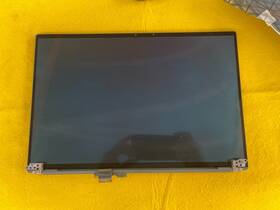
( Brand: Dell ), ( Manufacturer Part Number: G135834 ), ( Compatible Brand: For Generic ), ( Dead Pixel Policy: Contains 1 To 5 Dead Pixel S . 50 Restocking Fee. ), ( Screen Size: 16 In ), ( Display Technology: Led Lcd ), ( Compatible Model: For G135834, 13kvv ), ( Max. Resolution: 1920 X 1200 ), ( Screen Finish: Matte ), ( Type: Display Related Product ), ( Commodity: Complete Non Touch Screen Assembly Hinge Up ), ( Technology: Non Touch ), ( Manufacturer Warranty: 3 Months ), ( Lamp: Diode ), ( Connector Side: Bottom Right ), ( Country Of Origin: China ), ( Resolution: Fhd Wuxga )
Review DELL Inch Lcd Screen Non Touch Assembly Oem
The Dell Latitude 7430 (model number G135834, SKU 13KVV) is a sleek, high-performance business laptop designed to meet the demands of modern professionals while prioritizing security, mobility, and productivity. Engineered with a premium build quality, this 13.3-inch model features a slim yet sturdy chassis crafted from durable materials, ensuring both longevity and a refined aesthetic. At its core, the Latitude 7430 is powered by an Intel Core i5 or i7 processor (depending on configuration), paired with Intel Iris Xe graphics, delivering efficient performance for everyday tasks, light content creation, and business applications without sacrificing battery life. The inclusion of a **16:10 13.3-inch FHD (1920 x 1200) IPS touchscreen** enhances visibility with vibrant colors, wide viewing angles, and crisp text clarity, making it ideal for presentations, note-taking, or collaborative work. The touchscreen functionality adds an intuitive layer of interactivity, allowing users to annotate documents, navigate menus with finger gestures, or utilize touch-based productivity tools seamlessly.
Security is a cornerstone of the Latitude 7430, equipped with **Dell s vPro technology**, which enables enterprise-grade remote management, enhanced threat protection, and secure boot processes to safeguard sensitive data. The laptop includes a **fingerprint reader** for biometric authentication, a **TPM 2.0 chip** for hardware-based encryption, and **Dell s Secure Boot** to prevent unauthorized firmware modifications. Additionally, the **Dell Client Security Center** provides centralized control over security settings, ensuring compliance with corporate policies. For connectivity, the Latitude 7430 supports **Wi-Fi 6 (802.11ax)** and **Bluetooth 5.1**, enabling faster, more reliable wireless performance, while **Thunderbolt 4 (USB-C)** ports offer versatile connectivity for external displays, high-speed peripherals, and docking stations. The inclusion of **two USB-A ports** ensures backward compatibility with traditional devices, making it a versatile choice for both office and travel use.
Battery efficiency is a standout feature of the Latitude 7430, thanks to its **optimized power management** and **Intel Evo platform certification**, which promises up to **10 hours of productivity** on a single charge for web browsing and media consumption. The laptop also supports **fast charging**, allowing users to reach a 50% charge in just 30 minutes. The **backlit keyboard** with a comfortable, spill-resistant design ensures ergonomic typing even during extended work sessions, while the **spill-resistant magnesium alloy keyboard** adds durability for professionals on the go. The **Dell UltraSharp Precision Touchpad** offers precise multi-touch gestures, including Windows 10/11 gestures, for enhanced navigation and efficiency. With its **Dell Mobile Connect** feature, users can seamlessly extend their display to a paired smartphone, further boosting productivity in a multi-device workflow.
The Latitude 7430 is not just a tool for work but also a reliable companion for travel, thanks to its **lightweight design** (weighing approximately **2.8 lbs**) and **compact dimensions**, making it easy to carry in a slim briefcase or backpack. The **Dell DisplayLink** technology supports multiple external monitors, allowing users to extend their workspace for multitasking. The laptop also features **Dell s Active Health System**, which monitors hardware health and provides alerts for potential issues before they become critical. For audio, the **Dell Premium Audio** system with dual speakers and a built-in microphone ensures clear communication during video calls and presentations. Whether used in a corporate office, a remote workspace, or during frequent business travel, the Dell Latitude 7430 combines **performance, security, and portability** to deliver a seamless, professional computing experience tailored for today s dynamic work environment.
The Dell Latitude 5690 (model 13KVV) with a 16-inch touchscreen (5680 variant) is a mid-range business laptop designed for productivity and portability. Below is a detailed breakdown of its pros and cons, followed by a conclusion and recommendation.
---
### **Pros**
1. **Strong Performance for Business Use**
The 5690 is equipped with Intel Core i5 or i7 processors (11th or 12th Gen) paired with up to 32GB of DDR4 RAM, making it capable of handling multitasking, office applications, and light content creation. The Intel Iris Xe graphics (if included) provide decent performance for basic video editing or virtualization.
2. **Large 16-inch Touchscreen Display**
The 16-inch FHD (1920x1080) or 4K (3840x2160) touchscreen is a significant upgrade over traditional 14-inch business laptops. The touch functionality adds versatility for note-taking, presentations, and touch-based applications, though it may not be as responsive as a tablet.
3. **Durable Build and Business-Grade Features**
Dell s Latitude lineup is known for its ruggedness, with reinforced hinges, spill-resistant keyboards, and military-grade durability (MIL-STD-810G). The 5690 includes a backlit keyboard, fingerprint reader (on some models), and a secure boot option, making it suitable for corporate environments.
4. **Good Connectivity Options**
The laptop typically includes:- Thunderbolt 4 (USB-C) ports (for high-speed data transfer and external displays).
- HDMI 2.0 (for connecting to projectors or monitors).
- USB-A ports (for legacy peripherals).
- Optional SD card reader (on some configurations).
This makes it versatile for both work and external peripherals.
5. **Long Battery Life**
Dell markets the 5690 with up to 12 hours of battery life, which is decent for a business laptop. The 16-inch display may slightly reduce battery efficiency compared to smaller screens, but it remains adequate for a full workday.
6. **Windows 11 Pro Pre-installed**
The inclusion of Windows 11 Pro provides enterprise features like BitLocker encryption, remote desktop access, and better security controls, which are essential for business users.
7. **Lightweight for a 16-inch Laptop**
At around 3.8 4.2 lbs (1.7 1.9 kg), the 5690 is relatively lightweight for its screen size, making it portable compared to other 16-inch business laptops.
8. **Dell Support and Warranty**
Dell offers a standard 1-year warranty, with options for extended coverage or Dell ProSupport for businesses. This provides peace of mind for corporate users.
---
### **Cons**
1. **Limited Upgradeability**
Like most modern laptops, the 5690 has soldered RAM and storage, meaning users cannot upgrade these components after purchase. This can be a drawback if performance needs evolve over time.
2. **Average Cooling and Throttling**
The 5690 can run warm under sustained workloads, and some users report throttling during heavy multitasking or gaming. Dell s cooling system is adequate but not exceptional, which may limit its use for demanding tasks like video rendering or heavy virtualization.
3. **Touchscreen Limitations**
While the touchscreen is a nice feature, it is not as precise or responsive as a tablet (e.g., Microsoft Surface or iPad). The lack of a stylus (unless purchased separately) reduces its utility for drawing or note-taking.
4. **Discrete GPU Limitations**
If the 5690 includes an Intel Iris Xe GPU, it is not powerful enough for gaming or professional graphics work. For creative professionals, a dedicated GPU (e.g., NVIDIA MX series) would be preferable.
5. **Build Quality Variability**
Some users report minor quality control issues, such as loose hinges or inconsistent keyboard spacing. While the Latitude series is generally robust, individual units can vary slightly.
6. **Price Relative to Alternatives**
The 5690 is priced competitively for a 16-inch business laptop, but it may not offer as much value as some premium alternatives (e.g., Dell XPS 15 or Lenovo ThinkPad P1). For basic business use, it is a solid choice, but power users may find it lacking.
7. **No USB-C Audio Jack**
The lack of a traditional 3.5mm audio jack means users must rely on USB-C or Bluetooth for headphones, which can be inconvenient.
8. **Limited Port Selection on Some Models**
Depending on the configuration, some 5690 models may have fewer ports (e.g., fewer USB-A ports), which could be a drawback for users who need to connect multiple peripherals.
---
### **Conclusion**
The Dell Latitude 5690 (13KVV) with a 16-inch touchscreen is a well-rounded business laptop that excels in portability, durability, and productivity features. Its large touchscreen, strong performance for office tasks, and business-grade security make it an attractive option for professionals who prioritize versatility and reliability. However, its limitations in upgradeability, cooling, and graphics power mean it may not suit power users or creatives with demanding needs.
The 5690 strikes a good balance between screen size and portability, making it ideal for users who want a larger display without sacrificing too much battery life or weight. It is particularly well-suited for corporate environments, remote workers, and professionals who need a touchscreen for presentations or note-taking.
---
### **Recommendation**
**Buy the Dell Latitude 5690 if:**- You need a durable, business-grade laptop with a large 16-inch touchscreen for productivity.
- Your primary use cases involve office applications, web browsing, light video editing, or presentations.
- You value portability and security features like fingerprint readers and Windows 11 Pro.
- You are working in a corporate environment where reliability and support are important.
**Consider alternatives if:**- You require a dedicated GPU for graphics-intensive work (e.g., 3D rendering, gaming). In this case, look at the Dell Precision 5570 or Lenovo ThinkPad P1.
- You need upgradeable RAM/storage. The Lenovo ThinkPad T14 or HP EliteBook 840 G9 offer better upgrade options.
- You prioritize premium build quality and display. The Dell XPS 15 or MacBook Pro (M1/M2) may be worth the higher cost.
- You frequently use external displays and need more Thunderbolt ports. The Dell XPS 15 or Lenovo ThinkPad X1 Extreme offer more connectivity options.
Overall, the Dell Latitude 5690 is a solid choice for most business users who want a balance of performance, screen size, and durability without breaking the bank. If your needs align closely with its strengths, it is a recommended purchase.
Details:
The Dell 13KVV 16 LCD Screen Non Touch Assembly is a high-quality display related product designed for generic use. This assembly includes a 16-inch LED LCD screen with matte finish and resolution of 1920 x 1200. This product is a reliable OEM option for those in need of complete display assembly. The non-touch technology and DIODE lamp ensure a clear vibrant display, making it an essential component for any computer setup.
It is compatible with the 13KVV model and comes a 3-month manufacturer warranty.
part #: g135834 prices
- $64.50-$320.00
specifications laptoscreelc:
- brand: Dell
- mpn: G135834
- compatible brand: For Generic
- dead pixel policy: Contains 1 To 5 Dead Pixel S . 50 Restocking Fee.
- screen size: 16 In
- display technology: Led Lcd
- compatible model: For G135834, 13kvv
- max. resolution: 1920 X 1200
- screen finish: Matte
- type: Display Related Product
- commodity: Complete Non Touch Screen Assembly Hinge Up
- technology: Non Touch
- manufacturer warranty: 3 Months
- lamp: Diode
- connector side: Bottom Right
- country of origin: China
- resolution: Fhd Wuxga
payments laptoscreelc:
- credit card: Mastercard
- wallet: Apple-pay
- other
returns laptoscreelc:
- paid by: Buyer
- time: 30 Days
- method: Money back
- policy: Returns Accepted
shipping laptoscreelc:
- class: Standard
- type: Calculated
- service: USPS Ground Advantage
- carrier: USPS
- cost: $10.15
- transit: 5-9 Days
general laptoscreelc:
- condition: Used
- Computer Components Parts > Laptop Replacement Parts > Laptop Screens LCD Panels
seller laptoscreelc:
- city: Houston, Texas
- # reviews: 561
- rating: 98.8%
offer laptoscreelc:
- best offers: True
- sold: 0
- options: Ship-to-home
- quantity: 1
- availability: In Stock
- started: May 24, 2026
Dell G135834 Is Similar To:
- A114953g315t Generic Dell Replacement Laptop Lcd Screen Wxga Hd 032022016943 (29.9% similar) 8 laptop lcd screen resolution: GSX hd x 768 type: led diode connector: 40 pins bottom right may contain 3 to 5 dead pixels will work for Dell inspiring 5423, N140BGE-LB2-A2 model's also. 6 anarchistic: 43. lcd screen size: 14. Please match your original screens back light type, size, and ...(May 8th, 2018)
- A986011l327p Generic Laptop Lcd Replacemnet Led For Dell Inspiron (22.1% similar) 25 laptop lcd screen resolution: GSX x 900 type: led diode connector: 40 pins bottom left may contain 3 to 5 dead pixels please match your original screens back light type, size, and resolution before you purchase this item, because some model's come with more than one type of screens. 75 x ...(May 11th, 2018)
- D620-5043-lcd Generic Dell Latitude Replacement Laptop Lcd Screen Wxga 654367710821 (31.2% similar) Dell latitude D620 replacement laptop lcd screen x 8 resolution: GSX 800 type: cc fl single connector: 30 pins may contain 3 to 5 dead pixels please match your original screens back light type, size, and resolution before you purchase this item, because some model's come with more than one type of ...(May 30th, 2018)
- Led-1366-768-g-40-14.0-x11 Generic Dell Latitude Laptop Lcd Screen Replacement Wxga 529306022764 (32.3% similar) 5X8X12 anarchistic: pounds size:' requires technical installation item DIMENSIONS:1. Purchasing a screen with different specifications will not work your system. Dell latitude E6420 LTN140AT16 laptop lcd screen replacement 14...(May 16th, 2018)
- Led-1366-768-g-40-15.6-239 Dell Inspiron Laptop Lcd Screen Replacement Wxga Hd 610395664505 (33.3% similar) 6 item DIMENSIONS:1. You cannot deviate from your current screen specifications. Purchasing a screen with different specifications will not work your system. Product features screen size: 15. Dell inspiring N5110 laptop lcd screen replacement pounds size:'screen size: 15. 5 anarchistic: 05...(March 30th, 2018)
- 0015j5 Dell Genuine Inspiron Lcd Touchscreen Tp (37.6% similar) Screen is in good condition. Item is used. Look at pictures for details. Pulled from a working unit. Genuine Dell inspiring item has been fully tested, inspected and is in good working condition. 6 lcd touchscreen LP156WHB Twp a2 015J5 0015J5...(December 3rd, 2018)
- 0097y Dell Lcd Screen With Bezel (39.2% similar) The customer is urged to certify that parts ordered are correct one needed...(February 15th, 2017)
- 00gtn1 Hb156wx1-100 Dell Genuine Lcd (20.8% similar) Any question please feel free to ask. Its necessary for the end user to check with manufacturer, manual or other web sources insure compatibility. Our are correct to the best of knowledge, but with so many model's and parts its difficult know every compatible incompatible model...(August 26th, 2017)
- 00h0nx Cn-00h0nx Dell Used Inspiron Lcd Touch Screen With Cracked Digitizer (34.5% similar) The digitize is cracked. The lcd and chirpiest, cables are working fine...(August 31st, 2018)
- 00k19p Dc0200gt00 Dell Latitude Laptop Lcd Flex Cable Led Tested Warranty (22.4% similar) Stock photos. Orders purchased before noon central time are typically packaged and shipped out the same day. Notice: pictures shown are simply for reference...(February 6th, 2019)
- 00mj2p Dell Latitude Lcd Screen Matte Sp (34.5% similar) Pulled from a working unit. Item has been tested and is in good working condition. Item is used and screen in good condition. Dell latitude E7440 lcd screen matte LP140WF1 sp b1 P/N 00MJ2P this listing is for. Look at pictures for more details...(July 21st, 2018)
