SAMSUNG LT173KT03 Laptop Screen Display Panel 17.3 40PIN LTN173KT03-301
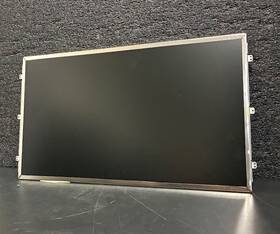
( Brand: Samsung ), ( Manufacturer Part Number: LT173KT03 ), ( Compatible Brand: Generics, Universal, For Hp ), ( Screen Finish: Matte ), ( Type: Led Lcd Screen ), ( Display Technology: Led Lcd ), ( Screen Size: 17.3 In ), ( Maximum Resolution: 1600 X 900 ), ( Color: Black ), ( Compatible Model: Generic Replacement Screens, For Hp ), ( Compatible Product Line: Universal, For Envy, For Pavilion )
Review SAMSUNG 17.3 Inch Laptop Matte Screen Display 40pin Panel
The **Samsung LT173KT03** is a high-performance **17.3-inch LCD panel** designed for premium laptops, offering an exceptional blend of clarity, color accuracy, and durability. Part of Samsung s trusted **LTN series**, this **40-pin (LVDS) display module**, identified by its model number **LTN173KT03-301**, delivers a **1600x900 (WXGA) resolution** with a **16:9 aspect ratio**, ensuring sharp visuals for productivity, media consumption, and creative work. The panel features a **16.7 million-color (8-bit RGB) color depth**, supported by a **24-bit RGB interface**, which provides rich, vibrant hues ideal for graphic design, video editing, and general computing tasks. With a **brightness of 250 nits**, the display maintains excellent visibility in well-lit environments while offering a comfortable viewing experience in ambient lighting conditions.
Engineered for longevity, the **LT173KT03** incorporates **IPS (In-Plane Switching) technology**, which enhances viewing angles to **178 horizontally and vertically**, reducing color shift and ghosting when viewed from extreme angles. This makes it well-suited for collaborative workspaces or presentations where multiple observers may be present. The panel also employs **Samsung s advanced backlight unit**, featuring **CCFL (Cold Cathode Fluorescent Lamp) technology**, which ensures consistent brightness and color consistency over extended use. Additionally, the **40-pin LVDS interface** allows for seamless integration with motherboards, making it a favored choice for OEMs assembling laptops, workstations, or industrial devices.
Beyond its technical specifications, the **LT173KT03** is built to withstand rigorous use, with a **high-quality polarizing filter and anti-glare coating** that minimizes reflections and enhances contrast. Its **matte finish** further reduces eye strain during prolonged sessions, making it a practical choice for professionals who demand both performance and comfort. While not as energy-efficient as modern LED-backlit panels, the **LTN173KT03** remains a reliable option for applications where cost-effectiveness and proven reliability are prioritized over ultra-low power consumption. Whether used in business laptops, gaming rigs, or multimedia devices, this panel delivers a **smooth, responsive display** that meets the demands of modern computing while maintaining Samsung s reputation for quality and innovation.
### **Pros and Cons of buying a Samsung LT173KT03 (17.3" 40-Pin Panel, LTN173KT03-301) Laptop Display**
#### **Pros:**1. **High Brightness and Visibility** The LTN173KT03 panel typically operates at a high brightness level (around 250-300 nits), making it suitable for well-lit environments. This is beneficial for outdoor use or bright office settings.
2. **Good Color Reproduction** While not a premium IPS panel, it provides decent color accuracy (typically 72% NTSC coverage) and is often used in budget-friendly business and gaming laptops. It can handle basic color tasks like web browsing, office work, and casual gaming.
3. **40-Pin Edge Connector** The 40-pin FPC (Flexible Flat Cable) connection is a standard for many laptop displays, making it easy to install in most laptops that support this interface. This is useful for replacements or upgrades.
4. **Affordable Replacement Option** Compared to high-end IPS or OLED panels, this TN panel is significantly cheaper, making it a practical choice for budget-conscious users or those replacing a damaged display.
5. **Durable and Reliable** TN panels are known for their longevity and resistance to burn-in, which can be an advantage for users who prioritize durability over color accuracy.
6. **Wide Availability** Due to its common use in budget laptops, spare parts and replacements are widely available online (eBay, AliExpress, etc.).
7. **Decent Refresh Rate** Some variants of this panel support 60Hz, which is standard for most laptops and sufficient for general use.
---
#### **Cons:**1. **Poor Viewing Angles** TN panels suffer from significant color shift and contrast loss when viewed from angles other than head-on. This makes them unsuitable for collaborative work or presentations where multiple viewers are involved.
2. **Limited Color Accuracy and Gamut** The panel typically covers only 72% of the NTSC color space, which is far below the 95% coverage of premium IPS or OLED panels. This results in washed-out colors, especially in vibrant or professional-grade content.
3. **Lower Contrast Ratio** TN panels have a lower contrast ratio (typically 1000:1 or less) compared to IPS or VA panels, leading to less vibrant blacks and reduced image depth.
4. **Eye Strain and Fatigue** Due to the lower color accuracy and brightness uniformity, prolonged use can cause eye strain, particularly in dimly lit environments.
5. **Not Ideal for Design or Content Creation** Professionals working in graphic design, video editing, or photography will find the color reproduction unsatisfactory and may need a higher-end panel (e.g., IPS, OLED, or P3-wide gamut).
6. **Potential for Flickering or Ghosting** Some TN panels exhibit motion blur or ghosting, especially at high refresh rates or during fast-paced scenes in games.
7. **Limited Future-Proofing** As display technology advances, TN panels are increasingly seen as outdated. Newer laptops often favor IPS or OLED for better user experience.
---
### **Conclusion:**The **Samsung LT173KT03 (LTN173KT03-301) 17.3" TN panel** is a practical and cost-effective choice for users who prioritize **budget, brightness, and durability** over color accuracy and viewing angles. It is well-suited for:
- **Basic computing tasks** (web browsing, office work, coding).
- **Budget gaming** (if paired with a capable GPU, though TN panels are not ideal for competitive gaming due to input lag and color issues).
- **Replacing a damaged display** in older or low-end laptops.
- **Outdoor or well-lit environments** where brightness is more critical than color fidelity.
However, it is **not recommended** for:- **Professional work** (graphic design, video editing, photography).
- **Multi-user setups** (due to poor viewing angles).
- **Users sensitive to eye strain** (TN panels can be harsh on the eyes in low-light conditions).
- **Future-proofing** (if you plan to keep the laptop for several years).
---
### **Recommendation:**- **Buy it if:** You need a **cheap, bright, and functional replacement display** for a budget laptop or if you re okay with the trade-offs for general use.
- **Avoid it if:** You require **accurate colors, wide viewing angles, or professional-grade performance**. In such cases, consider an **IPS or OLED panel** (e.g., Samsung LTN173WQ6, AU Optronics B173HAN01.1, or a P3-wide gamut display).
For most **casual users or budget replacements**, the LT173KT03 is a solid choice. For **serious users or professionals**, investing in a higher-quality panel is worth the extra cost.
Details:
The Samsung 17.3 Laptop Matte Screen Display LTN173KT03-301 is a high-quality LED LCD screen with maximum resolution of 1600 x 900. This display is versatile and can be used as a universal replacement screen for various laptop brands, offering 16:9 aspect ratio optimal viewing experience. It is a reliable and cost-effective option for those in need of replacement laptop screen. It features a sleek black color and matte finish, making it suitable for variety of laptop model's, including HP generic replacements.
part #: lt173kt03 prices
- $21.12-$82.96
specifications laptoscreelc:
- brand: Samsung
- mpn: Lt173kt03
- compatible brand: Generics, Universal, For Hp
- screen finish: Matte
- type: Led Lcd Screen
- display technology: Led Lcd
- screen size: 17.3 In
- maximum resolution: 1600 X 900
- color: Black
- compatible model: Generic Replacement Screens, For Hp
- compatible product line: Universal, For Envy, For Pavilion
shipping laptoscreelc:
- type: Calculated
- class: Standard
- cost: $0.00
- carrier: USPS
- service: USPS Ground Advantage
- transit: 6-11 Days
seller laptoscreelc:
- city: Los Angeles, California
- rating: 99.0%
- # reviews: 1176
offer laptoscreelc:
- quantity: 1
- availability: In Stock
- started: February 25, 2026
- options: Ship-to-home
- sold: 0
returns laptoscreelc:
- policy: No Returns
payments laptoscreelc:
- wallet: Google-pay
- other
- credit card: Mastercard
general laptoscreelc:
- condition: Used
- Computer Components Parts > Laptop Replacement Parts > Laptop Screens LCD Panels
Samsung LT173KT03 Is Similar To:
- 0022099266358 Samsung Laptop Lcd Screen (36.4% similar) Up for sale is a used Samsung LTN156AT09 15. Please see my other offers for more cool stuff. The case comes complete with camera and cables. You can remove the lcd to use in any other compatible laptop computer. Part numbers on LCD:LTN156AT05-U095KBA2117DLJ96-04853J this is an led back light lcd ...(February 15th, 2019)
- 0a66651 Samsung New Lenovo Wxga Led Lcd Screen (28.1% similar) Model part number: Samsung LTN156AT24, Frau 04W3261, pn 0A66651 screen size: GSX led lcd LTN156AT24 04W3261 image to this listing is for one premium panel in perfect new condition. 6 resolution: 1366X768 GSX back light type: led partial list of compatible laptops: Leno G570, G580, Z580, B580, and ...(September 15th, 2018)
- 0c1hnw 0cf9fx 0u884m 0p5ckj 089ymy Lcd Screen For Dell Lg Auo Samsung Chimei Boe (22.2% similar) 02DOCUMENTNOTSPECIFIED7. Screen SIZE15. Three years warranty. 8NORMAL0THIS screen is covered by our premium dead-pixel-free guarantee...(July 8th, 2018)
- 0c54gw Samsung Genuine Led Lcd Screen (31.9% similar) Pulled from a working unit. Item is fully tested and works great. 6 led lcd screen LTN156AT17 C54GW 0C54GW. Genuine Samsung 15. 6 led lcd screen LTN156AT17 C54GW 0C54GW this listing is for a genuine Samsung 15. Item is used. Look at pictures for details...(March 12th, 2018)
- 0fytxt Samsung Genuine Led Lcd Screen Fytxt (36.8% similar) Screen is in good condition. Item is fully tested and works great. Look at pictures for details. Genuine Samsung 15. 6 led lcd screen LTN156HL02-001 text 0FYTXT this listing is for a genuine Samsung 15. Item is used. 6 led lcd screen LTN156HL02-001 text 0FYTXT. Pulled from a working unit...(March 28th, 2018)
- 0hf239 Ltn141p4-l04 Dell Display Latitude Samsung (29% similar) Manufacturer: dell item for sale: displayed information: LTN141P4-L04 Samsung, 0HF239 HF239, other feature: Sega inverter Bret intact make and model: latitude D610DIMENSIONS: x lo imams. Want to send me an message. 1 positive note: no scratches. No dude en environs mensches ESP ol...(August 25th, 2018)
- 0jhnx6 Samsung Genuine Led Lcd Screen (31.9% similar) Genuine Samsung 15. 6 led lcd screen LTN156HT01 JHNX6 0JHNX6. Item is pulled from working unit. Look at pictures for details. Item is fully tested and in good working condition. 6 led lcd screen LTN156HT01 JHNX6 0JHNX6 this listing is for a genuine Samsung 15. Item is used...(March 12th, 2018)
- 0k737h Dell Samsung Led Lcd Screen Wxga Hd (33.9% similar) Samsung LTN154AT12 15...(May 17th, 2018)
- 0kdc9p 0mv65p Led Screen For Dell Samsung Lg Chimei Auo (20.4% similar) 8NORMAL0THIS screen is covered by our premium dead-pixel-free guarantee. 02DOCUMENTNOTSPECIFIED7. Three years warranty...(May 28th, 2018)
- 0m1gmv Samsung Ips Lcd Screen Dell Latitude (41.6% similar) Dell latitude 12. 5 lcd for E7280, E5280...(August 19th, 2018)
- 0n1wnk Hd Screen For Tl Dell Samsung Lg Chimei Auo (21.2% similar) 02DOCUMENTNOTSPECIFIED7. 8NORMAL0THIS screen is covered by our premium dead-pixel-free guarantee. Three years warranty...(November 7th, 2018)
