SAMSUNG LTM200KT10-Q01 Lcd Panel Screen 1600X900
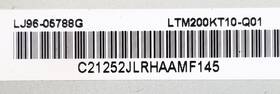
( Brand: Samsung ), ( Manufacturer Part Number: LTM200KT10-Q01 ), ( Compatible Brand: Various Brands ), ( Type: Screen Panel ), ( Country Of Origin: China )
Review SAMSUNG Lcd Panel Inch 1600x900 Matte Screen
The **Samsung LTM200KT10-Q01 LCD Panel** is a high-performance, professional-grade display designed for demanding applications where clarity, precision, and reliability are paramount. This 20-inch widescreen panel features a native resolution of **1600x900**, delivering crisp, sharp visuals with a **16:9 aspect ratio** that maximizes screen real estate for productivity, design, or multimedia tasks. Engineered with Samsung s advanced **TN (Twisted Nematic) technology**, this panel ensures fast response times typically around **5 milliseconds (GTG)** making it ideal for applications requiring smooth motion, such as video editing, CAD/CAM work, or real-time monitoring systems. The **10-bit color depth** (via FRC Frame Rate Control) enhances color gradation, reducing banding in gradients and providing a more natural, vibrant appearance, though it operates at an 8-bit input depth by default. With a **brightness level of 250 nits**, the panel offers clear visibility in well-lit environments, though it may require additional lighting adjustments in darker settings.
Built for durability and efficiency, the **LTM200KT10-Q01** incorporates a **low-power consumption design**, making it energy-efficient for continuous use in workstations, industrial setups, or embedded systems. The panel supports a **100Hz refresh rate**, which, while not as high as gaming monitors, ensures fluid performance for applications involving rapid data updates, such as financial trading platforms, medical imaging, or security surveillance. Its **VESA-compatible mounting system** (with a standard 75x75mm pattern) allows for flexible installation in tight spaces, whether mounted on a desk, wall, or integrated into a custom chassis. The **D-Sub (VGA) input** ensures compatibility with a wide range of legacy and modern devices, though it lacks native HDMI or DisplayPort, requiring an adapter for newer graphics cards or devices.
The **LTM200KT10-Q01** is particularly well-suited for industrial, commercial, and professional environments where cost-effectiveness and reliability are critical. Its **non-glare surface** reduces eye strain during prolonged use, while the **low blue light emission** (compared to some high-brightness displays) helps maintain comfort for extended sessions. Though not a consumer-grade gaming or multimedia monitor, its **high pixel density (92 PPI)** ensures text and fine details remain legible, making it a strong choice for applications like **ERP software, technical documentation, or embedded control systems**. With a **10-year lifespan** under normal operating conditions, this panel is built to withstand rigorous use, offering a balance of performance, affordability, and longevity for businesses and developers seeking a dependable display solution.
### **Pros and Cons of buying a Samsung LTN200KT10-Q01 (20" 1600x900 LCD Panel)**
#### **Pros:**1. **High Resolution for Its Size** The 1600x900 resolution provides a sharp display for its 20-inch size, making it suitable for applications requiring clarity, such as industrial monitoring, digital signage, or basic multimedia use.
2. **Brightness and Visibility** The panel typically offers a brightness level of around 500 nits, which is adequate for well-lit environments. It is not as bright as high-end displays but performs well in moderate lighting conditions.
3. **Wide Viewing Angles** Samsung s IPS-like technology in this panel ensures decent color consistency and viewing angles, reducing color shift when viewed from the side.
4. **Low Power Consumption** As an LCD panel, it consumes less power compared to OLED or high-end LED-backlit displays, making it cost-effective for continuous operation.
5. **Affordability** Compared to newer or higher-end panels, this model is relatively budget-friendly, making it a practical choice for basic applications.
6. **Compatibility** It supports standard VGA and HDMI inputs, making it easy to integrate with most computers, media players, or embedded systems.
7. **Durability** Samsung panels are generally built to last, with robust construction suitable for industrial or commercial use.
#### **Cons:**1. **Outdated Technology** This is an older LCD panel (likely from the early 2010s), meaning it lacks modern features like USB-C, HDMI 2.0, or advanced color calibration options.
2. **Limited Refresh Rate** The panel likely operates at a standard 60Hz refresh rate, which may feel sluggish for fast-paced applications or gaming.
3. **Color Accuracy and Depth** While decent for basic use, it does not match the color gamut or precision of modern IPS or OLED panels, which can be a drawback for graphic design or professional color work.
4. **No Touchscreen Option** If touch functionality is required, this panel will need an additional overlay, increasing cost and complexity.
5. **Potential for Burn-In (Minor Risk)** While LCD panels are less prone to burn-in than OLEDs, static images displayed for long periods could still leave faint residues.
6. **Limited Availability of Parts** As a discontinued model, finding replacement parts or technical support may be difficult over time.
7. **No Built-in Audio** Unlike some modern monitors, this panel does not include speakers, requiring external audio solutions.
---
### **Conclusion:**The **Samsung LTN200KT10-Q01** is a functional and cost-effective LCD panel for basic applications such as industrial monitoring, digital signage, or as a secondary display. It excels in clarity for its size, visibility in moderate lighting, and energy efficiency. However, its outdated specifications, lack of advanced features, and potential compatibility issues with newer systems may limit its usefulness for demanding or future-proofing needs.
If you require a **budget-friendly, reliable display for non-critical tasks**, this panel is a solid choice. However, if you need **higher resolution, better color accuracy, touch functionality, or modern connectivity**, investing in a newer IPS or OLED panel would be more advantageous.
### **Recommendation:**- **Buy it if:** You need a **low-cost, functional 20-inch display** for basic monitoring, signage, or legacy systems where performance is not a priority.
- **Avoid it if:** You require **high refresh rates, advanced color accuracy, touch support, or future-proof connectivity**. In such cases, consider a **modern IPS or OLED panel** (e.g., Samsung U28E590D, Dell S2721DGF, or similar) for better long-term usability.
Details:
See all photos and video for details. The screen panel was removed from a working HP Pro 3420 AI desktop computer.
part #: ltm200kt10q01 prices
- $22.00-$138.95
specifications laptoscreelc:
- brand: Samsung
- mpn: Ltm200kt10-q01
- compatible brand: Various Brands
- type: Screen Panel
- country of origin: China
returns laptoscreelc:
- policy: No Returns
general laptoscreelc:
- Computer Components Parts > Laptop Replacement Parts > Laptop Screens LCD Panels
- condition: Used
offer laptoscreelc:
- started: May 27, 2026
- options: Ship-to-home
- quantity: 1
- sold: 0
- availability: In Stock
shipping laptoscreelc:
- class: Standard
- transit: 3-8 Days
- type: Fixed
- cost: $22.00
- service: Standard
seller laptoscreelc:
- city: Staten Island, New York
- rating: 99.6%
- # reviews: 3501
payments laptoscreelc:
- credit card: Discover
- wallet: Apple-pay
- other
Samsung LTM200KT10-Q01 Is Similar To:
- 0022099266358 Samsung Laptop Lcd Screen (41.6% similar) Up for sale is a used Samsung LTN156AT09 15. Please see my other offers for more cool stuff. The case comes complete with camera and cables. You can remove the lcd to use in any other compatible laptop computer. Part numbers on LCD:LTN156AT05-U095KBA2117DLJ96-04853J this is an led back light lcd ...(February 15th, 2019)
- 0a66651 Samsung New Lenovo Wxga Led Lcd Screen (37% similar) Model part number: Samsung LTN156AT24, Frau 04W3261, pn 0A66651 screen size: GSX led lcd LTN156AT24 04W3261 image to this listing is for one premium panel in perfect new condition. 6 resolution: 1366X768 GSX back light type: led partial list of compatible laptops: Leno G570, G580, Z580, B580, and ...(September 15th, 2018)
- 0c1hnw 0cf9fx 0u884m 0p5ckj 089ymy Lcd Screen For Dell Lg Auo Samsung Chimei Boe (16.9% similar) 02DOCUMENTNOTSPECIFIED7. Screen SIZE15. Three years warranty. 8NORMAL0THIS screen is covered by our premium dead-pixel-free guarantee...(July 8th, 2018)
- 0c54gw Samsung Genuine Led Lcd Screen (40.4% similar) Pulled from a working unit. Item is fully tested and works great. 6 led lcd screen LTN156AT17 C54GW 0C54GW. Genuine Samsung 15. 6 led lcd screen LTN156AT17 C54GW 0C54GW this listing is for a genuine Samsung 15. Item is used. Look at pictures for details...(March 12th, 2018)
- 0fytxt Samsung Genuine Led Lcd Screen Fytxt (38.1% similar) Screen is in good condition. Item is fully tested and works great. Look at pictures for details. Genuine Samsung 15. 6 led lcd screen LTN156HL02-001 text 0FYTXT this listing is for a genuine Samsung 15. Item is used. 6 led lcd screen LTN156HL02-001 text 0FYTXT. Pulled from a working unit...(March 28th, 2018)
- 0j501t Samsung Ltn170ct08 Lcd Led (40% similar) New I was going to install in M17X and changed my mind...(December 9th, 2017)
- 0jhnx6 Samsung Genuine Led Lcd Screen (40.4% similar) Genuine Samsung 15. 6 led lcd screen LTN156HT01 JHNX6 0JHNX6. Item is pulled from working unit. Look at pictures for details. Item is fully tested and in good working condition. 6 led lcd screen LTN156HT01 JHNX6 0JHNX6 this listing is for a genuine Samsung 15. Item is used...(March 12th, 2018)
- 0k737h Dell Samsung Led Lcd Screen Wxga Hd (38.5% similar) Samsung LTN154AT12 15...(May 17th, 2018)
- 0kdc9p 0mv65p Led Screen For Dell Samsung Lg Chimei Auo (22.2% similar) 8NORMAL0THIS screen is covered by our premium dead-pixel-free guarantee. 02DOCUMENTNOTSPECIFIED7. Three years warranty...(May 28th, 2018)
- 0m1gmv Samsung Ips Lcd Screen Dell Latitude (36.2% similar) Dell latitude 12. 5 lcd for E7280, E5280...(August 19th, 2018)
- 0n1wnk Hd Screen For Tl Dell Samsung Lg Chimei Auo (23.2% similar) 02DOCUMENTNOTSPECIFIED7. 8NORMAL0THIS screen is covered by our premium dead-pixel-free guarantee. Three years warranty...(November 7th, 2018)
