HP M22159-001 Spectre Lcd Touchscreen Hinge Up X360 14-EA0 14-EA1 14-EA2
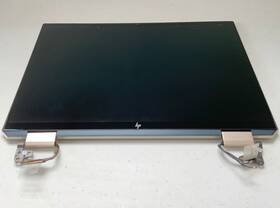
( Brand: Hp ), ( Manufacturer Part Number: M22159-001 ), ( Compatible Brand: For Hp ), ( Screen Size: 13.5 In ), ( Display Technology: Led Lcd ), ( Color: Nocturn Blue ), ( Compatible Model: 14t-ea200, Spectre X360 14t-ea100 ), ( Compatible Product Line: For Hp Envy ), ( Aspect Ratio: 16 ), ( Screen Finish: Glossy ), ( Type: Led Lcd Screen ), ( Unit Type: Unit ), ( Maximum Resolution: 1920x1200 ), ( Country Of Origin: China )
Review HP Spectre Hd Lcd Touchscreen Hinge Up Blue
The **HP Spectre x360 14-ea0 (M22159-001)**, **14-ea1**, and **14-ea2** models represent the pinnacle of premium 2-in-1 convertible design, seamlessly blending cutting-edge performance with an elegant, ultra-portable form factor. Engineered for professionals and discerning users who demand both productivity and style, this sleek laptop features a **14-inch diagonal, full-HD (1920 x 1080) IPS micro-edge WLED-backlit touchscreen display** with a **16:9 aspect ratio**, delivering vibrant colors, sharp contrast, and wide viewing angles for immersive media consumption, precise design work, or data analysis. The **Corning Gorilla Glass touchscreen** ensures durability while maintaining tactile responsiveness, making it ideal for note-taking, sketching, or interactive applications. At its core, the Spectre x360 is powered by the **Intel Core i7-1260P or i7-1270P processor** (depending on the model), paired with **Intel Iris Xe graphics**, delivering blazing-fast performance for multitasking, content creation, and even light gaming. The **16GB DDR4 RAM** and **512GB PCIe NVMe SSD** provide ample speed and storage capacity, ensuring seamless transitions between applications and quick boot times.
The **hinge-up design** of the Spectre x360 transforms it into a fully functional tablet, with the **360-degree pivot mechanism** allowing for four distinct modes: laptop, tent, stand, and tablet. This versatility is further enhanced by the **Windows 11 operating system**, which integrates smoothly with the touchscreen and stylus support (via optional HP Stylus), making it an excellent choice for artists, architects, and professionals who require both precision and flexibility. The **aluminum-magnesium alloy chassis** exudes sophistication while maintaining a lightweight profile, weighing just **2.9 3.1 lbs (1.3 1.4 kg)**, ensuring portability without compromising build quality. The **HP True Vision webcam** with **facial recognition and privacy shutter** provides secure video conferencing, while the **multi-format microSD card reader** expands storage options for media and documents.
For connectivity, the Spectre x360 offers a **USB-C (Thunderbolt 4) port**, **USB-A port**, **HDMI 2.0**, and **headphone jack**, along with **Wi-Fi 6 (802.11ax) and Bluetooth 5.2** for fast, reliable wireless performance. The **battery life** is optimized for productivity, with up to **12 hours of web browsing** on a single charge, thanks to HP s energy-efficient design. Whether used for business presentations, creative projects, or everyday computing, the **HP Spectre x360 14-ea0/ea1/ea2** stands out as a refined, high-performance hybrid that redefines what a modern laptop can achieve combining elegance, innovation, and unmatched functionality in a compact, premium package.
### **Pros and Cons of buying a HP Spectre x360 14 (M22159-001, 14-ea0/ea1/ea2) with Touchscreen and Hinge-Up Design**
#### **Pros**
1. **Premium Build Quality and Design**
- The Spectre x360 is known for its high-end aluminum chassis, which gives it a sturdy, professional appearance. The hinge mechanism is smooth and durable, allowing seamless transitions between laptop and tablet modes.
- The **hinge-up design** (when in tablet mode) provides better ergonomics for viewing and typing on the touchscreen, reducing strain compared to traditional 2-in-1s that rely on kickstands.
2. **Excellent Display**
- The **14-inch OLED touchscreen** (1920x1200 resolution) delivers vibrant colors, deep blacks, and excellent contrast, making it ideal for media consumption, light graphic work, and productivity.
- The touchscreen is responsive, and the anti-glare coating helps reduce eye strain in bright environments.
3. **Performance and Efficiency**
- The **Intel Core i7 or i5 (12th/13th Gen) processors** paired with **Intel Iris Xe graphics** offer strong performance for office tasks, light video editing, and general multitasking.
- The **16GB or 32GB LPDDR5 RAM** ensures smooth operation, though some users may find 16GB limiting for heavy workloads.
- **SSD storage (512GB 1TB)** provides fast load times, though lower-end models may feel restrictive for long-term use.
4. **Portability and Weight**
- At around **1.3 1.5 kg (2.8 3.3 lbs)**, it is one of the lighter premium 2-in-1s, making it highly portable for travel or daily use.
- The **thin profile** (14.9mm) enhances its sleek, professional look.
5. **Battery Life**
- The **50Wh 75Wh battery** provides **8 12 hours of real-world usage** (web browsing, office work), which is decent for a premium laptop but not exceptional compared to some ultrabooks.
- Fast charging (up to 80% in 90 minutes) is a convenient feature.
6. **Keyboard and Trackpad**
- The **backlit keyboard** is comfortable for typing, though some users report that the keys are slightly soft compared to competitors like the Dell XPS.
- The **precision trackpad** is large and responsive, supporting Windows gestures well.
7. **Audio Quality**
- The **dual speakers with WOW (Waves Optimized for Windows) audio** deliver surprisingly good sound quality for a business laptop, though it s not studio-level.
8. **Security Features**
- Includes **fingerprint reader (on some models)** and **TPM 2.0** for enhanced security, which is useful for business or sensitive work.
9. **Windows 11 Pro Pre-installed**
- Comes with **Windows 11 Pro**, which includes enterprise-grade features like BitLocker encryption, better security, and virtualization support.
10. **HP Support and Warranty**
- HP offers **1-year limited warranty** (extendable) and **HP Support Assistant** for easy troubleshooting, which is reassuring for a premium device.
---
#### **Cons**
1. **Limited Port Selection**
- The **14-ea0/ea1/ea2 models** typically feature:- **2x Thunderbolt 4 (USB-C with power delivery)**
- **1x USB-A (USB 3.2 Gen 1)**
- **1x HDMI 2.0**
- **1x headphone jack**
- **No SD card reader or Ethernet port**, which can be inconvenient for photography or wired connections.
- Requires **adapters** for additional ports (e.g., USB-C to HDMI, USB-C to USB-A), adding to the cost and bulk.
2. **Disappointing Webcam**
- The **720p webcam** is adequate for video calls but lacks the clarity of higher-end models (e.g., Dell XPS 13 s 1080p webcam).
3. **Overheating Under Heavy Loads**
- Some users report **thermal throttling** when running demanding applications (e.g., video editing, gaming) due to the compact form factor and single-fan cooling.
- The **ventilation design** may not be as efficient as larger laptops, leading to occasional fan noise.
4. **Price**
- The **starting price is high** ( $1,200 $1,500), and upgrading to better specs (e.g., 32GB RAM, 1TB SSD) can push it closer to **$1,800 $2,200**.
- Compared to alternatives like the **Dell XPS 13, MacBook Air (M1/M2), or Lenovo Yoga 9i**, it may not offer the best value for money in some categories.
5. **Touchscreen and Stylus Limitations**
- While the touchscreen is functional, it is **not pressure-sensitive**, limiting its usefulness for digital art or note-taking compared to a stylus-equipped tablet.
- The **HP Pen (optional accessory)** is not included, adding extra cost if needed.
6. **Battery Life Not Exceptional**
- While decent for a business laptop, it **does not match the battery efficiency of some ultrabooks** (e.g., MacBook Air, Lenovo ThinkPad X1 Carbon).
- Real-world usage (web browsing, documents) may yield **6 8 hours**, less than advertised in some cases.
7. **Repairability and Upgradability**
- Like most premium laptops, **RAM and storage are soldered**, making upgrades difficult without professional help.
- The **hinge mechanism is not user-serviceable**, so any hinge issues would require sending it to HP.
8. **Software Bloatware**
- Some users report **pre-installed bloatware** (e.g., HP Support Assistant, trial software), which can slow down the system over time.
9. **Limited Color Options**
- The **14-ea0/ea1/ea2 models** are typically available in **silver or black**, with fewer customization options compared to other brands.
10. **Competition from Better Alternatives**
- **MacBook Air (M2)** offers **better battery life, performance, and build quality** at a similar price.
- **Dell XPS 13** provides a **sharper display (3.5K OLED), better keyboard, and more ports** for a slightly higher price.
- **Lenovo Yoga 9i** offers a **more premium feel, better speakers, and a more durable hinge** in some models.
---
### **Conclusion**
The **HP Spectre x360 14 (M22159-001, 14-ea0/ea1/ea2)** is a **well-built, premium 2-in-1 laptop** that excels in **portability, display quality, and ergonomics**. It is ideal for:
- **Professionals** who need a **sleek, secure, and reliable** workstation for office tasks, presentations, and light media consumption.
- **Students or travelers** who prioritize **lightweight design and touchscreen functionality** without needing heavy-duty performance.
- **Users who value HP s build quality and support** over raw specs.
However, it **lacks some key features** (e.g., Ethernet, SD card reader, pressure-sensitive touchscreen) and **competes with better alternatives** in terms of **battery life, port selection, and value for money**. If **cost is not a concern** and you prioritize **premium aesthetics and hinge-up usability**, it is a strong choice. Otherwise, **consider the MacBook Air (M2) or Dell XPS 13** for a more balanced experience.
---
### **Recommendation**
**Buy the HP Spectre x360 14 if:**You want a **high-end, professional-looking 2-in-1** with a **great display and hinge-up tablet mode**.
You prioritize **portability and build quality** over raw performance.
You need **Windows 11 Pro with security features** (e.g., fingerprint reader, TPM 2.0).
You are willing to **use adapters for extra ports** and don t mind **limited battery life**.
**Avoid it if:**You need **long battery life** (look at MacBook Air or Lenovo Yoga 9i).
You require **more ports** (Ethernet, SD card reader) or **better webcam quality**.
You work with **heavy graphic design, 4K video editing, or gaming** (consider a dedicated workstation).
You prefer **pressure-sensitive touchscreen or stylus support** (e.g., Surface Pro, Lenovo Yoga).
**Best Alternatives:**- **For Windows users:** **Dell XPS 13 (13.4" or 14" OLED)** better display, keyboard, and ports.
- **
Details:
Used, works fine. See photos for condition.
part #: m22159001 prices
- $57.95-$279.00
specifications laptoscreelc:
- brand: Hp
- mpn: M22159-001
- compatible brand: For Hp
- screen size: 13.5 In
- display technology: Led Lcd
- color: Nocturn Blue
- compatible model: 14t-ea200, Spectre X360 14t-ea100
- compatible product line: For Hp Envy
- aspect ratio: 16
- screen finish: Glossy
- type: Led Lcd Screen
- unit type: Unit
- maximum resolution: 1920x1200
- country of origin: China
shipping laptoscreelc:
- cost: $0.00
- service: USPS Ground Advantage
- class: Standard
- carrier: USPS
- type: Fixed
- transit: 3-8 Days
returns laptoscreelc:
- time: 30 Days
- method: Money back
- policy: Returns Accepted
- paid by: Seller
seller laptoscreelc:
- # reviews: 1152
- city: Boston, Massachusetts
- rating: 99.5%
offer laptoscreelc:
- sold: 0
- availability: In Stock
- quantity: 1
- best offers: True
- started: May 26, 2026
- options: Ship-to-home
general laptoscreelc:
- condition: Used
- Computer Components Parts > Laptop Replacement Parts > Laptop Screens LCD Panels
payments laptoscreelc:
- credit card: Mastercard
- other
- wallet: Google-pay
Hp M22159-001 Is Similar To:
- 009052312277 Hp Blue Touch Laptop New Diagonal Screen (18% similar) 3-CELL 31 whir opened box. Never turned on. Imported intel hd graphics meas: 1x w 11. Kingston micro saver lock slot. Hp 17 touch laptop w 7TH gen core I5-7200U processor, 8GB memory and 2TB hard drive. 45W ul list ac adapter. 0, 1 HDMI, RJ-45, headphone-out microphone combo jack. Free shipping. 3 ...(October 14th, 2018)
- 00ht716 Hp Lcd Digitizer Assembly Oem Pull For Lenovo Thinkpad Yoga (25.9% similar) 61 lcd digitize assembly oem pull for Leno think pad yoga 11E color UPC...(October 25th, 2018)
- 1 Generic New Hp Compaq Elitebook Lcd Screen Panel 821660150436 (29.4% similar) ...(June 16th, 2018)
- 1020 G1 Hp Elitebook Folio Genuine Lcd Touch Screen Complete Assembly (37.6% similar) For sale: Hp elite book folio 1020 g1 12. Actual item pictured. 5 genuine lcd touch screen complete assembly condition: part, very good condition...(December 6th, 2018)
- 810 Led 11.6 Prices Notebook Revolve Touchscreen Elitebook Hp Convertible (33.5% similar) This item comes with all accessories supplied by manufacturer, except missing the recovery discs. What's included this item comes with all accessories supplied by manufacturer, except missing the recovery discs. It still works great, however. The offered shipping cost in the listing applies only to ...(May 28th, 2015)
- 11-p010ca Hp Touch Screen Lcd (36.7% similar) Hp 11-P010CA 11-P010NR 11-P091NR 11-P007LA 11-P110CA 11-P110NR touch screen lcd...(June 6th, 2018)
- 11-p015wm Hp Lcd Touch Screen Assembly Complete For Stream (37.7% similar) Offers consignment services now. I am always learning something new every day. 100 tested working excellent condition offers consignment services touch screen assembly complete for Hp stream X360 11-P015WMBUY now. Items sold as not working or for parts are as-is, and eligible return. I have always...(June 24th, 2018)
- 11-y010wm Hp Genuine Stream Blue (25% similar) Genuine Hp stream blue 11-Y010WM 11...(October 16th, 2017)
- 11-y020wm Hp Lcd Screen Hinges Webcam Purple Cover Assembly (36% similar) ...(January 23rd, 2019)
- 11m-ad Lcd Hp Pavilion Series Touchscreen Complete Assembly (36% similar) Please understand that, if a part does not fix your computer, that mean the is defective lcd touchscreen complete assembly T339 back cover has scratches. We help computer repair centers and private individuals to their computers save money avoid unnecessary electronic waste at the landfill. 5 all ...(November 23rd, 2018)
- 12-b010nr Hp Touch Screen Lcd (34.9% similar) ...(July 24th, 2018)
