HP N02887-001 Elitebook Fhd Lcd Touch Screen X360 830 G9 2-IN-1 13.3
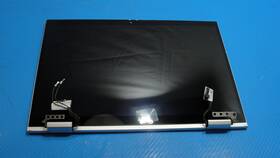
( Brand: Hp ), ( Manufacturer Part Number: N02887-001 ), ( Compatible Brand: For Hp ), ( Screen Finish: Glossy ), ( Type: Screen ), ( Screen Size: 13.3 In ), ( Maximum Resolution: 1920 X 1200 ), ( Color: Silver )
Review HP 830 G9 2-in-1 13.3 Inch Fhd Lcd Touch Screen Complete Assembly
The **HP EliteBook x360 830 G9 (N02887-001)** is a premium 2-in-1 laptop designed to seamlessly blend productivity and portability, catering to professionals, executives, and creative users who demand both power and versatility. Engineered with HP s signature durability and performance, this **13.3-inch Full HD (1920 x 1080) IPS micro-edge LCD touchscreen** delivers crisp, vibrant visuals with a **16:9 aspect ratio**, ensuring sharp text and vivid colors for work, presentations, or multimedia consumption. The **360-degree hinge system** transforms the device effortlessly into a laptop, tablet, or stand mode, making it ideal for note-taking, digital inking with the optional **HP Pen**, or hands-free viewing. Under the hood, the **8th Generation Intel Core i5-8265U processor** (or higher configurations) paired with **up to 16GB of DDR4 RAM** and **512GB PCIe NVMe SSD storage** ensures lightning-fast multitasking, smooth application performance, and ample space for documents, projects, and media all while maintaining a sleek, **13.3-inch chassis** that balances compactness with premium build quality.
Crafted for enterprise-grade reliability, the EliteBook x360 830 G9 features a **military-grade MIL-STD-810G durability rating**, protecting against drops, vibrations, and extreme temperatures, making it a resilient companion for travel or demanding work environments. The **backlit keyboard** with **HP Wide Vision anti-glare display** enhances usability in low-light conditions, while the **fingerprint reader** provides secure biometric authentication for quick and convenient access. With **Intel UHD Graphics 620** (or higher in some models), the device handles everyday tasks, light video editing, and business applications with ease, though it may require an external GPU for intensive creative workloads. The **dual-band Wi-Fi 5 (802.11ac) and Bluetooth 4.2** connectivity ensures stable, high-speed wireless performance, while the **USB-C (Thunderbolt 3 in some variants) and USB-A ports** offer flexibility for peripherals, docking stations, or external displays. Optional **HP Sure View privacy screen** technology further enhances security by reducing glare and preventing onlookers from viewing sensitive content. Whether used for corporate presentations, remote work, or on-the-go productivity, the **HP EliteBook x360 830 G9** combines cutting-edge technology with thoughtful ergonomics, delivering a refined, all-in-one solution for modern professionals.
### **Pros and Cons of the HP EliteBook x360 830 G9 (N02887-001) 13.3" 2-in-1 Laptop**
#### **Pros:**1. **Premium Build Quality** The EliteBook series is known for its durable, military-grade (MIL-STD-810G) construction, making it resistant to drops, dust, and extreme temperatures. The magnesium alloy chassis ensures longevity.
2. **Versatile 2-in-1 Design** The 360-degree hinge allows for laptop, tablet, tent, and stand modes, making it suitable for both work and entertainment. The touchscreen is responsive and useful for note-taking or creative tasks.
3. **Strong Performance** The **Intel Core i7-1165G7 (or i5/i7 variants)** processor provides solid performance for productivity tasks, including multitasking, office work, and light content creation. The **Intel Iris Xe graphics** handle basic graphic design and video editing well.
4. **Long Battery Life** With a **50Wh battery**, it offers **8-10 hours of real-world usage** (varies by workload), which is decent for a business laptop. HP s Power Manager software helps optimize power efficiency.
5. **High-Quality Display** The **13.3" FHD (1920x1080) IPS LCD** provides good color accuracy and viewing angles, though it lacks OLED or higher brightness levels found in some premium ultrabooks.
6. **Security Features** Includes **fingerprint reader, TPM 2.0, and HP Sure View privacy screen** (reduces glare and prevents peeking from the side). The **HP Sure Start** and **HP Sure Sense** security features help protect against firmware and malware attacks.
7. **Good Keyboard & Trackpad** The keyboard is **backlit and comfortable for long typing sessions**, though not as premium as some ThinkPad or MacBook keyboards. The trackpad is smooth and supports multi-touch gestures.
8. **Business-Grade Reliability** HP s EliteBook line is favored in corporate environments for its **reliability, warranty support, and upgradeability** (RAM and storage can often be expanded).
9. **Windows 11 Pro Pre-installed** Comes with **Windows 11 Pro**, which includes better security features (BitLocker, enterprise-grade tools) and access to Microsoft 365 integrations.
10. **Port Selection** Includes **two USB-C/Thunderbolt 4 ports (USB4 40Gbps), one USB-A 3.2 Gen 1, HDMI 2.0, microSD reader, and a headphone jack**, making it versatile for peripherals and external displays.
11. **Lightweight for a Business Laptop** Weighs around **1.4-1.6 kg**, making it portable enough for travel while still being sturdy.
12. **Good for Productivity & Work** Ideal for **office work, video conferencing, document editing, and light programming**. The **128GB SSD (or higher) storage** ensures fast boot and application loading.
---
#### **Cons:**1. **Outdated Processor (for 2024 Standards)** The **11th Gen Intel Core (Tiger Lake)** is now **three generations old**, and newer **13th/14th Gen Intel or AMD Ryzen 7040/7030** processors offer **better efficiency and performance**. If you need future-proofing, this may feel limiting.
2. **No USB-C Audio** Unlike newer models, this version **does not have USB-C audio**, meaning you must use the headphone jack for audio (though Thunderbolt 4 supports audio via adapters).
3. **Limited Upgradeability** While RAM and storage **can be upgraded**, the **SSD is often soldered** (depends on model), and RAM slots may be limited. Check before purchasing.
4. **Average Webcam Quality** The **720p HD webcam** is decent for video calls but not as sharp as newer 1080p webcams found in some ultrabooks.
5. **No Touchscreen Pen Support** While it has a touchscreen, it **does not support an active stylus** (like Microsoft Surface or Wacom pens), limiting creative flexibility.
6. **Fan Noise Under Load** The **active cooling system** can get noisy under heavy workloads (gaming, video rendering, or multitasking with multiple apps).
7. **No Backlit Keyboard on Some Models** Some variants may not have **backlit keyboards**, though this model (N02887-001) typically includes it.
8. **Limited Color Options** Mostly comes in **black or silver**, with fewer customization choices compared to consumer ultrabooks.
9. **No Thunderbolt 4 Docking Support** While it has **Thunderbolt 4 ports**, HP does not bundle a **dedicated docking station**, which some business users prefer.
10. **Price vs. Alternatives** At **$800-$1,200**, it competes with **newer Dell XPS 13, Lenovo ThinkPad X1 Carbon, or Microsoft Surface Laptop Studio**, which offer **better performance, displays, or touchscreen functionality** for similar prices.
11. **No 5G/Wi-Fi 6E** Relies on **Wi-Fi 6 (not 6E)**, which may be slower in crowded networks compared to newer Wi-Fi 6E models.
12. **Battery Life Not Exceptional** While decent, it **does not match ultrabooks like the MacBook Air or Dell XPS 13** in battery endurance, especially under heavy use.
---
### **Conclusion & Recommendation**
The **HP EliteBook x360 830 G9 (N02887-001)** is a **solid business-oriented 2-in-1 laptop** that excels in **durability, security, and portability**. It is well-suited for:
- **Corporate professionals** who need a **rugged, secure, and upgradeable** device.
- **Students or remote workers** who require a **versatile 2-in-1** for note-taking and presentations.
- **Users prioritizing build quality and longevity** over the latest specs.
However, if you need **cutting-edge performance, a premium display, or future-proofing**, newer models (like the **EliteBook x360 1040 G9 with 13th Gen Intel or AMD Ryzen**) or alternatives like the **Dell XPS 13, Lenovo ThinkPad X1 Carbon, or Microsoft Surface Laptop Studio** may be better choices.
#### **Who Should Buy It?**
**Business professionals** needing a **durable, secure, and portable** workstation.
**Users who prioritize 2-in-1 flexibility** for work and light entertainment.
**Those who value HP s warranty and support** in enterprise environments.
#### **Who Should Avoid It?**
**Gamers or power users** The **11th Gen Intel CPU and Iris Xe graphics** are insufficient for gaming or heavy content creation.
**Users needing the latest performance** If you want **13th/14th Gen Intel or Ryzen 7040**, newer models are better.
**Creative professionals** The **lack of a stylus and average display** make it less ideal for digital art or video editing.
**Budget-conscious buyers** If you can find a **refurbished ThinkPad or Dell XPS**, you may get better specs for less.
#### **Final Verdict:****Buy if you need a reliable, business-grade 2-in-1 with good build quality and security features.**
**Skip if you want the latest performance, a premium display, or plan to use it for gaming/content creation.**
For most **office and productivity use**, this remains a **great choice**, but if you can stretch your budget, a **newer EliteBook or a ThinkPad** would be a more future-proof investment.
Details:
Screen has been gently removed from a working HP EliteBook X360 830 G9 2-in-1 laptop and is in GOOD cosmetic condition, screen face only faint signs of use invisible with on, back cover visible scratches. Make the best deals with us. Actual Item Pictured.
part #: n02887001 prices
- $74.00-$279.00
specifications laptoscreelc:
- brand: Hp
- mpn: N02887-001
- compatible brand: For Hp
- screen finish: Glossy
- type: Screen
- screen size: 13.3 In
- maximum resolution: 1920 X 1200
- color: Silver
general laptoscreelc:
- Computer Components Parts > Laptop Replacement Parts > Laptop Screens LCD Panels
- condition: Used
offer laptoscreelc:
- availability: In Stock
- sold: 0
- options: Ship-to-home
- started: March 27, 2026
- quantity: 1
returns laptoscreelc:
- time: 30 Days
- paid by: Buyer
- policy: Returns Accepted
- method: Money back
seller laptoscreelc:
- rating: 99.5%
- # reviews: 140811
- city: Reno, Nevada
shipping laptoscreelc:
- carrier: UPS, FedEx
- type: Fixed
- service: UPS Ground, FedEx 2Day
- transit: 4-7 Days
- cost: $15.15
- class: Standard, Expedited
payments laptoscreelc:
- credit card: Diners-club
- other
- wallet: Google-pay
Hp N02887-001 Is Similar To:
- 0 Mc.fz.377 Bestparts Hp Pavilion Touchsmart Touch Screen Digitizer Glass Tablet (31.4% similar) This is genuine part SIZE:15. Compatible model's: Hp pavilion touch smart 15-F010DX, 15-F100DX, 15-F111DX. New and in good working condition. Best replacement for your faulty touch screen, function problems, or cracked screens...(July 28th, 2018)
- 009052312277 Hp Blue Touch Laptop New Diagonal Screen (25% similar) 3-CELL 31 whir opened box. Never turned on. Imported intel hd graphics meas: 1x w 11. Kingston micro saver lock slot. Hp 17 touch laptop w 7TH gen core I5-7200U processor, 8GB memory and 2TB hard drive. 45W ul list ac adapter. 0, 1 HDMI, RJ-45, headphone-out microphone combo jack. Free shipping. 3 ...(October 14th, 2018)
- 00ht716 Hp Lcd Digitizer Assembly Oem Pull For Lenovo Thinkpad Yoga (25.3% similar) 61 lcd digitize assembly oem pull for Leno think pad yoga 11E color UPC...(October 25th, 2018)
- 1 Generic New Hp Compaq Elitebook Lcd Screen Panel 821660150436 (35.1% similar) ...(June 16th, 2018)
- 1020 G1 Hp Elitebook Folio Genuine Lcd Touch Screen Complete Assembly (67.5% similar) For sale: Hp elitebook folio 1020 g1 12. Actual item pictured. 5 genuine lcd touch screen complete assembly condition: part, very good condition...(December 6th, 2018)
- 810 Led 11.6 Prices Notebook Revolve Touchscreen Elitebook Hp Convertible (24.1% similar) This item comes with all accessories supplied by manufacturer, except missing the recovery discs. What's included this item comes with all accessories supplied by manufacturer, except missing the recovery discs. It still works great, however. The offered shipping cost in the listing applies only to ...(May 28th, 2015)
- 11-k137cl Hp Pavilion Convertible Touch Assembly (34.5% similar) 98 for 48 us. 6 resolution: GSX condition brand new, direct from manufacture 100 compatible replacement screen display liquid crystal lcd used on this laptop model could be different manufacturers. Please match your original screens back light type, size and resolution before you make the purchase. ...(January 22nd, 2019)
- 11-n-digi Touch Screen Digitizer Glass For Hp Pavilion Laptops 738447546910 (30.1% similar) Compatible model's: Hp pavilion 11-N, 11-N083SA, 11-N010DX, 11-N015TU, X360. You can always if are unsure. only ships products within the USA. This is not the actual screen. This is the glass on top of screen that reacts to touch. New laptop replacement black digitize touch screen glass 11. 6 touch...(September 18th, 2018)
- 11-p010ca Hp Touch Screen Lcd (33.3% similar) Hp 11-P010CA 11-P010NR 11-P091NR 11-P007LA 11-P110CA 11-P110NR touch screen lcd...(June 6th, 2018)
- 11-p015wm Hp Lcd Touch Screen Assembly Complete For Stream (44.3% similar) Offers consignment services now. I am always learning something new every day. 100 tested working excellent condition offers consignment services touch screen assembly complete for Hp stream X360 11-P015WMBUY now. Items sold as not working or for parts are as-is, and eligible return. I have always...(June 24th, 2018)
- 11-v020wm Hp Chromebook Hd Touch Screen Chrome Os (42.9% similar) Comes with charger and Chromebook also for dummies intel celery N3060 processor in good condition no major dings, dents, or scratches. Hp 11-V020WM 11...(April 22nd, 2018)
