HP N12891-001 Sps Base Enclosure Wlan Elite Chromebook C640 G3
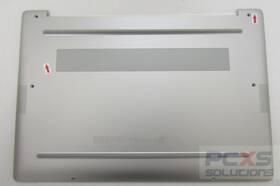
( Brand: Hp ), ( Manufacturer Part Number: N12891-001 ), ( Compatible Brand: For 3m ), ( Type: Bezel )
Review HP Used Pull Sps base Enclosure Wlan Elite Inch G3 Chromebook N12891
The **HP Chromebook 14" Elite Dragonfly (N12891-001) with SPS-Base Enclosure and C640 WLAN** is a premium, ultra-portable computing solution designed for professionals, educators, and tech-savvy users who demand both performance and security in a sleek, lightweight form factor. This system combines HP s signature durability with cutting-edge wireless capabilities, making it ideal for environments where mobility, security, and connectivity are paramount. The **N12891-001** model features a **14-inch 360-degree convertible touchscreen display**, offering versatility for note-taking, media consumption, or traditional laptop use, all while maintaining a compact footprint that weighs just **2.4 pounds**, ensuring effortless portability. The **SPS-Base Enclosure** enhances security by providing a secure, tamper-resistant housing for the device, ideal for corporate deployments or environments where physical protection is critical. Under the hood, this Chromebook is powered by the **MediaTek Helio G99 (MT6893) processor**, a high-performance chip optimized for ChromeOS, delivering smooth multitasking, efficient battery life, and seamless integration with Google s ecosystem. With **up to 16GB of LPDDR4X RAM** and **256GB of eMMC storage**, it balances speed and capacity, ensuring that users can handle demanding applications, cloud-based workflows, and media-rich tasks without compromise. The **C640 WLAN module** integrates advanced wireless technology, supporting **Wi-Fi 6 (802.11ax) and Bluetooth 5.0**, enabling faster, more stable connections in crowded networks and reducing latency for video calls, file transfers, and online collaboration. Security is further reinforced with **HP Sure View anti-glare display**, **HP Sure Start BIOS protection**, and **TPM 2.0 encryption**, safeguarding sensitive data against unauthorized access. The device also features **HP Sure Sense biometric authentication**, allowing for seamless, password-free logins via fingerprint recognition, while the **USB-C port** with **Thunderbolt 3 support** ensures compatibility with a wide range of peripherals, including external monitors, storage, and docking stations. Whether deployed in a corporate setting, educational institution, or remote workspace, this Chromebook delivers a harmonious blend of **performance, security, and mobility**, making it a standout choice for users who prioritize both functionality and peace of mind.
### **Pros and Cons of buying a HP Chromebook 14 (N12891) with SPS-Base Enclosure and Elite C640 WLAN**
#### **Pros**
1. **Performance and Hardware Specifications**
- The **Intel Core i5-1235U (12th Gen)** processor provides solid performance for everyday tasks, web browsing, office applications, and light multimedia work. It handles multitasking better than older Chromebooks.
- **8GB of RAM** ensures smooth operation when running multiple Chrome tabs, apps, and background processes without significant slowdowns.
- **128GB eMMC storage** is sufficient for basic use but may feel restrictive for users who store large files, videos, or install many Android apps. However, cloud storage (Google Drive, etc.) mitigates this limitation.
- **14-inch display** offers a good balance between portability and screen size, with **1920x1080 resolution**, providing clear text and decent media viewing.
2. **Chromebook Ecosystem and Software**
- **ChromeOS is lightweight, secure, and easy to use**, with seamless integration with Google Workspace (Docs, Sheets, Drive). It updates automatically, reducing maintenance hassle.
- **Android app compatibility** allows access to a growing library of apps (e.g., banking, productivity, entertainment), though performance may lag compared to a full-fledged OS.
- **Google Play Store integration** enables the use of many popular apps, though some may require occasional force-closing due to resource constraints.
- **Long software support** from HP, with ChromeOS updates for several years post-purchase.
3. **Portability and Build Quality**
- **Lightweight and slim design** makes it highly portable for students, travelers, or remote workers.
- **Durable build** with a metal frame and reinforced chassis, offering better protection against drops compared to some budget laptops.
- **Backlit keyboard** improves usability in low-light conditions.
4. **Connectivity and Features**
- **Wi-Fi 6 (Elite C640 WLAN)** ensures faster and more stable wireless connections, which is beneficial for streaming, video calls, and large file transfers.
- **USB-C and USB-A ports** provide flexibility for peripherals, external drives, and docking stations. The inclusion of a **USB-C to HDMI adapter** (often bundled) allows for easy external monitor connectivity.
- **SPS-Base Enclosure** (if included) adds a **kickstand, webcam privacy shutter, and additional ports** (e.g., HDMI, USB-A), enhancing functionality without needing a separate dock. This is particularly useful for students or professionals who need a more versatile setup.
- **HD webcam (720p)** is adequate for video calls but not ideal for high-quality content creation.
5. **Battery Life**
- Chromebooks are known for their **long battery life**, and this model typically lasts **8 10 hours** on a single charge for web browsing and light tasks. This makes it ideal for full-day use without frequent recharging.
6. **Security Features**
- ChromeOS includes **built-in security measures** such as automatic updates, sandboxing, and verification of apps from the Play Store, reducing the risk of malware.
- **TPM 2.0** chip provides hardware-level security for encryption and authentication.
7. **Affordability**
- Compared to Windows or macOS laptops with similar specifications, this Chromebook is **cost-effective**, making it an attractive option for budget-conscious buyers who don t need advanced software.
---
#### **Cons**
1. **Limited Storage**
- **128GB eMMC storage** is tight for users who store large files locally (e.g., high-resolution photos, videos, or games). While cloud storage helps, offline use may require frequent deletions or purchases of additional storage.
- Unlike SSDs, eMMC is slower, which can impact boot times and file transfers.
2. **No Traditional Operating System**
- ChromeOS is **not a full-fledged OS**, meaning it lacks support for:- **Native Windows or macOS apps** (e.g., Adobe Creative Suite, AutoCAD, or advanced programming tools).
- **Gaming** (though some Android games work, they are limited compared to Steam or Epic Games Store).
- **Heavy multitasking** (e.g., running virtual machines or complex software).
- Users who rely on **Windows-specific software** (e.g., for graphic design, engineering, or business applications) will need to use **Crosvm or Android emulation**, which is not as seamless as a native OS.
3. **Android App Limitations**
- While ChromeOS supports Android apps, **performance can be sluggish**, especially with demanding apps. Some apps may crash or require frequent restarts.
- **No full desktop environment** means no true multitasking (e.g., no side-by-side windows like on Windows or macOS).
4. **No DVD/CD Drive or SD Card Reader**
- The absence of a **physical drive** means no direct access to optical media or SD cards, which can be inconvenient for certain users (e.g., those who need to burn discs or transfer photos from cameras).
5. **Repairability and Upgradability**
- Like most Chromebooks, this model has **limited upgradability**. The RAM and storage are **soldered**, meaning they cannot be easily replaced by the user.
- While the battery is replaceable, other internal components (e.g., Wi-Fi card) may require professional servicing if damaged.
6. **Webcam and Microphone Quality**
- The **720p webcam** is adequate for video calls but lacks the clarity of higher-end cameras (e.g., 1080p). The microphone quality is also **average**, which may not be ideal for content creators or professional use.
- The **SPS-Base Enclosure** includes a **privacy shutter**, which is a nice feature but may not fully block light if the shutter mechanism is not perfect.
7. **Fan Noise Under Load**
- While the **Intel U-series processor** is power-efficient, the Chromebook may **generate noticeable fan noise** when running demanding tasks (e.g., compiling code, running heavy Android apps, or multitasking with many tabs open).
8. **Limited Customization**
- ChromeOS has **fewer customization options** compared to Windows or Linux. Users who prefer tweaking their OS (e.g., changing desktop themes, installing custom kernels) will find ChromeOS restrictive.
9. **Dependence on Google Services**
- ChromeOS is **deeply integrated with Google services** (Drive, Play Store, Chrome browser). Users who prefer alternatives (e.g., Microsoft 365, Firefox, or non-Google cloud storage) may find the ecosystem limiting.
10. **Potential for Overheating**
- Some users report that the **ventilation can be inadequate** under heavy loads, leading to **thermal throttling** or overheating. Proper airflow (e.g., not using it on soft surfaces) is recommended.
---
### **Conclusion**
The **HP Chromebook 14 (N12891) with SPS-Base Enclosure and Elite C640 WLAN** is a **strong, budget-friendly choice** for users who prioritize **simplicity, security, portability, and long battery life**. It excels in **everyday tasks such as web browsing, office work, streaming, and light multimedia consumption**. The **SPS-Base Enclosure adds significant value** by providing extra ports and a kickstand, making it more versatile for students or professionals who need a compact yet functional device.
However, it is **not ideal for users who require a full-fledged operating system** (e.g., for gaming, graphic design, programming, or running Windows applications). The **limited storage and lack of upgradability** may also be dealbreakers for power users or those who work with large files. Additionally, the **performance of Android apps can be inconsistent**, and the **lack of a traditional OS** restricts its use cases.
If you are looking for a **reliable, no-frills laptop for basic to moderate use**, this Chromebook is an excellent purchase. However, if you need **advanced software, gaming, or heavy multitasking**, you may want to consider a **Windows or macOS laptop** instead.
---
### **Recommendation**
**Buy this Chromebook if:**- You primarily use it for **web browsing, schoolwork, office tasks, streaming, or light content creation**.
- You value **security, simplicity, and long battery life**.
- You need a **portable, affordable device** that integrates well with Google Workspace.
- The **SPS-Base Enclosure** provides the extra functionality you need (e.g., HDMI output, kickstand).
- You are willing to rely on **cloud storage** for large files.
**Avoid this Chromebook if:**- You need to run **Windows or macOS applications** (e.g., Adobe Photoshop, AutoCAD, or advanced programming tools).
- You frequently work with **large files, videos, or games** that require significant storage or processing power.
- You expect **high-end performance** (e.g., for video editing, 3D rendering, or heavy multitasking).
- You dislike **Google s ecosystem** and prefer alternatives like Microsoft or Linux.
**Alternative Considerations:**- If you need **more storage**, look for a Chromebook
Details:
Hp USED PULL SPS-BASE ENCLOSURE WLAN Elite C640 14 inch G3 Chromebook - N12891-001-B. Please verify based on the part number and that it is compatible with your system. USPS does not guarantee delivery lead time they provide estimated dates.
part #: n12891001 prices
- $23.95-$65.00
specifications laptoscreelc:
- brand: Hp
- mpn: N12891-001
- compatible brand: For 3m
- type: Bezel
general laptoscreelc:
- condition: Used
- Computer Components Parts > Laptop Replacement Parts > Laptop Screens LCD Panels
shipping laptoscreelc:
- transit: 3-8 Days
- class: Standard, Expedited
- type: Calculated
- carrier: USPS, FedEx, UPS
- service: USPS Ground Advantage, USPS Priority Mail, FedEx Ground / FedEx Home Delivery, UPS Ground
- cost: $14.00
offer laptoscreelc:
- options: Ship-to-home
- quantity: 2
- sold: 0
- availability: In Stock
- started: February 23, 2026
payments laptoscreelc:
- other
- credit card: Mastercard
- wallet: Apple-pay
seller laptoscreelc:
- # reviews: 14805
- rating: 99.9%
- city: Tomball, Texas
returns laptoscreelc:
- policy: No Returns
Hp N12891-001 Is Similar To:
- 00ht716 Hp Lcd Digitizer Assembly Oem Pull For Lenovo Thinkpad Yoga (26.9% similar) 61 LCD digitize assembly oem pull for Leno think pad yoga 11E color UPC...(October 25th, 2018)
- 11-1101us Hp Oem Chromebook Toucad Trackpad Track Pad Mouse (23% similar) Oem Hp chromebook touched track pad track pad mouse ambo fully tested and working. 30 day warranty. Please see pics...(September 22nd, 2018)
- 11-v020wm Hp Chromebook Hd Touch Screen Chrome Os (29% similar) Comes with charger and chromebook also for dummies intel celery N3060 processor in good condition no major dings, dents, or scratches. Hp 11-V020WM 11...(April 22nd, 2018)
- 11-v031nr Hp Hd Display Chromebook New Factory Sealed 193015392526 (31% similar) Brand new factory sealed...(March 24th, 2019)
- 14-ak040wm 14-ak039wm Hp Chromebook White (32.3% similar) Hp chromebook 14-AK040WM white top 14 led LCD screen l 27 in excellent condition,newly pulled out by a certified technician from never or gently used product. 30 day warranty,money back guaranteed...(November 20th, 2017)
- 14-ak060nr Hp Chromebook Good Clean Lcd Frame Speakers Usb Board Screws (21.3% similar) I will further sell parts off of this as needed. Fast friendly first day shipping. This is for all pictured. It comes with some of the internal, bottom screws and pads. This is the exact one as pictured. It has the speakers, good clean frame and LCD. One large pad is missing. The last few photos are...(September 3rd, 2018)
- 17-e123cl Hp Pavilion Touch Lightly Used (12.4% similar) Absolutely no problems with it. Very lightly used. We bought it from Costco screen...(February 24th, 2019)
- 17-j-lcd-assemble Hp Used Envy Lcd Assemble Version (24.3% similar) Please for details. Hp envy 17-J LCD assemble non-touch version used overall good cosmetic condition, there are some keyboard marks on the screen. Hp envy 17-J laptop with non-touch screen. Anything else not mentioned or pictured is included. In their shipping details. All us and Italy buyers must ...(November 10th, 2018)
- 193015013162 Hp Chromebook White New Open Box (31.3% similar) 100 guaranteed. Hp chromebook X360 brand new open box free shipping...(March 4th, 2019)
- 337003-001 Hp 15.4-inch Tft Wsxga (23% similar) Ships from TX, USA. 4-INCH Taft scag Hp NX7000 w plastics part number: screen size: 15...(June 18th, 2017)
- 450.09706 Hp Chromebook Laptop Lcd Flex Cable Led Tested Warranty (19.5% similar) Orders purchased before noon central time are typically packaged and shipped out the same day. Stock photos. Notice: pictures shown are simply for reference. Item condition Hp oem original part taken from a good, working laptop tested and verified secondary identifier: 450...(August 29th, 2018)
