INNOLUX N133HCE-E7A Laptop Screen REV.C1 1080 13.3 In
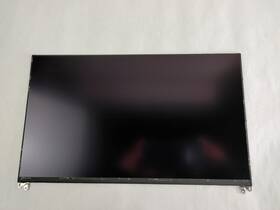
( Brand: Innolux ), ( Manufacturer Part Number: N133HCE-E7A ), ( Compatible Brand: For Innolux ), ( Type: Screen ), ( Compatible Product Line: N133hce-e7a Rev.c1 ), ( Screen Size: 13.3 In ), ( Aspect Ratio: 16 ), ( Unit Type: Unit ), ( Display Technology: Lcd ), ( Screen Finish: Matte ), ( Maximum Resolution: 1920 X 1080 ), ( California Prop 65 Warning: This Product Contains A Chemical Known To The State Of California To Cause Cancer. ), ( Item Length: 12 ), ( Machine Type: Laptop ), ( Touchscreen: No )
Review INNOLUX 13.3 In Matte Laptop Screen
The **Innolux N133HCE-E7A (Rev. C1)** is a high-performance, full-HD IPS panel designed to deliver an exceptional visual experience for laptops, workstations, and multimedia devices. Engineered with a **13.3-inch diagonal display**, this screen boasts a **1920 x 1080 (Full HD) resolution**, ensuring crisp, sharp imagery with vibrant colors and fine detail ideal for everything from office productivity to creative design work. The **In-Plane Switching (IPS) technology** incorporated into this panel provides a **178-degree wide viewing angle**, allowing for consistent color accuracy and contrast whether you're viewing content from a direct front-on perspective or at an oblique angle. This makes it particularly well-suited for collaborative environments, such as conference rooms or shared workspaces, where multiple users may need to view the screen simultaneously.
Underneath its sleek design lies a **brightness level of up to 300 nits**, striking a balance between visibility in well-lit environments and energy efficiency, while maintaining a **peak contrast ratio of 1000:1** to enhance depth and clarity in both text and graphics. The panel supports **16.7 million colors** through its **8-bit RGB color depth**, though it also features **FRC (Frame Rate Control) for 24-bit color**, ensuring richer hues and smoother transitions in dynamic content like videos and animations. This makes it a strong candidate for applications requiring precise color reproduction, such as photo editing, graphic design, or video production, where color fidelity is paramount.
For professionals and enthusiasts alike, the **N133HCE-E7A** incorporates **anti-glare treatment**, reducing reflections and eye strain during extended use, which is particularly beneficial in office or outdoor settings. Additionally, its **low blue light emission** helps promote eye comfort during prolonged screen time, aligning with modern ergonomic standards. The panel is optimized for **low power consumption**, making it an energy-efficient choice for laptops and thin-and-light devices without compromising on performance. Whether integrated into a business laptop, a creative workstation, or a multimedia entertainment device, this screen delivers a seamless blend of clarity, color accuracy, and durability, ensuring a premium visual experience across a variety of use cases.
**Pros and Cons of buying a Innolux N133HCE-E7A (13.3", 1920x1080, Rev. C1) Laptop Screen**
### **Pros**
The Innolux N133HCE-E7A is a widely used display module, particularly in budget and mid-range laptops, due to several strengths:1. **Resolution and Size** The 13.3-inch Full HD (1920x1080) resolution provides sharp text and decent image clarity for general tasks like web browsing, office work, and light multimedia consumption. The size is compact yet usable for most applications.
2. **Affordability** This display is commonly found in budget laptops (e.g., Acer, Lenovo, HP, and ASUS models), making it a cost-effective option for replacements or upgrades. Prices are generally lower compared to premium IPS or OLED panels.
3. **Wide Availability** Due to its popularity, spare parts and replacement screens are easily accessible, both from official retailers and third-party sellers. This reduces the risk of long wait times or difficulty in sourcing.
4. **Good Brightness and Viewing Angles** While not an IPS panel, it typically offers decent brightness (around 250-300 nits) and reasonable viewing angles for basic use. It performs adequately in well-lit environments for tasks like coding or document editing.
5. **Compatibility** The TN (Twisted Nematic) panel is compatible with most laptop motherboards and backlights, making it a straightforward upgrade for users replacing a faulty screen.
6. **Durability** TN panels are generally more durable than IPS or VA panels, with fewer concerns about burn-in or long-term color degradation, though they may suffer from slower response times.
7. **Backlight Options** The screen often pairs with a CCFL or LED backlight, and since it s a common module, finding compatible backlights is easier than with niche displays.
---
### **Cons**
Despite its advantages, the N133HCE-E7A has notable drawbacks:1. **Poor Color Accuracy and Gamut** TN panels are known for their limited color reproduction. The display typically has a narrow color gamut (around 65-70% NTSC), making it unsuitable for professional photo editing, graphic design, or color-critical work. Colors appear washed out or less vibrant compared to IPS or OLED panels.
2. **Narrow Viewing Angles** The viewing angles are significantly narrower than IPS panels, meaning colors and contrast degrade rapidly when viewed from the sides. This can be frustrating for collaborative work or presentations.
3. **Slow Response Time** TN panels often have slower response times (around 5-10 ms), which can lead to noticeable ghosting or smearing during fast-moving content like gaming or video playback. This is a major drawback for gamers or users who watch fast-paced action scenes.
4. **Low Contrast Ratio** The contrast ratio is typically poor (around 500:1 or lower), resulting in less vibrant blacks and a less immersive viewing experience compared to IPS or OLED displays.
5. **Eye Strain** The combination of poor color accuracy, brightness fluctuations, and limited contrast can cause eye strain during prolonged use, especially in dimly lit environments.
6. **Limited Use Cases** While suitable for basic tasks, the display is not ideal for content creators, designers, or gamers who require high-quality visuals. It also lacks features like high refresh rates or adaptive sync technologies found in premium panels.
7. **Potential for Burn-In (Minor Risk)** Although less prone to burn-in than OLED, static images (e.g., logos, menus) displayed for extended periods may leave faint ghosting, though this is rare with TN panels.
8. **Build Quality Variability** Some replacement screens may have lower-quality adhesives, cables, or protective coatings, leading to issues like screen detachment or reduced durability over time.
---
### **Conclusion**
The Innolux N133HCE-E7A is a practical and budget-friendly choice for users who prioritize affordability, availability, and basic functionality over visual quality. It excels in scenarios where cost is the primary concern and the display will be used for simple tasks like web browsing, office work, or light media consumption. However, for users who demand better color accuracy, wider viewing angles, or smoother visuals such as gamers, designers, or content creators the limitations of a TN panel make it an inferior option compared to modern IPS or OLED alternatives.
If you are replacing a faulty screen in an existing laptop or upgrading a budget device, this panel is a viable and cost-effective solution. However, if you are purchasing a new laptop and the display is a key consideration, investing in a laptop with an IPS or OLED screen would be far superior for long-term use.
---
### **Recommendation**
- **Buy the N133HCE-E7A if:**- You are replacing a screen in a budget laptop and need a reliable, affordable option.
- Your primary use involves basic tasks (email, documents, web browsing) where visual quality is not critical.
- You are on a tight budget and cannot afford an IPS or higher-end panel.
- **Avoid the N133HCE-E7A if:**- You work with color-sensitive tasks (photo editing, graphic design, video production).
- You game or watch fast-paced content where response time and contrast matter.
- You prioritize long-term eye comfort and immersive viewing experiences.
- You are purchasing a new laptop and can opt for a model with an IPS or OLED display instead.
For most users who require a premium display experience, upgrading to an IPS or OLED panel (even if slightly more expensive) will significantly enhance usability and satisfaction. The N133HCE-E7A is best suited for temporary or budget-specific needs rather than long-term use.
Details:
There may be signs of normal wear on these units that differ from the photos in listing. Displays are tested for signs of failing back-light and dead pixels. Shipping Information. If a part is not pictured, then it included in the sale.
Only items pictured are included. Compatibility. Tested for key functions, R2/Ready Resale. Please see the listing pictures.
Good Condition. Tested as complete unit in Linux environment and working.
part #: n133hcee7a prices
- $46.70-$63.99
specifications laptoscreelc:
- brand: Innolux
- mpn: N133hce-e7a
- compatible brand: For Innolux
- type: Screen
- compatible product line: N133hce-e7a Rev.c1
- screen size: 13.3 In
- aspect ratio: 16
- unit type: Unit
- display technology: Lcd
- screen finish: Matte
- maximum resolution: 1920 X 1080
- california prop 65 warning: This Product Contains A Chemical Known To The State Of California To Cause Cancer.
- item length: 12
- machine type: Laptop
- touchscreen: No
seller laptoscreelc:
- # reviews: 101916
- city: Indianapolis, Indiana
- rating: 99.8%
shipping laptoscreelc:
- cost: $0.00
- class: Standard, Expedited, One-day
- service: USPS Ground Advantage, UPS Ground, USPS Priority Mail, UPS Next Day Air Saver
- transit: 3-7 Days
- carrier: USPS, UPS
- type: Calculated
payments laptoscreelc:
- wallet: Google-pay
- other
- credit card: Discover
returns laptoscreelc:
- policy: Returns Accepted
- time: 30 Days
- paid by: Seller
- method: Money back
offer laptoscreelc:
- quantity: 1
- availability: In Stock
- sold: 0
- started: March 24, 2026
- options: Ship-to-home
general laptoscreelc:
- condition: Used
- Computer Components Parts > Laptop Replacement Parts > Laptop Screens LCD Panels
Innolux N133HCE-E7A Is Similar To:
- A111604g865n Generic Innolux Replacement Laptop Lcd Screen Wxga 721762178690 (36.4% similar) 3 inches Innolux N133BGE-EAA replacement laptop lcd screen 13. 875 x laptop lcd screen resolution: GSX HD 768 type: led diode connector: 30 pins bottom right may contain 3 to 5 dead pixels please match your original screens back light type, size, and resolution before you purchase this item, because...(July 12th, 2018)
- 0022099485698 Chimei Innolux N156bge-l21 Rev.c1 (33.6% similar) This is a tested chime 15. 6 laptop lcd screen. Model no: N156BGE-L21 rev. All photos are of the actual item so please review them carefully and submit any questions...(October 30th, 2017)
- 09f0dp Chimei Innolux Laptop Screen (41.6% similar) This item is used and has been tested to be fully functional. Chime Innolux N140BGE-L33 rev. C1 laptop screen 09F0DP. Please see pictures for specs...(July 20th, 2018)
- 0c00339 Innolux Genuine Lenovo Laptop Lcd Led Screen Grade (40.3% similar) Our highly trained and experienced technicians provide fast dependable service at very reasonable prices. Item:genuine Leno 15. Considered a bundle listing with the harness which is you are looking for lcd compatible model it easily removed just six Philips head screws and camera led think-pad ...(June 12th, 2018)
- 0jh0cn Innolux Genuine Led Lcd Screen (38.8% similar) Screen is in good condition. Look at pictures for details. Led lcd screen N140BGA-EA3 JH0CN 0JH0CN. Pulled from a working unit. Item is fully tested and works great. Genuine Innolux 14. Led lcd screen N140BGA-EA3 JH0CN 0JH0CN this listing is for a genuine Innolux 14. Item is used...(May 5th, 2018)
- 5d10k35945 Innolux Lenovo Ideapad Slim Led Lcd Screen Grade (35.2% similar) No one is ever ignored. Shipping: shipping charges are listed in this offer. All products are marked with serial number and QC badge. We combine shipping for multiple offers buyers. Panel brand: chi Meir Innolux model part number: N156HGE-EBB size: 15...(December 24th, 2018)
- 80aw-0e1-001nl Innolux New Lot Of Lcd Display Panel Screen Monitor Tft (30.9% similar) Trans missive resolution: 800 x 480 VGA aspect ratio: 16:9 h:v operating temperature: negative 20 to 70 degrees Celsius storage 30 80 Celsius. Contrast ratio: 300: 1 typ. Manufacturer: Innolux part number: AT080TN03 type of display: : 300 cd m2 typ. New lot of 120 Innolux AT080TN03 these are all ...(November 24th, 2018)
- 9r5k4 Dell Chimei Innolux Laptop (28.6% similar) Dell chime Innolux laptop lcd 9R5K4 N140FGE L32 rev c1 13...(February 15th, 2018)
- At070tn83 A70i Innolux New Touch Screen Lcd Panel Digitizer Board Bezel (27.3% similar) New out of box condition, in static free bags, warranty Innolux 7-INCH 7 touch screen lcd panel with digitize, board and bezel, complete kit. 5DMM pictures show one of the actual screen panel, kit is taken apart for pictures, quantity are available. 44HMM outline dimension: 165WX104H X5. 1 with 7 ...(June 13th, 2018)
- Bt101iw03-v.1 Innolux Lcd Display Screen (32.1% similar) There are lite scuffs from the keyboard on lcd. 1'' lcd display screen BT101IW03-V. You are buying on a tested and working Innolux comes with lcd ribbon cable...(February 24th, 2019)
- Bt10iw01 V.0 Innolux Led Lcd Wxga Glossy Screen (35.4% similar) For example, we keep all the motherboards in anti-static bags, etc. All products are in a good working and cosmetic condition. Photos on this page are of the actual product Innolux 10. Lcd screen is free of dead pixels, dark spots, or scratches on it. Lcd can has a dead pixels, dark spots...(April 7th, 2018)
