INNOLUX N140HCE-G51 Lcd Laptop Screen REV.C1 1080 In
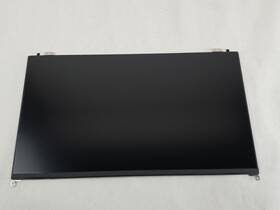
( Brand: Innolux ), ( Manufacturer Part Number: N140HCE-G51 ), ( Compatible Brand: For Innolux ), ( Type: Laptop Screen ), ( Compatible Product Line: N140hce-g51 Rev.c1 ), ( Screen Size: 14 In ), ( Aspect Ratio: 16 ), ( Unit Type: Unit ), ( Display Technology: Lcd ), ( Screen Finish: Matte ), ( Maximum Resolution: 1920 X 1080 ), ( Item Length: 12 ), ( Machine Type: Laptop )
Review INNOLUX In Matte Lcd Laptop Screen
The Innolux N140HCE-G51 REV.C1 is a high-quality 14-inch LCD laptop screen, offering a resolution of 1920 x 1080 pixels. This full HD display provides an impressive level of detail and clarity, making it ideal for a wide range of activities, from watching movies and playing games to working on documents and presentations.
The screen features a matte finish, which reduces glare and reflections, ensuring that you can see the content clearly, even in brightly lit environments. The display also has a wide viewing angle, allowing you to view the content from various angles without any significant color shift or loss of brightness.
In addition, the Innolux N140HCE-G51 REV.C1 is energy-efficient, thanks to its low power consumption. This means that it can help extend the battery life of your laptop, making it a great choice for those who are always on the go.
The screen is also durable and reliable, with a sturdy construction that can withstand regular use. It is also compatible with various laptop models, making it a versatile option for those who want to upgrade their display without having to buy a new laptop.
Overall, the Innolux N140HCE-G51 REV.C1 is a high-performance, full HD LCD laptop screen that offers excellent clarity, wide viewing angles, low power consumption, and durability. It is a great choice for anyone looking to upgrade their laptop display, whether for work or entertainment purposes.
Pros of buying Innolux N140HCE-G51 Rev.C1 1920x1080 14-inch LCD laptop screen:1. High resolution: With a 1920x1080 resolution, the screen offers sharp and clear images, making it ideal for multimedia tasks such as watching videos and playing games.
2. Wide viewing angles: The Innolux N140HCE-G51 Rev.C1 has wide viewing angles, allowing you to view the screen from different angles without experiencing color shift or loss of brightness.
3. Energy-efficient: The screen features low power consumption, which can help extend the battery life of your laptop.
4. Thin and lightweight: This 14-inch screen is thin and lightweight, making it easy to carry around and fit into smaller spaces.
Cons of buying Innolux N140HCE-G51 Rev.C1 1920x1080 14-inch LCD laptop screen:1. Lack of HDR support: The screen does not support HDR, which may result in less vibrant colors and lower contrast in HDR content.
2. Limited brightness: With a maximum brightness of 250 cd/m , the screen may not be suitable for use in brightly lit environments.
3. Lack of touchscreen capability: The Innolux N140HCE-G51 Rev.C1 does not have touchscreen capability, which may limit its usefulness for certain applications.
Conclusion:The Innolux N140HCE-G51 Rev.C1 1920x1080 14-inch LCD laptop screen is a good option for those looking for a high-resolution, energy-efficient, and lightweight screen for their laptop. Despite its lack of HDR support and limited brightness, its wide viewing angles and thin and lightweight design make it a suitable choice for most users.
Recommendation:If you are looking for a high-resolution, energy-efficient, and lightweight screen for your laptop, the Innolux N140HCE-G51 Rev.C1 1920x1080 14-inch LCD laptop screen is a good option to consider. However, if you require HDR support or higher brightness, you may want to consider other options with these features.
Details:
This compatibility should be obtained by comparing the model and part number of item from listing to one that customer is attempting replace. Tested as complete unit in Linux environment and working. Only the item in photo is included sale. ORDERS, Our system will combine order automatically if they fall within a set of guidelines.
Good Condition. This Innolux N140HCE-G51 REV.C1 14 in screen can be installed a number of systems. If possible, include photos or video to assist in understanding the problem. Displays are tested for signs of failing back-light and dead pixels.
part #: n140hceg51 prices
- $46.70-$63.99
specifications laptoscreelc:
- brand: Innolux
- mpn: N140hce-g51
- compatible brand: For Innolux
- type: Laptop Screen
- compatible product line: N140hce-g51 Rev.c1
- screen size: 14 In
- aspect ratio: 16
- unit type: Unit
- display technology: Lcd
- screen finish: Matte
- maximum resolution: 1920 X 1080
- item length: 12
- machine type: Laptop
returns laptoscreelc:
- method: Money back
- paid by: Seller
- policy: Returns Accepted
- time: 30 Days
general laptoscreelc:
- Computer Components Parts > Laptop Replacement Parts > Laptop Screens LCD Panels
- condition: Used
shipping laptoscreelc:
- transit: 4-9 Days
- cost: $0.00
- class: Standard, Expedited, One-day
- carrier: USPS, UPS
- service: USPS Ground Advantage, UPS Ground, USPS Priority Mail, UPS Next Day Air Saver
- type: Calculated
payments laptoscreelc:
- credit card: Mastercard
- wallet: Paypal
- other
offer laptoscreelc:
- sold: 0
- started: September 25, 2024
- availability: In Stock
- options: Ship-to-home
- quantity: 4
seller laptoscreelc:
- city: Indianapolis, Indiana
- rating: 99.6%
- # reviews: 81332
Innolux N140HCE-G51 Is Similar To:
- A111604g865n Generic Innolux Replacement Laptop Lcd Screen Wxga 721762178690 (35.9% similar) 3 inches Innolux N133BGE-EAA replacement laptop lcd screen 13. 875 x laptop lcd screen resolution: GSX HD 768 type: led diode connector: 30 pins bottom right may contain 3 to 5 dead pixels please match your original screens back light type, size, and resolution before you purchase this item, because...(July 12th, 2018)
- 0022099485698 Chimei Innolux N156bge-l21 Rev.c1 (34.8% similar) This is a tested chime 15. 6 laptop lcd screen. Model no: N156BGE-L21 rev. All photos are of the actual item so please review them carefully and submit any questions...(October 30th, 2017)
- 09f0dp Chimei Innolux Laptop Screen (40.8% similar) This item is used and has been tested to be fully functional. Chime Innolux N140BGE-L33 rev. C1 laptop screen 09F0DP. Please see pictures for specs...(July 20th, 2018)
- 0c00339 Innolux Genuine Lenovo Laptop Lcd Led Screen Grade (42.9% similar) Our highly trained and experienced technicians provide fast dependable service at very reasonable prices. Item:genuine Leno 15. Considered a bundle listing with the harness which is you are looking for lcd compatible model it easily removed just six Philips head screws and camera led think-pad ...(June 12th, 2018)
- 0jh0cn Innolux Genuine Led Lcd Screen (41.9% similar) Screen is in good condition. Look at pictures for details. Led lcd screen N140BGA-EA3 JH0CN 0JH0CN. Pulled from a working unit. Item is fully tested and works great. Genuine Innolux 14. Led lcd screen N140BGA-EA3 JH0CN 0JH0CN this listing is for a genuine Innolux 14. Item is used...(May 5th, 2018)
- 18201666 Innolux Genuine Lcd Display Hd For Lenovo (35.6% similar) 4/4 a HDTV NB check to see if this part is compatible with your system before purchasing. 4/3 a HDD NB5D10H34067IVO M140NWR4 r2 NB5D10K81642IV M140NWR6-R0 Hts NB5D10K81460LG LP140WHU-TPG1 NB5D10K81457SD LTN140AT39-L01 NB5D10K81083BO NT140WHM-N31 NB5D10K85754IN N140BGA-EB3 NB5D10H91344LG LP140WH8-...(January 11th, 2019)
- 5d10k35945 Innolux Lenovo Ideapad Slim Led Lcd Screen Grade (37.8% similar) No one is ever ignored. Shipping: shipping charges are listed in this offer. All products are marked with serial number and QC badge. We combine shipping for multiple offers buyers. Panel brand: chi Meir Innolux model part number: N156HGE-EBB size: 15...(December 24th, 2018)
- 80aw-0e1-001nl Innolux New Lot Of Lcd Display Panel Screen Monitor Tft (36.2% similar) Trans missive resolution: 800 x 480 VGA aspect ratio: 16:9 h:v operating temperature: negative 20 to 70 degrees Celsius storage 30 80 Celsius. Contrast ratio: 300: 1 typ. Manufacturer: Innolux part number: AT080TN03 type of display: lcd brightness: 300 cd m2 typ. New lot of 120 Innolux AT080TN03 ...(November 24th, 2018)
- 9r5k4 Dell Chimei Innolux Laptop (28% similar) Dell chime Innolux laptop lcd 9R5K4 N140FGE L32 rev c1 13...(February 15th, 2018)
- At070tn83 A70i Innolux New Touch Screen Lcd Panel Digitizer Board Bezel (27% similar) New out of box condition, in static free bags, warranty Innolux 7-INCH 7 touch screen lcd panel with digitize, board and bezel, complete kit. 5DMM pictures show one of the actual screen panel, kit is taken apart for pictures, quantity are available. 44HMM outline dimension: 165WX104H X5. 1 with 7 ...(June 13th, 2018)
- Bt101iw03-v.1 Innolux Lcd Display Screen (37% similar) There are lite scuffs from the keyboard on lcd. 1'' lcd display screen BT101IW03-V. You are buying on a tested and working Innolux comes with lcd ribbon cable...(February 24th, 2019)
