LENOVO NV116WHM-N48 Chromebook Lcd Screen Led 300E 11.6 1366X768
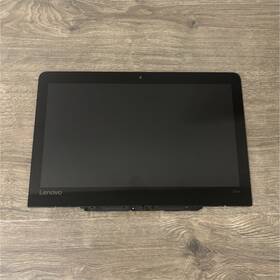
( Brand: Lenovo ), ( Manufacturer Part Number: NV116WHM-N48 ), ( Compatible Brand: For Lenovo ), ( Display Technology: Led Lcd ), ( Screen Size: 11.6 In ), ( Color: Black ), ( Compatible Model: 300e ), ( Compatible Product Line: For Chromebook ), ( Screen Finish: Matte ), ( Type: Lcd Screen ), ( Maximum Resolution: 1366 X 768 ), ( Item Height: 6.5 In ), ( Item Width: 0.25 In )
Review LENOVO Chromebook Lcd Screen 11.6 Inch Matte Led 1366x768
The **Lenovo NV116WHM-N48 300E Chromebook** features a sleek and functional **11.6-inch LED-backlit LCD display** that delivers crisp visuals for productivity, entertainment, and everyday tasks. This screen boasts a **1366x768 resolution**, providing a clear and sharp viewing experience with a standard 16:9 aspect ratio, ideal for web browsing, document editing, and multimedia consumption. The display is designed to offer vibrant colors and smooth contrast, ensuring readability even in well-lit environments, while its compact size makes it perfect for users who prioritize portability without sacrificing performance. Whether you're working on assignments, streaming videos, or managing emails, the display ensures a comfortable viewing experience with minimal eye strain. Built to complement the Chromebook s lightweight and durable construction, this screen is a key component in delivering a seamless, efficient, and user-friendly computing experience for both personal and professional use.
The Lenovo NV116WHM-N48 (300E) Chromebook is an affordable, entry-level device designed primarily for basic tasks like web browsing, document editing, and light multimedia consumption. Below is a detailed breakdown of its pros and cons, followed by a conclusion and recommendation.
---
### **Pros:**1. **Affordability**: This Chromebook is priced very competitively, making it accessible for budget-conscious buyers who need a simple, no-frills device for everyday tasks.
2. **Lightweight and Portable**: Weighing around 2.6 pounds (1.18 kg) and featuring a slim design, it is easy to carry around, ideal for students or professionals who need a device for on-the-go use.
3. **Decent Battery Life**: The Chromebook is equipped with a 3-cell battery that typically lasts between 8 to 10 hours on a single charge, which is reasonable for a low-end device. This makes it suitable for a full day of light use.
4. **Chrome OS**: Running Chrome OS, the device is secure, lightweight, and optimized for web-based applications. It updates automatically, ensuring compatibility with the latest online tools and security patches.
5. **Basic Performance**: The Intel Celeron N4100 processor (a quad-core, low-power chip) handles everyday tasks like web browsing, email, Google Docs, and light video streaming without significant lag. It s not designed for demanding tasks like gaming or video editing, but it gets the job done for simple needs.
6. **Full HD Display**: The 11.6-inch LED-backlit LCD screen offers a resolution of 1366x768, which is clear enough for reading, watching videos, and basic productivity work. While not as sharp as higher-resolution displays, it is adequate for its price point.
7. **USB-C Port**: The inclusion of a USB-C port (alongside a USB 2.0 port) allows for modern connectivity options, such as charging, data transfer, and connecting to peripherals like keyboards or mice.
8. **No Bloatware**: Unlike some Windows-based laptops, Chromebooks come with minimal pre-installed software, reducing the risk of bloatware slowing down the system.
9. **Durability**: Lenovo Chromebooks are generally built to last, with sturdy plastic construction and a focus on longevity, which is appealing for users who want a device that won t break easily.
10. **Google Play Store Access**: The device supports the Google Play Store, allowing users to install a limited selection of Android apps, which can be useful for productivity or entertainment.
---
### **Cons:**1. **Limited Storage**: The Chromebook comes with only 32GB of eMMC storage, which is very limited. While Chrome OS primarily relies on cloud storage (Google Drive), this can be restrictive for users who need to store large files locally or prefer offline access to apps and data.
2. **No Upgradable RAM or Storage**: The RAM and storage are soldered to the motherboard, meaning users cannot upgrade them later. This can be frustrating if the device becomes outdated and you want to extend its lifespan.
3. **Weak Processor**: The Intel Celeron N4100 is a low-power chip optimized for efficiency rather than performance. While it handles basic tasks well, it struggles with multitasking, heavy applications, or even moderately demanding web browsing (e.g., multiple tabs with videos or complex websites). It also lacks an integrated GPU, so graphics performance is poor.
4. **Single USB Port (USB-C)**: While the USB-C port is modern, the Chromebook only includes one such port (alongside a USB 2.0 port). This limits connectivity options for users who need to connect multiple peripherals simultaneously. There is no HDMI, DisplayPort, or additional USB ports, which can be inconvenient.
5. **No SD Card Reader**: The absence of an SD card reader means users cannot easily transfer photos or videos from cameras or other devices without using a USB adapter or cable.
6. **Limited Portability for Some Users**: At 11.6 inches, the screen is small, which may not be comfortable for extended use, especially for tasks like coding, writing, or graphic design. Users who prefer larger screens may find this size cramped.
7. **Chrome OS Limitations**: While Chrome OS is secure and efficient, it is not ideal for users who rely heavily on Windows-specific software. Compatibility with non-web applications is limited, and some professional or creative tools may not be available.
8. **No Backlit Keyboard**: The keyboard lacks backlighting, which can be inconvenient in low-light environments. This is a minor inconvenience but one that some users may find frustrating over time.
9. **Speaker Quality**: The built-in speakers are basic and lack depth or clarity, which may not be satisfactory for users who enjoy high-quality audio or frequently use the device for media consumption.
10. **Limited Fan Cooling**: The Chromebook lacks a cooling fan, which means the processor may throttle under heavy loads to prevent overheating. This can lead to slower performance during demanding tasks, though such tasks are unlikely on this device.
---
### **Conclusion:**The Lenovo NV116WHM-N48 (300E) Chromebook is a solid choice for users who prioritize affordability, portability, and simplicity. It excels in scenarios where the device will primarily be used for web browsing, email, document editing, and light multimedia consumption. Its lightweight design, decent battery life, and Chrome OS make it a practical option for students, budget-conscious professionals, or anyone who needs a no-frills device for basic tasks.
However, its limitations such as the weak processor, limited storage, lack of upgradability, and minimal connectivity options make it unsuitable for users with demanding needs. If you require multitasking, offline access to heavy applications, or the ability to connect multiple peripherals, this Chromebook will quickly feel restrictive. Additionally, users who prefer larger screens or better audio quality may find it lacking.
For those who accept these trade-offs in exchange for a low-cost, portable device, the NV116WHM-N48 is a reliable and functional choice. For others, especially those who need more power or flexibility, investing in a slightly higher-end Chromebook or a Windows-based laptop may be worth the extra cost.
---
### **Recommendation:** - **Buy this Chromebook if:**- You need a budget-friendly, lightweight device for basic tasks like web browsing, email, and light document editing.
- You primarily rely on cloud storage (Google Drive) and don t need much local storage.
- You don t require high-performance computing, gaming, or advanced multimedia editing.
- Portability is a priority, and you re okay with a small screen and limited connectivity options.
- **Avoid this Chromebook if:**- You need a device for multitasking, heavy applications, or offline work that requires significant local storage.
- You frequently connect multiple peripherals or need an HDMI output for external displays.
- You prefer a larger screen or better audio quality.
- You rely on Windows-specific software or require a more powerful processor for demanding tasks.
For a slightly better alternative within a similar price range, consider the **Acer Chromebook Spin 311** or **HP Chromebook 14**, which offer slightly more storage, better processors, and additional ports (like HDMI). However, if your needs align closely with the NV116WHM-N48 s strengths, it remains a practical and cost-effective option.
Details:
Lenovo 300E Chromebook LCD Screen 11.6 Matte LED 1366x768 NV116WHM-N48.
part #: nv116whmn48 prices
- $25.00-$53.00
specifications laptoscreelc:
- brand: Lenovo
- mpn: Nv116whm-n48
- compatible brand: For Lenovo
- display technology: Led Lcd
- screen size: 11.6 In
- color: Black
- compatible model: 300e
- compatible product line: For Chromebook
- screen finish: Matte
- type: Lcd Screen
- maximum resolution: 1366 X 768
- item height: 6.5 In
- item width: 0.25 In
seller laptoscreelc:
- rating: 100.0%
- # reviews: 36
- city: Bowling Green, Kentucky
payments laptoscreelc:
- credit card: Discover
- other
- wallet: Google-pay
offer laptoscreelc:
- quantity: 1
- started: February 23, 2026
- sold: 0
- best offers: True
- availability: In Stock
- options: Ship-to-home
general laptoscreelc:
- Computer Components Parts > Laptop Replacement Parts > Laptop Screens LCD Panels
- condition: Used
returns laptoscreelc:
- policy: No Returns
shipping laptoscreelc:
- service: USPS Ground Advantage
- cost: $8.46
- carrier: USPS
- type: Calculated
- class: Standard
- transit: 4-10 Days
Lenovo NV116WHM-N48 Is Similar To:
- 00hm076 Lenovo Lcd Touch (26.3% similar) 00HM076 - Lenovo 14. Shipping orders are normally processed promptly within hours. However, under certain circumstances, there may be some delay. Need it fast. For details. Picture is for reference only. Product has been tested and pulled from working systems. Free shipping is for lower 48 ...(March 1st, 2019)
- 00hm806 Lenovo Lcd Display Thinkpad Tablet Helix (26% similar) I ordered for cracked lcd replacement but don't need it BC just a new laptop happy buying...(October 18th, 2018)
- 00hn541 Lenovo Thinkpad Lcd Screen Front Bezel (43% similar) The customer is urged to certify that parts ordered are correct one needed...(October 16th, 2018)
- 00hn684 Lenovo Thinkpad Edp Lcd Cable For Touch Models Fru (36.1% similar) Lenovo think pad 00HN684 cable EDP for touch new genuine T450S 2 lcd model's Frau: compatible: touch pad condition: brand...(June 10th, 2018)
- 00hn747 Lenovo Thinkpad Touch Screen Fhd Ips New (35.8% similar) New open box. Item is brand new. Ordered the wrong part, didn realize till I opened box...(March 18th, 2019)
- 00hn825 Lg New Lenovo Thinkpad Led Lcd Screen Fhd Ips Ag (38.2% similar) Same-day shipping:same day shipping is available by special request only, on a case-by-case basis. Includes original bag, film cover is still in place. If for any reason an order is shipped to such address, the will have warranty voided - no of type be honored. Customer provided postage us. Its made...(April 16th, 2019)
- 00hn827 Lenovo Lcd Panel 14 (27.5% similar) However under certain circumstances there may be some delay and we request your patience. Lcd panel 14 HD x multi-touch glossy Bacall: Lenovo 00HN827...(June 21st, 2017)
- X1 20a7 Version 00hn829 Carbon Panel 20a8 Ibm Lenovo Touch Type Lcd 2 (19.4% similar) Application laptop model number LP140QH1 sp a2 screen size 14 compatible brand Lenovo widescreen yes interface type led products status stock resolution response time 2MS brightness 250CD m display ratio contrast ratio panel type Taft...(May 30th, 2015)
- 00hn835 04y1558 04w1596 04w3555 Lenovo Oem Lcd Screen (31.3% similar) Condition: used whats included: oem Lenovo X121E X130E X131E X140E11...(April 13th, 2018)
- 00hn842 Lenovo Lcd 14 Wqhd (29.7% similar) Lenovo think pad x1 carbon gen 2 HD touch screen bezel HN829 LP140QH1THIS lcd has one tiny very small scratch on the plastic sold at discount front can be peel away and remove in you ever need to return this part for any reason,be sure not tamper proof warranty sticker other tag that contains serial...(June 27th, 2017)
- 00hn843 Lenovo Ibm Touch Lcd For Thinkpad Yoga (33.1% similar) This is an original oem product. Condition: this item has passed our rigorous quality control guidelines that are set by the original equipment manufacturer. Qty 27 available, call for discount index computer re-marketing inc. Oem our in house technicians have been trained and certified on the ...(July 24th, 2018)
