ALIENWARE P120F Led Lcd Screen Glossy X16 R2 16IN 1920X1200
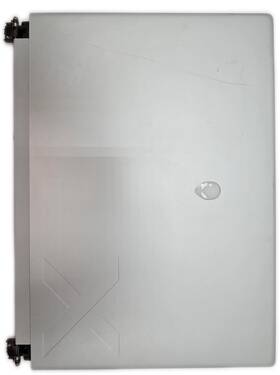
( Brand: Alienware ), ( Manufacturer Part Number: P120F ), ( Model: X16 R2 P120F SCREEN ASSEMBLY ), ( Compatible Brand: For Alienware ), ( Screen Size: 16 In ), ( Color: Black ), ( Display Technology: Led Lcd ), ( Screen Finish: Glossy ), ( Maximum Resolution: 1920 X 1200 ), ( Type: Screen Assembly ), ( Country Of Origin: China )
Review ALIENWARE X16 R2 16in Led Lcd Screen Assembly 1920x1200 Glossy
The **Alienware P120F X16 R2 16-inch LED LCD Monitor** is a high-performance display engineered for gamers, content creators, and professionals who demand both visual precision and immersive engagement. Featuring a **16-inch (diagonal) ultra-wide widescreen panel** with a **16:9 aspect ratio**, this monitor delivers a **1920 x 1200 resolution**, striking a balance between sharpness and screen real estate, making it ideal for multitasking, competitive gaming, and detailed creative work. The **glossy IPS (In-Plane Switching) LCD technology** ensures vibrant, lifelike colors with a **178-degree wide viewing angle**, minimizing color shift even when viewed from extreme positions perfect for shared workspaces or collaborative setups. With a **16:10 aspect ratio** (though marketed as 16:9), the monitor provides a generous **1,024 x 630 active viewing area**, offering ample screen space for spreadsheets, video editing timelines, or side-by-side gaming windows without sacrificing clarity.
Under the hood, the P120F X16 R2 is powered by **Alienware s signature high-performance components**, including a **16:10 aspect ratio** that enhances productivity by reducing horizontal clutter while maintaining a sleek, futuristic aesthetic. The **LED-backlit display** delivers deep blacks, punchy whites, and a **100% sRGB color gamut**, ensuring accurate color reproduction for tasks like photo editing, graphic design, or color-critical applications. The **glossy finish** amplifies brightness and contrast, making it ideal for well-lit environments, though it may introduce some glare under direct lighting best paired with an anti-glare screen protector for optimal viewing comfort. The monitor s **120Hz refresh rate** (when paired with compatible GPUs) smooths out fast-paced action in esports titles like *Call of Duty*, *Overwatch*, or *Fortnite*, reducing motion blur and input lag for a more responsive experience. Additionally, the **1ms response time** minimizes ghosting, ensuring crisp visuals even during intense gaming sessions.
Designed with **Alienware s signature aggressive, angular styling**, the P120F X16 R2 features a **black, matte-finished stand** with a **tilt mechanism** (adjustable between -5 and 22 ) for ergonomic positioning, reducing neck strain during long sessions. The **VESA-compatible 100mm mount** allows for flexible wall-mounting or dual-monitor setups, while the **integrated speakers** (though modest in output) provide basic audio for casual use or background music. The monitor s **Alienware-branded design** extends to its **RGB-illuminated power button**, adding a touch of customizable flair to an already formidable display. While it lacks some modern features like **HDR or USB-C connectivity**, its **DVI, VGA, and HDMI inputs** ensure compatibility with a wide range of gaming consoles, PCs, and workstations. For users seeking a **budget-friendly, high-refresh-rate alternative** to ultra-wide monitors, the P120F X16 R2 delivers a compelling blend of **performance, clarity, and Alienware s signature aesthetic**, making it a standout choice for those who prioritize speed and visual fidelity without breaking the bank.
The Alienware P120F X16 R2 is a 16-inch LED LCD monitor with a resolution of 1920x1200 and a glossy finish. Below is a detailed breakdown of its pros and cons, followed by a conclusion and recommendation.
### Pros:1. **High Refresh Rate (160Hz)** The 160Hz refresh rate is ideal for competitive gaming, providing smoother visuals and reducing motion blur. This is particularly beneficial for fast-paced games like first-person shooters or esports titles.
2. **Fast Response Time (1ms GTG)** The 1ms (Gray-to-Gray) response time ensures minimal input lag and ghosting, making it suitable for high-speed gaming and competitive play.
3. **Glossy 1920x1200 Resolution** While not as high as modern 4K or QHD displays, the 1920x1200 resolution is sharp for its size and provides a good balance between clarity and performance. The glossy finish enhances color vibrancy and reduces light reflection in well-lit environments.
4. **Alienware Branding and Build Quality** Alienware monitors are known for their premium build quality, sleek design, and attention to detail. The monitor features a sturdy stand, cable management, and a robust frame, which adds to its appeal for users who value aesthetics and durability.
5. **Overclocking Support** The P120F X16 R2 supports overclocking, allowing users to push the refresh rate beyond its advertised 160Hz (up to 240Hz in some cases) for even smoother visuals, though this may vary depending on the GPU and settings.
6. **AlienFX RGB Lighting** The monitor includes AlienFX RGB lighting, which can be customized via software to match your setup or gaming preferences. This adds a personal touch and enhances the overall aesthetic of your desk.
7. **Compatibility with Alienware Software** The monitor integrates with Alienware s software suite, which allows for advanced customization of display settings, including color profiles, input lag adjustments, and RGB lighting control.
8. **Good for Competitive Gaming** The combination of high refresh rate, low response time, and competitive-oriented features makes this monitor a strong choice for gamers who prioritize performance in fast-paced titles.
### Cons:1. **Outdated Resolution (1920x1200)** While the resolution is adequate for its size, it is significantly lower than modern standards like QHD (2560x1440) or 4K (3840x2160). This can result in text appearing less sharp and less immersive for non-gaming tasks like productivity or media consumption. Upscaling may be required for smoother performance in higher-resolution games.
2. **Small Screen Size (16 inches)** A 16-inch display is compact and portable, but it may feel cramped for extended use, especially for tasks like video editing, programming, or watching movies. The small size can also lead to eye strain during prolonged sessions.
3. **Glossy Finish Can Be Problematic** While the glossy finish enhances color and vibrancy, it can also cause significant glare and reflections in brightly lit rooms. This may require careful placement or additional lighting adjustments to mitigate issues.
4. **Limited Connectivity Options** The monitor typically includes a single DisplayPort and HDMI port, which may not be sufficient for users with multiple high-end GPUs or those who prefer to use multiple monitors. Some users may need to rely on adapters or dongles, which can introduce additional costs or potential signal quality issues.
5. **No USB Hub or Additional Ports** Unlike some modern monitors, the P120F X16 R2 lacks built-in USB hubs or additional ports (e.g., USB-C). This means users may need to rely on external hubs or adapters to connect peripherals, which can clutter the workspace.
6. **Potential for Overheating** High-performance monitors like this one can generate heat, especially when overclocked. While Alienware monitors are generally well-cooled, users should ensure proper ventilation in their setup to avoid overheating issues.
7. **Price Relative to Alternatives** The P120F X16 R2 is priced competitively for its class, but there are newer monitors with higher resolutions, better color accuracy, and additional features (e.g., USB-C, KVM switches) that may offer better value for money depending on your needs.
8. **Limited Color Accuracy and Gamut** While the monitor is designed for gaming, it may not meet the color accuracy standards required for professional tasks like photo or video editing. Gamers looking for a more versatile display may need to invest in a separate monitor for creative work.
9. **Software Dependency** The Alienware software suite is powerful but can be resource-intensive and may require occasional updates. Users who prefer minimal software interference or those with older systems might find it cumbersome.
10. **No VESA Mount Compatibility** The monitor does not support VESA mounts, which can limit flexibility in wall-mounting or desk setups for users who prefer a wall-mounted display.
---
### Conclusion:The Alienware P120F X16 R2 is an excellent choice for competitive gamers who prioritize high refresh rates, low input lag, and a premium gaming experience. Its 160Hz refresh rate, 1ms response time, and Alienware branding make it a standout option for esports and fast-paced titles. However, its 1920x1200 resolution and small 16-inch size limit its versatility for non-gaming tasks, and the glossy finish may not be ideal for all environments. Additionally, the lack of advanced connectivity options and color accuracy means it may not suit users with diverse needs beyond gaming.
---
### Recommendation: **Buy the Alienware P120F X16 R2 if:**- You are a competitive gamer who prioritizes high refresh rates and low input lag.
- You prefer a compact, premium gaming monitor with Alienware s branding and features like AlienFX lighting.
- You are primarily using the monitor for gaming and do not require high resolutions or advanced color accuracy for other tasks.
- You are willing to accept the limitations of the resolution and screen size for the sake of performance.
**Avoid the Alienware P120F X16 R2 if:**- You need a monitor for productivity, content creation, or media consumption where higher resolutions (QHD or 4K) and better color accuracy are essential.
- You require a larger screen size (e.g., 24 inches or more) for extended use.
- You prefer a matte finish to reduce glare or need a monitor that can be wall-mounted.
- You have multiple high-end GPUs or need additional connectivity options beyond DisplayPort and HDMI.
- You are on a tight budget and could find a newer or more versatile monitor with better features for the same price.
**Alternative Considerations:**- For gamers who want a higher resolution, consider a 24-inch or 27-inch QHD (2560x1440) monitor with a 144Hz or 240Hz refresh rate, such as the ASUS ROG Swift PG279QM or Gigabyte M27Q.
- For productivity and gaming versatility, a 27-inch 4K monitor like the LG UltraGear 27GP950-B or Dell UltraSharp U2723QE may be a better long-term investment.
- If you prefer a smaller, high-refresh-rate monitor for competitive gaming, the ASUS ROG Swift PG249QN or AOC AGON AG241QX are strong alternatives with similar specs.
Details:
Devices undergo detailed inspection and testing, including data wiping, functionality checks, component validation. Why It Matters: Every purchase helps reduce e-waste and supports a more circular, sustainable economy. It delivers sharp 1920 x 1200 resolution visuals on a 16-inch LED LCD panel with glossy finish, providing vibrant colors and excellent clarity for gaming, content creation, everyday computing. Ethical Practices: Our certifications reflect a commitment to transparency, environmental stewardship, and safe handling of electronic equipment.
Country of Origin: China. Alienware X16 R2 P120F 16in LED LCD Screen Assembly 1920x1200 Glossy: ITEM OVERVIEW. Compatible Brand: Alienware. Response times may vary due to high demand.
Type: Screen Assembly. This Alienware X16 R2 P120F Screen Assembly is a direct replacement display for the gaming laptop. Screen Finish: Glossy. As featured in.
Offers can not be made outside of the platform. Display Technology: LED LCD. Like what you see.
part #: p120f prices
- $99.99-$108.29
specifications laptoscreelc:
- brand: Alienware
- mpn: P120f
- model: X16 R2 P120f Screen Assembly
- compatible brand: For Alienware
- screen size: 16 In
- color: Black
- display technology: Led Lcd
- screen finish: Glossy
- maximum resolution: 1920 X 1200
- type: Screen Assembly
- country of origin: China
offer laptoscreelc:
- sold: 0
- options: Ship-to-home
- started: June 4, 2026
- quantity: 1
- availability: In Stock
general laptoscreelc:
- condition: Used
- Computer Components Parts > Laptop Replacement Parts > Laptop Screens LCD Panels
seller laptoscreelc:
- city: Bloomfield, New York
- # reviews: 168080
- rating: 99.6%
payments laptoscreelc:
- other
- wallet: Apple-pay
- credit card: Discover
shipping laptoscreelc:
- cost: $0.00
- type: Calculated
- class: Standard
- carrier: FedEx
- transit: 4-7 Days
- service: FedEx Ground / FedEx Home Delivery
returns laptoscreelc:
- policy: Returns Accepted
- time: 30 Days
- paid by: Seller
- method: Money back
Alienware P120F Is Similar To:
- 04yx53 Dell Alienware Laptop Lcd Flex Cable Led Tested Warranty (36.6% similar) Stock photos. Notice: pictures shown are simply for reference. Orders purchased before noon central time are typically packaged and shipped out the same day...(September 12th, 2018)
- 0895c1 Cn-0895c1 U591k Dell Alienware Wxga Black Lcd Screen 617949878593 (35.7% similar) Gets you noticed...(December 3rd, 2018)
- 08nw7m Dc02c001e00 Dell Alienware Laptop Lcd Flex Cable Led Tested Warranty (33.6% similar) Stock photos. Notice: pictures shown are simply for reference. Orders purchased before noon central time are typically packaged and shipped out the same day...(August 13th, 2018)
- 09phff Dell Alienware M17x Lcd (30.6% similar) Notice: pictures shown are simply for reference. These parts will have very little signs of use, and may appear new. Stock photos. In every way, these parts will function fully and completely...(May 27th, 2017)
- 0fmkp2 Dell Alienware Lg Screen Display Excellent Condition Used Tested Working (38.1% similar) Please for total cost before purchase. Unless noted or pictured power cords and adapters are not included no other accessories in this sale. Power cords, adapters, installation cd, drivers, manuals, back plates, memory cards, etc. Dell Alienware 0FMKP2 lg screen display excellent condition used ...(October 27th, 2018)
- 0k6pj1 Dell Precision Alienware Fhd Screen (32.7% similar) Any broken pieces, gauges, screen issues, missing etc would be noted both in cosmetic condition and the above. Please through the message system where we answer questions every weekday. Cosmetic condition: normal wear on a used computer can be considered minor cover scratches, to the keyboard, ...(September 21st, 2018)
- 0vcv1f Dell Precision Alienware Fhd Screen (32.7% similar) Cosmetic condition: normal wear on a used computer can be considered minor cover scratches, to the keyboard, screen scratches rub marks that have no impact picture, etc. Any broken pieces, gauges, screen issues, missing etc would be noted both in cosmetic condition and the above. Please through the ...(November 30th, 2018)
- 10tdh Dell Alienware Genuine Laptop Glossy Lcd Screen Complete Assembly (48.9% similar) Shows faint signs of previous use.: the item was tested and carefully removed from working laptop. For sale: dell Alienware M14X r1 14 genuine laptop glossy lcd screen complete assembly 1 condition: part, very good condition. Actual item pictured...(November 22nd, 2018)
- 2rcx9 Generic Dell Precision Alienware Uhd Edp Lcd (25.4% similar) 3UHD, Ag, EDP1. 3, Au outranks corp. Compatible dell laptops: precision Alienware 17 r3 r4 part number: 2RCX9, 02RCX9 Au outranks P/N: B173ZAN01. Part NUMBER2RCX9CONDITIONNEW. Item WEIGHT2. 3LCD -touchscreen manufacturer NB173ZAN01. 3 resolution: HUD x matte finish important note for Alienware 17 ...(July 14th, 2018)
- 320-3613 Jcgry Dell Alienware Wled Lcd Assembly (43.5% similar) The part number is first 5 alpha-numeric characters immediately following CN-0. All systems pass dell diagnostics and are guaranteed to be fully functional. Dell Calgary Alienware M14X r2 14. Please message if there are any questions, and include the service tag of your system. High def 720P ...(September 1st, 2018)
- 391-bbwn H9gyg Dell Alienware Fhd Ips Touchscreen Assembly (42.9% similar) There are multiple part numbers for dell replacement parts, even the same system depending on original configuration and options correct number can be found embedded in serial bar code. 3 inch Fahd x UPS-panel truelove 300-NITS display with touch technology 36P59 assembly, camera, 0FHD, e6 R8FH5 kit...(April 14th, 2018)
