ASUS UX8406CA-DS79T Bottom Screen Zenbook Dual Oled Laptop Duo 3K 120HZ Touchscreen
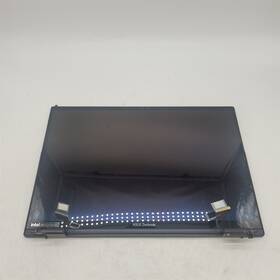
( Brand: Asus ), ( Manufacturer Part Number: UX8406CA-DS79T ), ( Compatible Brand: For Asus ), ( Type: Bottom Screen )
Review ASUS Bottom Screen Zenbook Dual Inch Oled 3k 120hz Touchscreen Laptop
The **ASUS ZenBook Duo 14 OLED UX8406CA-DS79T Bottom Screen** is a meticulously engineered, high-performance touchscreen panel designed exclusively for ASUS s revolutionary dual-screen laptop concept, the **ZenBook Duo 14 OLED**. This precision-crafted display is the lower of the two 3K (3000 x 2000 pixels) OLED screens, delivering an immersive, ultra-sharp visual experience with unparalleled clarity and color accuracy. Engineered with ASUS s proprietary **OLED technology**, the panel features a **120Hz refresh rate**, ensuring fluid motion, smooth scrolling, and near-instantaneous response times ideal for multitasking, creative workflows, and media consumption. The **3K resolution** provides a pixel density of **221 PPI**, rendering text and images with breathtaking sharpness, while the **100% DCI-P3 color gamut** ensures vibrant, lifelike hues with deep blacks and infinite contrast ratios, making it perfect for video editing, graphic design, and entertainment.
The bottom screen is optimized for **touch functionality**, featuring **10-point multi-touch support** and **ASUS Active Pen compatibility**, allowing for precise input and intuitive interactions. Its **14-inch diagonal size** complements the top screen s design, offering a seamless dual-display experience that maximizes productivity whether splitting applications, annotating documents, or using the screen as a secondary workspace. The panel is built with **ASUS s ErgoSense technology**, which enhances ergonomics by adjusting the screen s angle for better viewing comfort during extended use. Additionally, the **anti-glare coating** minimizes reflections, ensuring consistent visibility even in bright environments, while the **HDR400 support** elevates dynamic range, delivering richer details in both bright and dark scenes.
Under the hood, the display is backed by **ASUS s advanced panel calibration and color management tools**, allowing users to fine-tune settings for optimal performance across various tasks. The **low blue light mode** and **eye comfort technology** further reduce eye strain during prolonged sessions, making it suitable for both professional and casual users. Whether you're a content creator, a student, or a power user, the **ZenBook Duo 14 OLED s bottom screen** combines cutting-edge technology with thoughtful design, offering a premium visual experience that elevates productivity and creativity to new heights. Built to ASUS s high standards, this screen is not just an accessory it s a cornerstone of the Duo 14 s innovative dual-display ecosystem.
### Pros and Cons of Buying a Replacement Bottom Screen for the ASUS ZenBook Duo 14 OLED (UX8406CA-DS79T)
#### **Pros:**1. **High-Quality Display** The ZenBook Duo 14 features a **3K OLED touchscreen (2880 x 1800 resolution)** with **120Hz refresh rate**, delivering sharp, vibrant visuals and smooth performance for multimedia, productivity, and gaming. OLED screens also offer deeper blacks and better contrast compared to traditional LCDs.
2. **Touchscreen Functionality** The touchscreen is useful for **note-taking, drawing, or interactive applications**, making it ideal for professionals, artists, or students who rely on digital annotation.
3. **Dual-Screen Design** The **detachable second screen (UX8406CA-DS79T)** enhances productivity by allowing multitasking (e.g., using one screen for work and the other for reference material). This is a unique feature that sets it apart from standard laptops.
4. **Durable Build** ASUS uses **aluminum chassis and reinforced hinges**, which contribute to a sturdy and premium feel. The screen is also designed to be **durable against wear and tear**, though accidental damage can still occur.
5. **Compatibility with ASUS Ecosystem** If you already own other ASUS devices (e.g., monitors, peripherals), the replacement screen integrates seamlessly with ASUS s software and accessories.
6. **Wider Color Gamut & HDR Support** The OLED panel supports **wide color gamut (100% DCI-P3)** and **HDR10**, making it ideal for **video editing, graphic design, and content creation**.
7. **Long Lifespan of OLED** While OLED screens can degrade over time (burn-in risk), high-quality panels from reputable manufacturers (like ASUS) are designed to last **years** with proper usage.
8. **After-Sales Support & Warranty** Purchasing from **ASUS-authorized sellers or official repair centers** ensures warranty coverage, reducing long-term risks.
---
#### **Cons:**1. **High Cost** Replacement screens for premium OLED laptops are **expensive**, often ranging between **$500 $800 ** depending on the seller and authenticity. This can be a significant investment, especially if the laptop is not under warranty.
2. **Risk of Counterfeit or Low-Quality Replacements** Buying from **unverified third-party sellers** may result in **fake screens, poor image quality, or compatibility issues**. Always purchase from **ASUS-approved vendors** or well-reviewed repair shops.
3. **Potential for Burn-In** OLED screens are susceptible to **permanent image retention (burn-in)** if static elements (e.g., menus, logos) are displayed for long periods. While modern OLED panels have improved, this remains a risk for heavy users.
4. **Installation Complexity** Replacing the screen requires **technical skill**, especially if the laptop is still under warranty (voiding it). Improper installation can damage the **hinges, touch sensors, or internal components**.
5. **Limited Availability of Genuine Parts** Finding an **authentic ASUS replacement screen** can be difficult, leading some users to opt for **aftermarket alternatives** that may not match the original quality.
6. **Weight & Portability Impact** The ZenBook Duo 14 is **already heavier than standard laptops** due to its dual-screen design. A damaged or improperly installed screen could further affect **balance and durability**.
7. **Potential for Software Glitches** After replacement, some users report **touchscreen sensitivity issues, display calibration problems, or driver conflicts**, requiring troubleshooting.
8. **Warranty Void Risk** If the laptop is **still under manufacturer warranty**, attempting a DIY screen replacement may **void coverage**, leaving you without protection if further issues arise.
---
### **Conclusion & Recommendation**
#### **Should You Buy a Replacement Screen?**
**Yes, if:**- The screen is **permanently damaged** (dead pixels, backlight failure, touch malfunction).
- You **prioritize display quality** and are willing to invest in a high-end replacement.
- You **purchase from a trusted source** (ASUS service center, authorized resellers) to avoid counterfeit parts.
- You are **comfortable with installation** or have access to a professional technician.
**No, if:**- The damage is **minor** (e.g., minor scratches, minor touch sensitivity issues) and repairable via software or screen protector.
- You are **not tech-savvy** and risk voiding warranty or causing further damage.
- The cost **exceeds the laptop s remaining value**, making replacement more economical than buying a new device.
- You **cannot verify authenticity**, risking poor performance or compatibility issues.
#### **Best Approach:**1. **Check Warranty Status** If under warranty, contact **ASUS support** before proceeding.
2. **Compare Prices** Look for **authentic ASUS replacement screens** on:- ASUS Official Store (https://www.asus.com)
- Amazon (verified sellers) (https://www.amazon.com)
- eBay (with seller ratings) (https://www.ebay.com)
- **Local ASUS service centers** (for in-person verification)
3. **Consider Professional Installation** If unsure, take it to a **certified repair shop** to avoid voiding warranty or damaging the laptop.
4. **Test Before Finalizing** If possible, **request a demo** of the replacement screen to ensure it meets quality expectations.
5. **Explore Alternatives** If the laptop is old, weigh whether **upgrading to a newer model** (e.g., ZenBook Pro Duo) is more cost-effective.
#### **Final Recommendation:**If the **screen is critically failed** and you **cannot afford a new laptop**, purchasing a **genuine ASUS replacement screen** from a **trusted source** is the best long-term solution. However, **budget carefully** aftermarket or counterfeit screens may save money upfront but could lead to **poor performance, compatibility issues, or further damage**.
For most users, **maintaining the original screen** (via protective measures like screen protectors) is preferable unless damage is severe. If the laptop is **nearing end-of-life**, consider **repurposing it for less demanding tasks** (e.g., media playback) rather than investing in a costly repair.
Details:
Bottom screen for ASUS Zenbook Duo Dual 14 OLED 3K 120Hz Touchscreen Laptop COSMETIC CONDITION VERY GOOD FUNCTIONALITY TESTED. 100% Satisfaction. Liquid, misuse, accidental damage is also not covered. PRODUCT INFO Items Included: Item only.
part #: ux8406cads79t prices
- $99.95-$3109.09
specifications laptoscreelc:
- brand: Asus
- mpn: Ux8406ca-ds79t
- compatible brand: For Asus
- type: Bottom Screen
seller laptoscreelc:
- # reviews: 163972
- city: Mount Prospect, Illinois
- rating: 99.5%
shipping laptoscreelc:
- service: USPS Ground Advantage
- type: Calculated
- class: Standard
- carrier: USPS
- cost: $0.00
- transit: 2-6 Days
payments laptoscreelc:
- wallet: Apple-pay
- other
- credit card: Diners-club
returns laptoscreelc:
- paid by: Seller
- policy: Returns Accepted
- time: 30 Days
- method: Money back
general laptoscreelc:
- Computer Components Parts > Laptop Replacement Parts > Laptop Screens LCD Panels
- condition: Used
offer laptoscreelc:
- availability: In Stock
- sold: 0
- best offers: True
- quantity: 1
- options: Ship-to-home
- started: June 10, 2026
Asus UX8406CA-DS79T Is Similar To:
- A113884r747l Generic Asus Zenbook Replacement Laptop Lcd 032022003066 (30.3% similar) 3 full-HD led diode substitute only. Asus zenbook UX31A N133HSE-EA1 rev. LCD screen size: 13. Regardless how people share their positive experience in upgrading, it is for sure the product will not be working properly when you attempt to replace your existing GSX HD or screen. C1 replacement laptop...(October 26th, 2018)
- A925127j315j Generic Asus Laptop Screen Wxga Hd 091819871578 (26.9% similar) Inches laptop LCD screen resolution: GSX HD x 768 type: led diode connector: 40 pins bottom right may contain 3 to 5 dead pixels please match your original screens back light type, size, and resolution before you purchase this item, because some model's come with more than one type of screens. LCD ...(May 28th, 2018)
- A984762s125p Generic Asus Laptop Screen Led Bottom Left Wxga 191820661301 (26% similar) 1 x laptop LCD screen resolution: GSX HD 768 type: led diode connector: 40 pins bottom left may contain 3 to 5 dead pixels please match your original screens back light type, size, and resolution before you purchase this item, because some model's come with more than one type of screens. LCD screen...(May 8th, 2018)
- A986853y335t Asus Laptop Led Lcd Screen Replacement 634972683086 (23.8% similar) 2 year warranty. Disconnect your laptop power and remove the battery before installation to avoid any damage of electrical components. Repair difficulty - low. 6 connector: 40 pin led screen socket screen finish: glossy resolution: GSX 1366X768 HD this is brand new laptop replacement for. Please, ...(November 17th, 2018)
- A987674a317z Asus Laptop Led Lcd Screen Replacement 634972683345 (23.8% similar) Product features warranty: 2 years screen size: 14. Disconnect your laptop power and remove the battery before installation to avoid any damage of electrical components. Please, make sure your original screen has the same specifications before purchasing this item. Repair difficulty - low. Connector...(November 17th, 2018)
- Led-1366-768-g-40-15.6-3803 Asus Replacement Laptop Lcd Led Display Screen 656729554623 (20.8% similar) 6 item DIMENSIONS:1. You can deviate from your current screen specifications. Product features screen size: 15. Purchasing a screen with different specifications will work your system...(December 21st, 2018)
- Led-1366-768-g-40-15.6-a118 Asus Laptop Lcd Screen Wxga Hd Led Compatible 610395665960 (27.5% similar) You cannot deviate from your current screen specifications. 5 anarchistic: 60. 5 pounds size:' requires technical installation item DIMENSIONS:1. Product features screen size: 15. Purchasing a screen with different specifications will not work your system. Asus K50I laptop LCD screen 15...(March 31st, 2018)
- Led-1366-768-g-40-15.6-ee9399 Generic Asus Wxga Laptop Led Screen 610395664352 (23% similar) Asus K53E SX087V K53E-BBR1 15. 6 connector: 40 pins screen finish: glossy maximum resolution: HD1 year warranty please match your original screens back light type, size, and resolution before you purchase this item, because some laptop model's come with more than one type of screens. 6 GSX laptop ...(June 15th, 2018)
- Led-1366-768-g-40-15.6-slim-u-l204 Generic Asus New Replacement Lcd Screen For Laptop 634304542098 (26.8% similar) You can deviate from your current screen specifications. 05 pounds size:'technical installation required item DIMENSIONS:1. Purchasing a screen with different specifications will work your system...(November 30th, 2018)
- Q501l Screen Q550lf Asus Led Oem 13n0-pxa0111 15.6 Lcd Touch Q550l Ltn156hl01 (31% similar) Amp amp most popular. Q550LF Q550L Q501L 13N0 PXA0111 LTN156HL01 oem Asus LCD screen 15. Please exercise caution and be patient to open the box safely. On Oct at PDT, amp a div amp...(June 10th, 2015)
- 13nb00t9p02016 Asus New Touchscreen Digitizer Replacement (27.6% similar) Purchased brand new, never used. Still in the plastic...(June 10th, 2018)
