DELL Y75C4 Xps Palmrest Touchpad
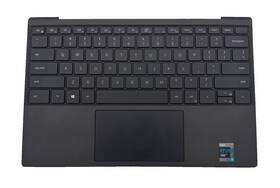
( Brand: Dell ), ( Manufacturer Part Number: Y75C4 ), ( Compatible Brand: For Dell ), ( Type: Top Case ), ( Color: Black ), ( Compatible Model: Dell Xps 13 ), ( Compatible Product Line: For Dell Xps ), ( Aspect Ratio: 16 )
Review DELL Xps Palmrest Touchpad Grade
The Dell Y75C4 XPS 13 Palmrest Touchpad is a sophisticated and intuitive input device that is seamlessly integrated into the renowned Dell XPS 13 laptop. This premium palmrest touchpad is designed with precision and elegance, boasting a large 4.1 x 2.9-inch surface area for comfortable and accurate navigation.
The touchpad features Dell's renowned PalmRejection technology, ensuring that your hand rests on the palmrest won't interfere with your cursor movements, maintaining a smooth and uninterrupted user experience. The touchpad supports multi-touch gestures, allowing you to easily navigate through your digital content with a simple swipe, pinch, or tap.
The XPS 13 palmrest touchpad is constructed with high-quality materials, including a smooth and responsive glass surface that provides a seamless glide for your fingers. The touchpad is also Precision-engineered, offering a 10-point touch and a 3mm travel distance for a reliable and responsive input.
The Dell Y75C4 XPS 13 Palmrest Touchpad is not only functional but also aesthetically pleasing, matching the sleek and modern design of the XPS 13 laptop. It is also easy to clean and maintain, ensuring that your touchpad remains in top condition for an optimal user experience.
In conclusion, the Dell Y75C4 XPS 13 Palmrest Touchpad is a must-have feature for anyone looking for a high-quality, responsive, and reliable input device for their laptop. Its precision engineering, multi-touch gestures support, and PalmRejection technology make it an excellent choice for both casual and professional users.
Pros of buying Dell XPS 13 (Y75C4) with palmrest touchpad:1. Precision and responsiveness: The palmrest touchpad on the Dell XPS 13 is designed for precision and responsiveness, making it easier to navigate and interact with your laptop.
2. Sensitivity and accuracy: The touchpad features high sensitivity and accuracy, making it ideal for users who rely on precise mouse movements for work or gaming.
3. Convenience: The palmrest touchpad eliminates the need for a separate mouse, making it more convenient to use and transport the laptop.
4. Customization: Dell's touchpad software allows for customization of settings, such as sensitivity, scrolling speed, and tapping gestures.
Cons of buying Dell XPS 13 (Y75C4) with palmrest touchpad:1. Limited functionality: While the palmrest touchpad offers many benefits, it may not be suitable for all users. For example, some users may prefer a separate mouse for more control or for gaming.
2. Limited real estate: The palmrest touchpad can take up valuable space on the laptop, reducing the overall size of the keyboard and potentially making it more difficult to type comfortably.
3. Limited compatibility: Some software may not be optimized for touchpad use, which could result in limited functionality or compatibility issues.
Conclusion:The Dell XPS 13 (Y75C4) with a palmrest touchpad offers many benefits, including precision, responsiveness, and customization. However, it may not be suitable for all users, and some may prefer a separate mouse for more control or for gaming. Ultimately, the decision to purchase a laptop with a palmrest touchpad depends on the user's personal preferences and needs.
Recommendation:If you value precision, responsiveness, and convenience in your laptop, and are willing to sacrifice some keyboard space, the Dell XPS 13 (Y75C4) with a palmrest touchpad is a great option. However, if you prefer a separate mouse or need more control for gaming, you may want to consider a laptop with a traditional touchpad or a separate mouse.
Details:
Compatible with DELL XPS 13. It has been tested, is guaranteed to work 100% and minimal wear hairline scratches; 7/10 condition.
part #: y75c4 prices
- $24.95-$34.99
specifications laptoscreelc:
- brand: Dell
- mpn: Y75c4
- compatible brand: For Dell
- type: Top Case
- color: Black
- compatible model: Dell Xps 13
- compatible product line: For Dell Xps
- aspect ratio: 16
seller laptoscreelc:
- # reviews: 11388
- rating: 100.0%
- city: San Juan, Puerto Rico
offer laptoscreelc:
- availability: In Stock
- best offers: True
- sold: 0
- options: Ship-to-home
- started: February 21, 2025
- quantity: 1
general laptoscreelc:
- condition: Used
- Computer Components Parts > Laptop Replacement Parts > Laptop Screens LCD Panels
payments laptoscreelc:
- wallet: Paypal
- other
- credit card: Discover
returns laptoscreelc:
- paid by: Seller
- time: 30 Days
- policy: Returns Accepted
- method: Money back
shipping laptoscreelc:
- transit: 5-11 Days
- cost: $0.00
- type: Fixed
- class: Expedited
- carrier: USPS
- service: USPS Priority Mail
Dell Y75C4 Is Similar To:
- 00rrxy Dell Xps 2710 Lcd (38.8% similar) In every way, these parts will function fully and completely. These parts will have very little signs of use, and may appear new. Notice: pictures shown are simply for reference. Stock photos...(July 21st, 2017)
- 01chnp 1chnp Dell Xps One (29.4% similar) This was tested and pulled from Dell xps 2720 AI computer...(August 19th, 2017)
- 023rpx Dell Xps 2720 Lcd (35.8% similar) These parts will have very little signs of use, and may appear new. Notice: pictures shown are simply for reference. In every way, these parts will function fully and completely. Stock photos...(July 21st, 2017)
- 025vy7 Ltn173kt02-d01 Dell Inspiron Lcd Screen Panel Hd Grade Tested Warranty (33.3% similar) 3 manufacturer: Samsung resolution: HD x 900 finish: matte touchscreen: NO3CAPABLE: no digitize incl: NO30 day money back guarantee warranty: all parts are tested and guaranteed to be working as described. The screen is original, not an aftermarket replacement. Notice: pictures shown are simply for ...(July 26th, 2018)
- 032ywt Dell Xps One 2720 (32.8% similar) ...(June 25th, 2017)
- 06p84r Dell Xps Lcd Display Assembly (35.4% similar) The customer is urged to certify that parts ordered are correct one needed...(January 31st, 2019)
- 074xjt N98cy Dell Lot 20 New Xps (24% similar) These parts will have use marks including scratches and or rub. This item is a lot of 20 pieces. They may, or may not, be in original oem packaging, and have never been used installed. In every way, these parts will function fully and completely. Notice: pictures shown are simply for reference. Via ...(March 3rd, 2017)
- 07th8v Dell Xps 9343 Flawed (40% similar) 3LCD manufacturer: LCD resolution: Fahd 1920 x 1080LCD inverter included: LCD model number: webcam finish: matte touchscreen: NO3D capable: Norton: this damaged has the following specific details this is an loco and its visually in good condition but a few lines across bottom of screen when on. ...(July 14th, 2017)
- 07txhy Dell Xps 2720 Lcd (35.8% similar) Stock photos. Notice: pictures shown are simply for reference. In every way, these parts will function fully and completely. These parts will have very little signs of use, and may appear new...(July 21st, 2017)
- 07w2x9 Dc02c00dj00 Dell Xps Intel Realsense Lcd Touch Screen Assembly Fhd Webcam (35.8% similar) If there are any imperfections, they very minor and hardly noticeable. LCD complete details back light: led color: silver size: 13 resolution: Fahd 1920 x 1080 webcam: yes finish: glossy touchscreen: YES3CAPABLE: NO30 day money back guarantee warranty: all parts are tested and guaranteed to be ...(March 7th, 2019)
- 098cm4 F9tmn 82d2m Dell Xps (22.9% similar) Notice: pictures shown are simply for reference. Stock photos. 5 manufactured by: Dell touchscreen: yes type model: lg PHILLIPS30 day money back guarantee warranty: all parts are tested and guaranteed to be working as described...(September 1st, 2017)
