GOOGLE 54000110-R07 Chromebook Pixel Lcd Touchscreen CB001
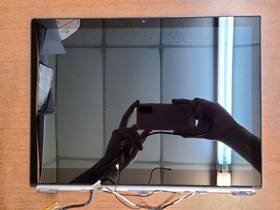
( Brand: Google ), ( Manufacturer Part Number: 54000110-R07 ), ( Compatible Brand: For Google ), ( Screen Finish: Glossy ), ( Type: Screen Digitizer ), ( Display Technology: Touchscreen ), ( Screen Size: 13 In ), ( Color: Silver ), ( Compatible Model: Google Chromebook Pixel Cb001 ), ( Compatible Product Line: For Google Chromebook ), ( Country Of Origin: China )
Review GOOGLE Chromebook Pixel Inch Complete Lcd Touchscreen Assembly
The **Google Chromebook Pixel CB001 (Model 54000110-R07)** is a groundbreaking, ultra-premium laptop that redefined the concept of a Chromebook with its sleek design, high-end specifications, and seamless integration with Google s ecosystem. Introduced in 2013 as part of Google s ambitious push into the premium laptop market, this 13-inch model stands out as a testament to the company s vision of blending simplicity with cutting-edge performance. Its **13.3-inch 2560 x 1792 (QHD) IPS LCD touchscreen display** delivers stunning clarity, vibrant colors, and near-perfect viewing angles, making it ideal for everything from casual browsing and multimedia consumption to professional design work and creative tasks. The touchscreen interface, though not as advanced as modern multi-touch gestures, adds a layer of intuitive interaction, allowing users to navigate the Chrome OS interface with a natural, finger-driven approach. The display s high resolution ensures sharp text and crisp visuals, while the IPS technology guarantees consistent color accuracy and wide viewing angles, reducing eye strain during extended use.
Beneath its minimalist yet robust aluminum unibody chassis, the Chromebook Pixel CB001 houses a **2.2 GHz Intel Core i5-4300U processor**, paired with **8GB of DDR3L RAM** and a **512GB SSD**, offering a balance of speed and storage capacity that was revolutionary for its time. This configuration ensures smooth multitasking, rapid boot times, and efficient handling of demanding applications, from Google s own suite of productivity tools to lightweight creative software. The SSD not only accelerates system responsiveness but also provides ample space for documents, media, and applications, though users may find the storage capacity limiting by today s standards. The laptop s **802.11ac Wi-Fi and Bluetooth 4.0** connectivity ensures reliable wireless performance, while the inclusion of a **USB 3.0 port** (alongside a single USB 2.0 port) and a **microSD card reader** provides versatile connectivity options for peripherals and external storage.
One of the standout features of the Chromebook Pixel CB001 is its **full keyboard with a dedicated trackpad**, a rarity in Chromebooks of its era that prioritized touchpad navigation. The keyboard is backlit, offering enhanced usability in low-light conditions, and its layout is designed for comfort and precision, making it a joy to type for extended periods. The trackpad, meanwhile, is large and responsive, supporting multi-touch gestures that enhance navigation within Chrome OS and other applications. The laptop s **10-hour battery life** (as rated by Google) is another highlight, allowing users to work or stream content for an entire day without needing a recharge, a significant advantage for professionals and students on the go.
The Chromebook Pixel CB001 s design language is a study in minimalism and elegance, with its **silver aluminum body** exuding a premium feel that sets it apart from the more utilitarian Chromebooks of the time. The absence of a physical CD/DVD drive and the inclusion of a single USB port (alongside the microSD slot) reflect Google s focus on a streamlined, modern computing experience. While the build quality is solid, some users may find the lack of a traditional HDMI port or additional USB ports a minor inconvenience, though the inclusion of a USB-C port (via an adapter) in later models addressed some of these limitations. The laptop s **1.5 kg weight** makes it portable yet sturdy, suitable for both office environments and travel.
At its core, the Chromebook Pixel CB001 is a visionary device that pushed the boundaries of what a Chromebook could achieve, blending the simplicity of Chrome OS with the performance and polish of a high-end laptop. It was designed for users who demanded more from their computing devices those who valued speed, portability, and a seamless integration with Google s cloud services. While it may feel dated by modern standards, its legacy lies in its influence on the evolution of Chromebooks, inspiring future iterations to prioritize premium build quality, high-resolution displays, and powerful hardware. Whether used for work, education, or entertainment, the Chromebook Pixel CB001 remains a fascinating artifact of Google s early foray into the premium laptop market, offering a unique blend of innovation and functionality that continues to captivate tech enthusiasts and collectors alike.
The **Google Chromebook Pixel (CB001, Model 54000110-R07)** is a high-end device from 2013, known for its premium build, powerful hardware, and innovative design. Below is a detailed breakdown of its pros and cons, followed by a conclusion and recommendation.
---
### **Pros**
1. **Premium Build Quality**
The Chromebook Pixel was one of the first ultrabooks with a magnesium-aluminum alloy chassis, giving it a sleek, durable, and lightweight design (1.45 lbs). The build quality remains excellent even by modern standards, with a sturdy hinge and a full-metal body.
2. **Excellent Display**
The 13.3-inch **1920x1080 LCD touchscreen** (with 224 PPI) was cutting-edge in 2013 and still delivers sharp, vibrant visuals. The screen is bright, has good color accuracy, and supports multi-touch gestures, which was rare on budget devices at the time.
3. **Powerful Hardware for Its Era**
The device features an **Intel Core i5-4300U (Haswell, 2.9GHz base, up to 3.4GHz with Turbo Boost)** paired with **8GB of RAM** and **128GB SSD storage**. While modern standards would consider this underpowered, for its time, it was a significant upgrade over typical Chromebooks, which often had weaker CPUs and less RAM.
4. **Long Battery Life (For Its Time)**
The Chromebook Pixel was praised for its battery life, lasting **up to 10 hours** on a single charge in real-world usage. While modern Chromebooks can exceed this, the Pixel s efficiency was impressive for a high-end device in 2013.
5. **Full Keyboard & Trackpad**
Unlike many budget Chromebooks, the Pixel included a **full-sized keyboard with backlit keys** and a **large, responsive trackpad** with multi-gesture support. This made it feel more like a premium laptop than a basic netbook.
6. **Google s Chrome OS Ecosystem**
As a Chromebook, it integrates seamlessly with Google Workspace (Docs, Sheets, Drive), Chrome extensions, and Android apps (via the Play Store). It also benefits from automatic updates, security patches, and cloud-based productivity.
7. **Portability & Thin Profile**
At **0.66 inches thick and 1.45 lbs**, it was one of the thinnest and lightest laptops of its time, making it highly portable for a premium device.
8. **Future-Proofing (To an Extent)**
While not as future-proof as a modern Windows or macOS laptop, the Pixel s hardware can still handle **light web browsing, office work, media consumption, and basic Android apps** with reasonable performance. It can also run **Linux via Crostini** (though with limitations).
9. **Resale Value & Collectibility**
Due to its rarity and historical significance, the Chromebook Pixel holds value in the used market. It may appeal to collectors or enthusiasts interested in early premium Chromebooks.
10. **No Fan (Passive Cooling)**
The Pixel used **passive cooling**, meaning it ran quietly without a fan. While this can lead to thermal throttling under heavy loads, it contributed to its silent operation.
---
### **Cons**
1. **Outdated Hardware**
The **Intel Core i5-4300U (2013)** is now **10 years old** and struggles with modern demands. It cannot run **Windows 10/11 natively** (only via third-party emulators like ChromeOS Deploy Utility or Windows 10 IoT LTSC, which are unstable). Performance in **Linux is also limited** due to driver restrictions.
2. **Limited Storage (128GB SSD)**
The **128GB SSD** is small by modern standards, especially if you use cloud storage sparingly. While expandable via USB, it lacks an **M.2 slot or microSD slot**, making upgrades difficult.
3. **No HDMI or USB-C (Only USB 2.0 & Micro-HDMI)**
The Pixel has **two USB 2.0 ports and a Micro-HDMI port**, which are outdated compared to modern USB-C/Thunderbolt ports. This limits connectivity options for peripherals, external monitors, or faster data transfer.
4. **No Dedicated GPU**
Unlike modern Chromebooks with **Intel Iris Xe or AMD Radeon graphics**, the Pixel relies on **Intel HD 4400 integrated graphics**, which cannot handle **gaming, video editing, or 3D rendering**.
5. **Chrome OS Limitations**
While Chrome OS is lightweight and secure, it lacks **deep customization, offline app support, and native support for Windows/macOS software**. Users who rely on **Adobe Creative Suite, AutoCAD, or other non-web apps** will find it unusable.
6. **No Touchscreen for Productivity (Only for Media)**
The touchscreen is **not optimized for productivity** (e.g., no pressure sensitivity, limited multitouch gestures). It s more suited for **media consumption, drawing (with a stylus), or casual browsing** than serious work.
7. **No Backlit Keyboard (Early Model)**
The **CB001 (2013) does not have a backlit keyboard**, which is a minor inconvenience in low-light conditions. Later models (like the Pixelbook) included this feature.
8. **No Thunderbolt or DisplayPort**
The lack of **Thunderbolt or DisplayPort** means it cannot connect to **high-resolution external monitors** or high-speed peripherals like SSDs.
9. **Battery Degradation Over Time**
After **8-10 years of use**, the **original 42Wh battery** may have significantly degraded, reducing runtime. Replacing it is difficult and expensive.
10. **No 5G/Wi-Fi 6 (Depends on Model)**
Most **CB001 models use older Wi-Fi standards (802.11ac or earlier)**, which may struggle with modern **5G networks or high-bandwidth Wi-Fi 6 routers**.
11. **No USB 3.0 or Fast Charging**
The **USB 2.0 ports** are slow compared to modern **USB 3.0/3.1 or USB-C fast charging**. Charging is slow, and data transfer is limited.
12. **Limited Software Support**
- **No native Windows 10/11** (only via emulation).
- **Linux support is limited** (Crostini works but is not as smooth as on newer Chromebooks).
- **No support for modern Android apps** (some may not run due to architecture differences).
---
### **Conclusion**
The **Google Chromebook Pixel (CB001, 2013)** is a **historically significant device** with **excellent build quality, a great display, and a powerful CPU for its time**. However, **10 years later, its hardware is severely outdated**, making it **unsuited for most modern tasks** beyond **light web browsing, media consumption, and basic productivity**.
If you are looking for a **vintage tech collector s item** or a **budget-friendly retro laptop**, it has charm. But for **daily use in 2024**, it is **not a practical choice** due to its **lack of native Windows/Linux support, slow ports, and weak performance in modern software**.
---
### **Recommendation**
- **Buy if:**- You are a **tech enthusiast or collector** interested in early premium Chromebooks.
- You need a **lightweight, portable device for simple tasks** (web browsing, PDFs, media) and don t mind limitations.
- You plan to **use it as a secondary device** for nostalgia or educational purposes.
- **Do not buy if:**- You need **modern productivity software** (Microsoft Office, Adobe Creative Suite, etc.).
- You rely on **Windows or Linux for work**.
- You want **fast connectivity (USB-C, Thunderbolt, Wi-Fi 6)** or **high-performance graphics**.
- You expect **long-term usability** beyond basic tasks.
#### **Alternatives to Consider:**- **For a modern Chromebook:** **Acer Chromebook Spin 713 (2023)** or **Lenovo Chromebook Duet 5 (2023)** for productivity.
- **For a retro Windows experience:** **Used Dell XPS 13 (2015-2017) or Lenovo ThinkPad X1 Carbon (2016-2018)**.
- **For a budget Linux machine:** **Used MacBook Air (2017-2020) or Framework Laptop 12/13 (2022)**.
If you still decide to purchase the **Chromebook Pixel CB001**, expect to **use it for nostalgic or limited purposes** rather than as a primary workstation.
Details:
If an item is. Anything Else Not Mentioned Or Pictured Is Included.: GOOGLE CHROMEBOOK PIXEL CB001 13 COMPLETE LCD TOUCHSCREEN ASSEMBLY 54000110-R07. SEND ME A MESSAGE AND I WILL FIX ALL ISSUES WITHIN 24HRS.
part #: 54000110r07 prices
- $50.00-$79.99
specifications laptoscreelc:
- brand: Google
- mpn: 54000110-r07
- compatible brand: For Google
- screen finish: Glossy
- type: Screen Digitizer
- display technology: Touchscreen
- screen size: 13 In
- color: Silver
- compatible model: Google Chromebook Pixel Cb001
- compatible product line: For Google Chromebook
- country of origin: China
seller laptoscreelc:
- city: Buena Park, California
- rating: 99.7%
- # reviews: 27128
offer laptoscreelc:
- quantity: 1
- availability: In Stock
- best offers: True
- started: May 11, 2026
- sold: 0
- options: Ship-to-home
returns laptoscreelc:
- method: Money back
- time: 30 Days
- policy: Returns Accepted
- paid by: Buyer
general laptoscreelc:
- condition: Used
- Computer Components Parts > Laptop Replacement Parts > Laptop Screens LCD Panels
shipping laptoscreelc:
- type: Fixed
- cost: $14.99
- carrier: USPS
- class: Economy, Expedited
- transit: 3-8 Days
- service: Economy, USPS Priority Mail
payments laptoscreelc:
- credit card: Discover
- other
- wallet: Paypal
Google 54000110-R07 Is Similar To:
- Google C0a Pixelbook 12.3 Inch Lcd Touch Screen Assembly Complete Display mf442 (57.3% similar) Original photos item appearance. Google pixel book C0A 12.3 lcd touch screen assembly complete display #MF442 excellent working condition. Lcd back cover has a few small insignificant scratches. Please before opening a return with. Each sale comes with our quality guarantee...(January 29th, 2024)
- Google G6901105201 Genuine Pixelbook G021a 13.3 Inch Bottom Case And Batteries (45.7% similar) Item is covered by a 30-DAY warranty from the moment of delivery. Check pictures. Every item is in stock and ready to ship. Genuine Google pixel book G021A 13.3 lcd touch screen assembly complete. The item was carefully removed and has been used previously...(November 14th, 2024)
- Google Ga00519-us Pixelbook Go G021a 13.3 Inch Lcd Touch Screen Complete Assembly As-is Read (59.1% similar) You get the used pixel book go 13.3 touchscreen with lid included frame. Used in working order great condition...(December 22nd, 2024)
- Google 202b Pixelbook Go 13.3 Inch Original Touch Screen Assembly Lcd Display Grade A (54.4% similar) Please refer to the attached photos for details. Please review the photos carefully before purchasing. Google pixel book go 13.3 original touch screen assembly lcd display not pink, tested. 202B, - the screen was carefully removed from a functional laptop and exhibits minor signs of wear. Fully ...(January 6th, 2025)
- Google Cb001 Genuine Chromebook Pixel 13 Inch Lcd Touch Screen Assembly (76.1% similar) I will include the rubber gasket and screws that were removed to take apart assembly. Screen works and was carefully removed from a Google chromebook pixel CB001. Its a used screen so it wont be perfect but looks decent. There are some slight dings on the lid but nothing to noticeable unless you ...(December 18th, 2025)
