DELL P2FG7 Latitude Laptop Lcd Lvds Display Webcam Ribbon E5550 40PIN Cable
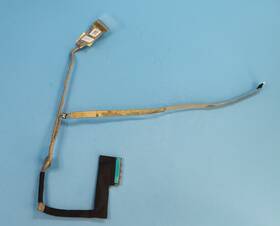
( Brand: Dell ), ( Manufacturer Part Number: P2FG7 ), ( Compatible Brand: For Dell ), ( Type: Lcd Cable ), ( Display Technology: Led Lcd ), ( Country Of Origin: China ), ( Compatible Product Line: For Dell Latitude )
Review DELL Latitude Laptop Lcd 40pin Lvds Display And Webcam Ribbon Cable
The **Dell P2FG7 Latitude E5550 LCD 40-Pin LVDS Display with Webcam Ribbon Cable** is a high-quality, professional-grade replacement display module designed specifically for the Dell Latitude E5550 business laptop series. This precision-engineered panel combines durability, clarity, and ergonomic functionality to deliver an optimal viewing experience for productivity, collaboration, and multimedia tasks. Featuring a **40-pin LVDS (Low Voltage Differential Signaling) interface**, this display ensures seamless compatibility with the E5550 s internal display controller, maintaining the laptop s native resolution of **1920 x 1080 pixels** (Full HD) with a crisp, sharp image that minimizes eye strain during extended use. The **15.6-inch widescreen LCD** incorporates advanced optical coatings, including **anti-glare and anti-reflective layers**, to reduce ambient light interference and enhance visibility in various lighting conditions, whether in a brightly lit office or a dimly lit conference room.
At the heart of this display is a **high-brightness backlight system**, typically utilizing **LED technology**, which provides consistent illumination and improved energy efficiency compared to traditional CCFL backlights. The **webcam ribbon cable** included in this package is a critical component, ensuring that the laptop s built-in camera remains fully functional after installation, enabling seamless video conferencing, remote meetings, and digital communication. Crafted from high-grade, flexible materials, the ribbon cable is designed to withstand repeated connections and disconnections without compromising signal integrity or risking damage to the webcam module. The **40-pin connector** is a standard Dell specification, ensuring a secure and reliable fit within the E5550 s display bay, reducing the risk of loose connections that could lead to flickering, distorted visuals, or complete display failure.
Beyond its technical specifications, this replacement display is built to meet Dell s stringent quality and reliability standards, making it an ideal choice for businesses, IT professionals, and tech-savvy users seeking a long-lasting upgrade. Whether replacing a damaged original display, upgrading to a higher-quality panel, or addressing a faulty webcam connection, this module offers a **direct, plug-and-play solution** that restores full functionality to the Latitude E5550. The inclusion of the webcam ribbon cable ensures that no additional components are required, simplifying the installation process and minimizing downtime. With its **rugged construction, sharp visual output, and compatibility with Dell s proprietary hardware**, this display module is an essential component for maintaining the performance and professionalism of the E5550 in both corporate and field environments.
### Pros and Cons of Buying a Dell P2FG7 Latitude E5550 LCD (40-Pin LVDS Display with Webcam and Ribbon Cable)
#### **Pros:**1. **Reliability and Brand Reputation** Dell s Latitude series is known for durability, business-grade performance, and strong customer support. The E5550, in particular, is a well-established model with a proven track record in enterprise and professional environments.
2. **Compatibility with Business Needs** The E5550 is designed for productivity, featuring a robust build, security features (such as TPM, fingerprint readers in some models, and enterprise-grade encryption), and compatibility with corporate IT policies. This makes it ideal for office use, remote work, or deployment in organizations.
3. **Upgradability** The E5550 supports RAM and storage upgrades (via SODIMM slots and HDD/SSD bays), allowing users to extend its lifespan by adding more memory or switching to faster storage (e.g., NVMe SSDs).
4. **Display and Connectivity Options** The inclusion of a **40-pin LVDS display cable** and a **webcam ribbon cable** suggests this is a refurbished or open-box unit with a functional screen and camera. LVDS cables are reliable for internal display connections, and the webcam functionality is useful for video conferencing.
5. **Cost-Effective Alternative** Purchasing a used or refurbished E5550 with an included display and webcam can be significantly cheaper than buying a new ultrabook or premium laptop while still offering strong performance for basic to moderate workloads (web browsing, office software, light multimedia, etc.).
6. **Hardware Longevity** The E5550 s hardware (Intel Core i5/i7, 4th-gen architecture) remains functional for years, even if it lacks the speed of newer CPUs. For tasks like document editing, coding, or general use, it can still perform adequately.
7. **Availability of Parts and Support** Since the E5550 is an older model, spare parts (RAM, HDDs, batteries) and technical support (from Dell or third-party vendors) are widely available, reducing long-term maintenance issues.
---
#### **Cons:** 1. **Outdated Hardware** The E5550 uses a **4th-generation Intel Core processor (Haswell)**, which is now **10 years old**. This means:- Slower performance compared to modern CPUs (e.g., Intel 12th/13th-gen or AMD Ryzen).
- Higher power consumption and heat output relative to newer, more efficient chips.
- Inability to run modern software smoothly (e.g., latest versions of Adobe Creative Suite, advanced video editing tools, or resource-intensive games).
2. **Limited RAM and Storage** Most pre-owned E5550 units come with **8GB RAM (often non-upgradable in some configurations)** and **500GB 1TB HDDs**, which are slow compared to modern SSDs. This can lead to lag in multitasking or when working with large files.
3. **No Modern Connectivity** The E5550 lacks:- USB-C/Thunderbolt ports (only USB 3.0, HDMI, DisplayPort, and legacy ports like VGA).
- Wi-Fi 6 or Bluetooth 5.0 (typically Wi-Fi 5/4 and Bluetooth 4.0).
- This can be a limitation for newer peripherals or high-speed data transfer needs.
4. **Battery Life Degradation** Older laptops, especially those with high usage, often suffer from **reduced battery capacity**. Expect **3 5 hours of runtime** on a full charge, which may be insufficient for all-day use without frequent recharging.
5. **Display Quality Limitations** The **LVDS display** (likely an older LCD panel) may have:- Lower resolution (e.g., 1366x768 or 1920x1080, depending on the model).
- Poor color accuracy or brightness compared to modern IPS panels.
- Potential dead pixels or backlight issues if the unit is refurbished.
6. **Security Risks with Older Software** The E5550 may not support the latest **Windows updates** (Windows 11 requires TPM 2.0 and Secure Boot, which some older models lack). Running outdated OS versions can expose the laptop to **security vulnerabilities**.
7. **Limited Future-Proofing** As software and hardware evolve, the E5550 will increasingly struggle to keep up. Tasks like **AI-driven applications, 4K video editing, or virtualization** will be difficult or impossible without significant upgrades.
8. **Potential Hidden Issues** Since this is a **refurbished or open-box unit**, there is a risk of:- **Faulty internal components** (e.g., failing HDD, loose connections, keyboard wear).
- **No warranty or limited return options** (depending on the seller).
- **Inconsistent quality control** (some refurbished units may have been poorly repaired).
---
### **Conclusion:**Buying a **Dell Latitude E5550 with a 40-pin LVDS display and webcam ribbon cable** can be a **cost-effective solution** if you need a **reliable, business-grade laptop for basic to moderate tasks** (e.g., office work, web browsing, light programming, or educational use). Its **durability, upgradability, and availability of parts** make it a practical choice for users who prioritize **longevity over raw performance**.
However, if you require **modern performance, long battery life, high-resolution displays, or future-proofing**, this laptop will **quickly become outdated**. The **lack of USB-C, slow storage, and outdated processor** will limit its usefulness for **gaming, video editing, or running the latest software**.
---
### **Recommendation:** - **Buy it if:**- You need a **budget-friendly, durable laptop** for **basic productivity tasks**.
- You plan to **upgrade RAM/storage** to extend its usability.
- You can find it at a **significantly discounted price** (e.g., from a trusted refurbisher or corporate liquidator).
- You are okay with **compromising on speed and modern features**.
- **Avoid it if:**- You require **high-performance computing** (e.g., 3D rendering, AI, or gaming).
- You need **long battery life** (expect frequent charging).
- You want **future-proof connectivity** (USB-C, Thunderbolt, Wi-Fi 6).
- You cannot verify the **condition of the display, keyboard, or internal components** before purchase.
#### **Alternatives to Consider:**- **For Budget Productivity:** Refurbished **Lenovo ThinkPad T480/T490** (better keyboard, more modern ports).
- **For Light Gaming/Modern Use:** Used **Dell XPS 13 (7th/8th-gen)** or **HP Spectre x360** (if you can find a good deal).
- **For Enterprise Needs:** Newer **Lenovo ThinkPad P-series** or **Dell Precision 35xx** (if budget allows).
- **For Absolute Budget:** A **used MacBook Pro (2015 2017)** or **Windows-based ultrabook** (e.g., **Acer Swift 3**) with better battery life.
If you proceed with the E5550, **inspect it thoroughly** (test the display, keyboard, webcam, and ports) and **consider purchasing from a reputable seller** (e.g., Dell Outlet, Amazon Renewed, or a trusted refurbisher) to minimize risks.
Details:
Dell Latitude E5550 Laptop LCD 40pin LVDS Display Webcam Ribbon Cable P2FG7.
part #: p2fg7 prices
- $10.79-$19.88
specifications laptoscreelc:
- brand: Dell
- mpn: P2fg7
- compatible brand: For Dell
- type: Lcd Cable
- display technology: Led Lcd
- country of origin: China
- compatible product line: For Dell Latitude
shipping laptoscreelc:
- type: Calculated
- service: USPS Ground Advantage, USPS Priority Mail, FedEx 2Day, FedEx Standard Overnight
- carrier: USPS, FedEx
- cost: $0.00
- transit: 3-8 Days
- class: Standard, Expedited, One-day
general laptoscreelc:
- condition: Used
- Computer Components Parts > Laptop Replacement Parts > Laptop Screens LCD Panels
returns laptoscreelc:
- paid by: Seller
- policy: Returns Accepted
- time: 30 Days
- method: Money back
payments laptoscreelc:
- other
- wallet: Google-pay
- credit card: Diners-club
seller laptoscreelc:
- # reviews: 2000 9
- city: Delmar,
- rating: 100.0%
offer laptoscreelc:
- started: May 11, 2026
- availability: In Stock
- sold: 0
- quantity: 1
- options: Ship-to-home
Dell P2FG7 Is Similar To:
- A114953g315t Generic Dell Replacement Laptop Lcd Screen Wxga Hd 032022016943 (30.8% similar) 8 laptop lcd screen resolution: GSX HD x 768 type: led diode connector: 40 pins bottom right may contain 3 to 5 dead pixels will work for Dell inspiring 5423, N140BGE-LB2-A2 model's also. 6 anarchistic: 43. lcd screen size: 14. Please match your original screens back light type, size, and ...(May 8th, 2018)
- A986011l327p Generic Laptop Lcd Replacemnet Led For Dell Inspiron (33.1% similar) 25 laptop lcd screen resolution: GSX x 900 type: led diode connector: 40 pins bottom left may contain 3 to 5 dead pixels please match your original screens back light type, size, and resolution before you purchase this item, because some model's come with more than one type of screens. 75 x ...(May 11th, 2018)
- D620-5043-lcd Generic Dell Latitude Replacement Laptop Lcd Screen Wxga 654367710821 (38% similar) Dell latitude D620 replacement laptop lcd screen x 8 resolution: GSX 800 type: cc fl single connector: 30 pins may contain 3 to 5 dead pixels please match your original screens back light type, size, and resolution before you purchase this item, because some model's come with more than one type of ...(May 30th, 2018)
- Led-1366-768-g-40-14.0-x11 Generic Dell Latitude Laptop Lcd Screen Replacement Wxga 529306022764 (39.8% similar) 5X8X12 anarchistic: pounds size:' requires technical installation item DIMENSIONS:1. Purchasing a screen with different specifications will not work your system. Dell latitude E6420 LTN140AT16 laptop lcd screen replacement 14...(May 16th, 2018)
- Led-1366-768-g-40-15.6-239 Dell Inspiron Laptop Lcd Screen Replacement Wxga Hd 610395664505 (33.9% similar) 6 item DIMENSIONS:1. You cannot deviate from your current screen specifications. Purchasing a screen with different specifications will not work your system. Product features screen size: 15. Dell inspiring N5110 laptop lcd screen replacement pounds size:'screen size: 15. 5 anarchistic: 05...(March 30th, 2018)
- 0015j5 Dell Genuine Inspiron Lcd Touchscreen Tp (28.6% similar) Screen is in good condition. Item is used. Look at pictures for details. Pulled from a working unit. Genuine Dell inspiring item has been fully tested, inspected and is in good working condition. 6 lcd touchscreen LP156WHB Twp a2 015J5 0015J5...(December 3rd, 2018)
- 0097y Dell Lcd Screen With Bezel (27% similar) The customer is urged to certify that parts ordered are correct one needed...(February 15th, 2017)
- 00gtn1 Hb156wx1-100 Dell Genuine Lcd (17.4% similar) Any question please feel free to ask. Its necessary for the end user to check with manufacturer, manual or other web sources insure compatibility. Our are correct to the best of knowledge, but with so many model's and parts its difficult know every compatible incompatible model...(August 26th, 2017)
- 00h0nx Cn-00h0nx Dell Used Inspiron Lcd Touch Screen With Cracked Digitizer (28.6% similar) The digitize is cracked. The lcd and chirpiest, cables are working fine...(August 31st, 2018)
- 00k19p Dc0200gt00 Dell Latitude Laptop Lcd Flex Cable Led Tested Warranty (43.4% similar) Stock photos. Orders purchased before noon central time are typically packaged and shipped out the same day. Notice: pictures shown are simply for reference...(February 6th, 2019)
- 00mj2p Dell Latitude Lcd Screen Matte Sp (38.7% similar) Pulled from a working unit. Item has been tested and is in good working condition. Item is used and screen in good condition. Dell latitude E7440 lcd screen matte LP140WF1 sp b1 P/N 00MJ2P this listing is for. Look at pictures for more details...(July 21st, 2018)
